Introduction
For decades, software development operated under a distinct separation of concerns. Developers wrote code as fast as possible to meet business requirements, operations engineers deployed the infrastructure, and security teams acted as the final quality gate before release. This traditional approach created massive organizational silos. Security checks performed at the final stage often resulted in long project delays, frustrating rewrites, and missed deadlines.
When DevOps emerged, it broke down the barrier between development and operations, drastically speeding up application delivery. However, security was frequently treated as an afterthought in early DevOps pipelines. Fast deployments often meant fast delivery of insecure code into production environments. To address this risk, the software engineering community introduced DevSecOps, a methodology aimed at integrating security practices throughout the entire software development lifecycle.
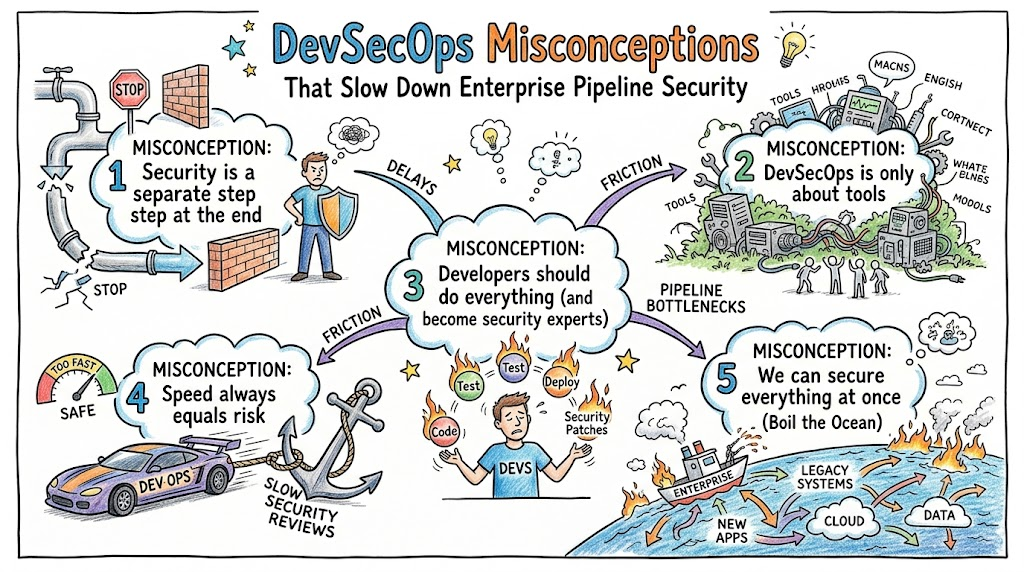
Unfortunately, as the term gained popularity, it also generated significant confusion. Many engineering organizations, project managers, and security beginners have fallen victim to widespread misunderstandings about what this discipline actually requires. These misconceptions slow down adoption, lead to poorly optimized automation, and create friction between software developers and cybersecurity personnel.
Developing a clear understanding of practical security practices within automated pipelines is crucial for modern engineers. Organizations must learn to look past the marketing hype and focus on operational realities. Specialized educational platforms like DevOpsSchool provide structured, experience-driven paths to help teams separate industry myths from functional engineering realities, ensuring smooth and secure workflows.
What Is DevSecOps Really?
DevSecOps stands for Development, Security, and Operations. At its core, it is the practice of integrating security testing, risk assessment, and compliance verifications seamlessly into every phase of the continuous integration and continuous deployment pipeline. It represents a fundamental shift away from periodic, manual security reviews toward continuous, automated compliance and threat mitigation.
To understand this concept clearly, consider a manufacturing analogy. Imagine building an automobile. Traditional security is the equivalent of a safety inspector checking the brakes only after the car is completely assembled and sitting on the shipping dock. If the inspector finds a defect in the braking mechanism at this late stage, the mechanics must tear down the entire vehicle to fix it, costing valuable time and money.
DevSecOps is the practice of installing automated testing sensors at every single station along the assembly line. The raw steel is scanned for defects before it is molded. The brake pads are tested automatically the moment they are attached to the axle. By the time the vehicle reaches the end of the line, safety has been verified incrementally at every single step, ensuring a fast, secure, and predictable release.
In modern software engineering, this means security is no longer an isolated event. It is embedded directly within writing code, building binaries, provisioning cloud architecture, and monitoring live production infrastructure. It turns security from an external roadblock into an internal engineering capability.
Why DevSecOps Misconceptions Exist
The rapid growth of the cloud-native ecosystem is one of the primary drivers behind these common misunderstandings. As companies migrated to cloud platforms and microservices, the sheer velocity of software delivery outpaced traditional security strategies. Organizations rushed to adopt new terminology without updating their underlying workflows or engineering mindsets.
Another major factor is the tool-driven approach taken by many software vendors. The technology market is filled with platforms claiming to deliver complete security compliance with a single installation. This causes many engineering leaders to mistake software licenses for actual cultural transformation, assuming that purchasing a tool automatically solves their underlying security issues.
Furthermore, a significant knowledge gap persists between software developers and traditional security engineers. Software developers are trained to focus on features, performance, and application logic. Security professionals are traditionally trained in risk management, network boundaries, and compliance frameworks.
Without comprehensive, integrated training, these groups speak entirely different technical languages. This communication breakdown leads to poor tool configurations, high rates of false positives, and deep-seated myths regarding how security automation should function in a modern enterprise environment.
Myth vs Reality: DevSecOps Misconceptions
| Myth | Reality |
| DevSecOps is only about buying and running security tools. | It is a combination of engineering culture, collaborative processes, and targeted automation. |
| Implementing security checks slows down the development lifecycle. | Early automated testing detects defects early, reducing expensive late-stage rewrites. |
| DevSecOps completely replaces the need for a dedicated security team. | Security teams shift into enablement roles, building guardrails and helping developers triage risks. |
| DevSecOps is an expensive methodology only meant for large enterprises. | Startups and small teams benefit significantly by using open-source utilities to prevent major breaches. |
| Integrating security into pipelines is too complex for beginners to learn. | Teams can adopt a gradual, step-by-step approach starting with basic linting and secret detection. |
| Automating security testing eliminates all human software vulnerabilities. | Automation flags known patterns, but human review remains essential for complex logical flaws. |
Misconception #1: DevSecOps Is Just Security Tools
One of the most persistent misunderstandings is that implementing DevSecOps simply requires adding security tools to your existing pipeline. Managers often believe that buying commercial scanners instantly makes their development process secure. This tool-centric view overlooks the critical human elements of process, communication, and engineering culture.
When an organization focuses entirely on tools, they usually end up overloading their systems. They turn on every single scanner rule out of the box, which floods developers with thousands of security alerts on their first day. Many of these alerts are false positives or low-priority issues that do not apply to the specific application context.
[Developer Code Commit]
         │
         ▼
[Unconfigured Scanner] ──► Generates 1,500 Unfiltered Alerts
         │
         ▼
[Pipeline Failure] ───────► Developers Overwhelmed & Bypass Scanner
This alert fatigue quickly causes software developers to view security tools as an annoying operational obstacle. Instead of resolving vulnerabilities, engineering teams find ways to bypass the scans, ignore the reports, or request permanent exemptions just to hit their production deadlines.
True DevSecOps prioritizes culture and clear processes over raw tooling. Tools are merely the mechanisms used to execute a well-defined security policy. A mature implementation requires setting up collaborative triaging workflows, teaching developers how to interpret scan results, and customizing rulesets to match the actual risk profile of the application.
Misconception #2: DevSecOps Slows Down Development
Many engineering teams believe that adding automated security checks directly into the continuous integration pipeline will ruin their deployment velocity. They worry that running comprehensive code analysis and container scans on every pull request will turn a five-minute build into a multi-hour ordeal, stalling engineering output.
This concern stems from memories of legacy security audits, where applications were held up for weeks while external reviewers generated massive spreadsheets of vulnerabilities. In reality, shifting security to the left accelerates long-term software delivery velocity. It addresses security defects when they are easiest and cheapest to fix.
[Security Defect Found in Production]
Identify Issue ──► Create Hotfix Ticket ──► Re-test System ──► Urgent Deploy (High Risk/High Cost)

[Security Defect Found in CI Pipeline]
Scanner Flags Line 12 ──► Developer Fixes Code Instantly ──► Clean Build (Low Risk/Zero Cost)
Fixing a vulnerability found in a live production system requires emergency hotfixes, extensive regression testing, and significant architectural stress. By running fast, incremental scans during the initial code compilation stage, developers receive feedback within minutes. They can fix the vulnerability immediately while they are still working on that specific code block, preventing technical debt from accumulating.
Misconception #3: DevSecOps Replaces Security Teams
A common fear among traditional cybersecurity professionals is that DevSecOps is designed to automate them out of a job. Conversely, some management teams mistakenly believe that because developers are now running automated scanners, they can downsize their dedicated information security department to save on operational costs.
Both perspectives are incorrect. Security teams do not disappear; their day-to-day responsibilities evolve. In a traditional setup, security engineers act as manual inspectors who review completed applications. In a DevSecOps model, they transition into platform enablers who build the underlying security infrastructure for the entire company.
Traditional Model:
[Dev/Ops Teams] ──► [Finished Software] ──► [Security Gatekeeper] ──► Production

DevSecOps Model:
[Security Engineers] ──► Build Guardrails & Automated Templates
                                 │
                                 ▼
                    [Dev/Ops Shared Pipeline] ──► Automated Verification ──► Production
Under this shared responsibility model, security teams focus on high-impact strategic initiatives. They conduct threat modeling sessions, customize automation rules, review complex business logic that scanners miss, and analyze runtime security anomalies. They empower developers by providing them with secure code templates, pre-hardened base container images, and optimized testing frameworks.
Misconception #4: DevSecOps Is Only for Enterprises
Many early-stage companies, startups, and small development teams assume that comprehensive pipeline security is an expensive luxury intended only for Fortune 500 corporations. They believe they lack the budget, specialized staff, and infrastructure scale necessary to implement automated security practices.
This line of reasoning leaves small companies highly vulnerable. Malicious actors do not ignore small businesses; they actively target them because they know their systems generally lack robust defensive controls. A single major data breach or exposed credential database can easily bankrupt a young company, destroying customer trust and causing severe legal penalties.
The good news is that the modern DevSecOps ecosystem offers exceptional open-source solutions that fit perfectly into small team workflows. Startups can implement highly effective security controls without spending thousands of dollars on enterprise software licenses.
Startup Security Foundation (Low Cost/High Impact):
1. Git Pre-commit Hooks (Block hardcoded passwords)
2. Open-Source Linting & SAST (Scan code structure)
3. Basic Container Scanning (Check base image vulnerabilities)
By establishing these basic automated habits early in a company’s lifecycle, small teams prevent systemic security debt. It is far easier to build a secure architecture from the start with a three-person team than it is to retroactively fix thousands of microservices across an enterprise with hundreds of engineers.
Misconception #5: DevSecOps Is Too Complex
When engineers look at advanced cloud-native security diagrams featuring service meshes, real-time runtime inspection engines, and automated policy-as-code frameworks, they often become overwhelmed. This complexity makes teams believe that unless they completely revamp their entire infrastructure, they cannot start practicing DevSecOps.
This perspective creates adoption paralysis. Engineering leaders delay implementing security upgrades because they are waiting for the perfect moment when their team has free time to complete a massive infrastructure overhaul. That perfect moment rarely arrives in a fast-moving engineering department.
The key to success is adopting a gradual, evolutionary roadmap. You do not need to implement every single security scan type on your first day. A practical approach focuses on continuous, incremental improvements over time.
Phase 1 (Week 1): Run a secrets detector to stop API keys leaking into Git repositories.
Phase 2 (Month 1): Add a basic static code scanner to check application code dependencies.
Phase 3 (Quarter 1): Integrate a lightweight container scanner into your build phase.
By breaking down the implementation into small, manageable milestones, the engineering team naturally adapts to the new workflows without feeling overwhelmed. Complexity is managed by taking small steps and focusing on continuous improvement.
How DevSecOps Actually Works in Real Systems
To understand how these practices function in a real-world software environment, let us follow the journey of a single code change through a secure deployment pipeline. This shows how automation and engineering collaboration work together in a modern cloud-native system.
Step 1: Local Code Development
A software developer works on a feature branch locally on their workstation. Before they even push their code to the central repository, local pre-commit hooks run automated checks. These hooks scan the code for common mistakes, such as accidentally hardcoding private API keys or database passwords.
Step 2: The Pull Request and Continuous Integration Trigger
The developer pushes their validated branch to the central Git server and opens a pull request. This action automatically triggers the continuous integration pipeline. The build agent compiles the application and immediately triggers two distinct automated security scans:
- Static Application Security Testing (SAST): This engine scans the raw source code text line by line, looking for dangerous coding patterns like SQL injection bugs or cross-site scripting risks.
- Software Composition Analysis (SCA): This tool checks the open-source third-party libraries used by the application against public vulnerability databases to ensure the team is not importing outdated, compromised dependencies.
Step 3: Container Compilation and Image Scanning
Once the source code passes inspection, the pipeline builds the application into a container image. Before this image is stored in the company registry, an automated container scanner inspects the base operating system layers. It looks for known vulnerabilities within system libraries and verifies that the container is configured to run as a non-root user.
Step 4: Dynamic Testing in Staging
The verified container is deployed to an isolated staging environment. Here, the pipeline runs a automated Dynamic Application Security Testing (DAST) tool. Unlike the earlier source code scans, DAST simulates real-world attacks against the active running application, checking for authentication flaws and misconfigured security headers.
Step 5: Production Deployment and Continuous Monitoring
If all security gates remain clear, the code change is automatically deployed to the production environment. Once live, runtime security agents continuously monitor the application container behavior, tracking active system calls and network traffic patterns to detect any unexpected malicious activity.
Core Components of DevSecOps
To build a reliable automated pipeline, engineering teams must combine several specialized security testing disciplines. Each component serves a distinct purpose at a specific stage of the development lifecycle.
| Component | Purpose | Practical Tools |
| Static Application Security Testing (SAST) | Analyzes internal source code for structural flaws, insecure design patterns, and programming errors without executing the code. | SonarQube, Semgrep, Checkmarx |
| Software Composition Analysis (SCA) | Identifies open-source third-party dependencies and detects known vulnerabilities or licensing non-compliance issues. | Snyk, OWASP Dependency-Check, Trivy |
| Secrets Management | Prevents cryptographic keys, passwords, and API tokens from being committed to source control by storing them securely. | HashiCorp Vault, AWS Secrets Manager, GitGuardian |
| Container Security | Scans container images for vulnerabilities within base operating system packages and verifies secure runtime configurations. | Trivy, Clair, Aqua Security |
| Dynamic Application Security Testing (DAST) | Attacks the running application from the outside to identify operational flaws, deployment configuration errors, and input validation gaps. | OWASP ZAP, Burp Suite Automation |
| Runtime Observability & Logging | Tracks the behavior of live applications in production to detect active exploitation attempts, unauthorized configuration modifications, or strange behavior. | Falco, Prometheus, ELK Stack |
Benefits of Correct DevSecOps Implementation
Implementing these practices correctly provides significant advantages across the entire software development organization. It benefits software developers, operational engineers, and business stakeholders alike.
Accelerated Time-to-Market with Reduced Security Overhead
By automating security checks within the deployment pipeline, teams eliminate the traditional manual review bottleneck that occurs right before a production launch. Applications move from development to production faster because security verification happens continuously during the build process, rather than during an unexpected delay at the end of the project cycle.
Drastic Reductions in Software Remediation Costs
Discovering a serious security flaw when code is running live in production is incredibly expensive and stressful. It requires emergency engineering meetings, complex rollbacks, and intensive testing. Finding that exact same flaw during code compilation costs almost nothing, as the developer can fix the issue within minutes before moving on to their next task.
Improved Organizational Trust and Compliance Audit Readiness
When security controls are written as code directly inside the deployment pipeline, every single code change generates a clear, automated audit trail. Teams no longer need to spend weeks manually gathering evidence for compliance audits. The pipeline logs provide verifiable proof that every single piece of code was scanned, tested, and approved before entering production.
Common Mistakes in DevSecOps Adoption
Even with the best intentions, engineering teams often run into problems when first adopting these practices. Recognizing these common pitfalls helps organizations avoid systemic implementation failures.
The Adoption Failure Checklist
- Treating Security Scans as Blocking Gates Immediately: Turning on a new tool and instantly configuring it to block every single build when it finds any vulnerability completely breaks developer workflows and causes widespread organizational frustration.
- Failing to Customize Scanners to the Application Context: Running tools with default configurations results in high rates of false positives, which distracts engineers and quickly leads to widespread alert fatigue.
- Isolating Security Engineers from Pipeline Planning: Excluding security professionals from the initial design of the continuous integration framework leads to poorly configured tools and friction between engineering departments.
- Neglecting Regular Training for Development Teams: Expecting developers to fix complex security bugs flagged by automated utilities without providing them with fundamental secure coding education leads to repetitive mistakes.
- Overloading the Build Pipeline with Excessively Long Scans: Forcing developers to wait for hours for complex, deep scans to finish on minor code updates hurts deployment velocity and invites engineers to bypass the security infrastructure entirely.
Real-World Example: Without DevSecOps
To see the value of this approach, let us look at a typical corporate software launch executed without integrated security practices. This scenario illustrates how unexpected vulnerabilities can derail product timelines and create immense operational stress.
The Context
An e-commerce engineering team spends four months building a brand-new customer payment portal. The developers use a modern JavaScript framework alongside dozens of open-source third-party utility packages to accelerate features and hit their target launch deadline.
The Incident
Two days before the scheduled public product launch, the corporate cybersecurity group conducts their mandatory quarterly manual security review. They run an external security scan against the staging server and discover that one of the core open-source libraries used to parse customer billing data contains a well-known, high-severity remote code execution vulnerability.
[4 Months of Development] ──► [Production Launch Set] ──► [Manual Pre-Launch Security Review]
                                                                        │
                                                                        ▼
[Launch Indefinitely Delayed] ◄── [Complete Code Rewrite] ◄── [Critical Security Flaw Found]
The Impact
The scheduled launch is put on hold indefinitely. Because this specific library is deeply integrated across multiple application layers, developers must spend the next two weeks rewriting major components of the payment architecture. The business suffers public embarrassment from delayed feature delivery, engineering morale drops significantly, and the security team is viewed as a frustrating roadblock.
Real-World Example: With DevSecOps
Now, let us examine how that exact same software development project functions when integrated security practices are woven naturally into the engineering culture from day one.
The Context
The same e-commerce team builds the exact same customer payment portal. However, this time, they integrate automated security testing right into their build infrastructure.
The Incident
During the second week of development, an engineer adds the exact same vulnerable open-source library to handle customer billing data. They save their work, commit the code to their feature branch, and push it up to initiate a pull request.
[Developer Adds Vulnerable Library]
                 │
                 ▼
[Automated SCA Scanner Runs in Pipeline]
                 │
                 ▼
[Vulnerability Detected Instantly] ──► Block Build & Output Secure Alternative Options
                 │
                 ▼
[Developer Upgrades Library in 10 Mins] ──► Clean Build Passed ──► Project Stays On Schedule
                 │
                 ▼
[Secure On-Time Production Launch]
The Impact
Within three minutes of pushing the code, the automated Software Composition Analysis scanner flags the library, identifies the remote code execution vulnerability, and leaves a descriptive comment on the pull request explaining that upgrading to a newer version resolves the risk.
The developer reads the automated feedback, changes the dependency version string in their package file, and runs the build again. The check passes cleanly. The issue is resolved completely in ten minutes, security debt is avoided, and the application launches securely on schedule.
Best Practices for DevSecOps Adoption
Transitioning to an integrated security model requires a pragmatic, deliberate strategy. Use this actionable checklist to guide your team toward a sustainable and successful implementation.
Step 1: Clean Up Secrets Management Before Adding Scanners
Before you turn on any source code analysis engines, ensure you have completely scrubbed your environment of exposed credentials. Implement automated git pre-commit hooks to block developers from accidentally committing passwords, certificates, or cloud keys to your repositories.
Step 2: Introduce Automation Gradually with Non-Blocking Audits
When you introduce a new security tool to your pipeline, configure it to run in an advisory, non-blocking mode first. Let the scanner gather metrics for a few weeks without breaking builds. Use this initial period to identify and filter out false positives and customize the rulesets to match your application logic.
Step 3: Define Clear, Risk-Based Pass/Fail Thresholds
Once your tools are tuned, establish reasonable conditions for breaking a build. For instance, you might set a policy stating that a pipeline will only fail if it detects unpatched vulnerabilities categorized as Critical or High with a verifiable exploit path. Allow minor style issues or low-priority alerts to pass through to the backlog without stopping deployments.
Step 4: Cultivate Security Champions Inside Development Teams
Identify engineers within your general development teams who show a strong interest in cybersecurity. Train them to become Security Champions. These engineers act as internal advocates, helping their immediate peers triage scan results and ensuring security practices are considered during initial feature designs.
Step 5: Focus on Continuous Developer Education
Do not treat automated scan reports as a replacement for foundational engineering knowledge. Provide your software developers with regular, practical training focused on secure design patterns, threat modeling concepts, and real-world vulnerability remediation techniques.
Role of DevOpsSchool in Learning DevSecOps
Moving past industry buzzwords requires structured, hands-on engineering education. Many teams struggle to adopt automated security workflows because their engineers have never been taught how to configure, customize, and maintain scanners within modern continuous integration environments.
Educational institutions like DevOpsSchool play a vital role in closing this technical knowledge gap. They offer practical courses focused on real-world engineering environments, steering clear of pure theory or marketing hype. Students learn exactly how to build secure pipelines, manage high alert volumes, and design robust defensive patterns across cloud architectures.
By working through realistic laboratory environments, engineers gain the practical confidence needed to implement these practices successfully within their organizations. They learn to view security as an enabling engineering capability rather than an aggressive compliance gatekeeper, helping smooth collaboration across entire technical organizations.
Career Importance of DevSecOps Skills
The demand for software professionals who understand both rapid cloud deployment mechanisms and comprehensive information security architecture is growing rapidly. Organizations worldwide recognize that hiring specialized talent is essential to protect their production data from sophisticated threats.
Specialized Career Path Matrix
- DevSecOps Engineer: Focuses on designing, building, and maintaining automated security pipelines, managing secret storage engines, and creating company-wide policy-as-code frameworks.
- Application Security (AppSec) Engineer: Focuses on code architecture validation, performing advanced threat modeling exercises, triaging complex security scan alerts, and coaching development groups on secure coding habits.
- Cloud Security Architect: Focuses on securing cloud-native infrastructure, implementing zero-trust network boundaries, configuring identity management access controls, and overseeing container runtime defenses.
- Modern Site Reliability Engineer (SRE): Focuses on maintaining high system availability, building fault-tolerant infrastructure, and tracking system observability metrics alongside runtime security tracking.
Core Technical Skill Requirements
To excel in this expanding field, engineers need a balanced foundation across multiple technical domains:
                  ┌───────────────────────────────┐
                  │      DevSecOps Engineer       │
                  │         Core Skills           │
                  └───────────────┬───────────────┘
                                  │
         ┌────────────────────────┼────────────────────────┐
         ▼                        ▼                        ▼
┌─────────────────┐      ┌─────────────────┐      ┌─────────────────┐
│ System & Cloud  │      │ Pipeline & Code │      │  Security Tools │
├─────────────────┤      ├─────────────────┤      ├─────────────────┤
│ • Linux Systems │      │ • CI/CD Systems │      │ • SAST/DAST/SCA │
│ • AWS/Azure/GCP │      │ • Python/Bash   │      │ • Vault Mgmt.   │
│ • Kubernetes    │      │ • IaC Tools     │      │ • Policy Engine │
└─────────────────┘      └─────────────────┘      └─────────────────┘
Industries Using DevSecOps
Automated security integration has expanded far beyond classic tech firms. Any industry that processes sensitive user information, manages critical infrastructure, or operates under strict government compliance rules relies heavily on these automated engineering workflows.
Banking and Financial Services
Financial corporations process millions of sensitive monetary transactions daily. They use automated pipelines to enforce compliance frameworks, verify data encryption standards at every build step, and ensure that customer banking applications remain secure against fraudulent manipulation.
Healthcare and Digital Medicine
Medical applications handle private patient records governed by strict regulatory frameworks like HIPAA. Healthcare platforms use integrated pipeline security to enforce strict data privacy rules, scan healthcare microservices for vulnerabilities, and verify that access controls are rigorously validated before software updates roll out.
Enterprise Software-as-a-Service (SaaS) Providers
Modern cloud business platforms deploy updates multiple times a day to millions of global users. They use automated pipelines to run continuous web application security scans and container layer inspections, ensuring their rapid deployment velocity never exposes corporate customer data to internet threats.
Future of DevSecOps
As technology evolves, the integration of security within automated development workflows will continue to adapt. Several major trends are already reshaping how modern engineering departments protect their production systems.
Intelligent Vulnerability Triaging and Remediation Assistance
Modern static analysis tools are starting to integrate advanced machine learning models to help engineers handle alert volumes. These intelligent assistants go beyond flagging code errors; they analyze the application context to filter out false positives and automatically generate tailored, secure code patches for review.
Universal Implementation of Policy-as-Code
Organizations are moving away from manual compliance reviews and textual security documentation. Future systems will write security regulations as explicit, version-controlled code files using tools like Open Policy Agent (OPA). These automated policy files run directly inside the deployment pipeline, verifying that cloud configurations meet corporate guardrails before infrastructure is ever provisioned.
Advanced Runtime Protection and eBPF-Powered Observability
The boundary between pipeline security testing and live production monitoring is fading. Advanced cloud-native deployments utilize Extended Berkeley Packet Filter (eBPF) technology to observe container systems at the Linux kernel layer. This allows real-time security systems to detect and block malicious network anomalies instantly, automatically feeding performance logs back to development teams to improve future code iterations.
FAQs (15 Questions)
What is the primary difference between DevOps and DevSecOps?
DevOps focuses on breaking down organizational barriers between software development and system operations to maximize software delivery velocity. DevSecOps builds directly on top of this foundation by integrating automated security validation testing and risk management workflows directly into every single phase of that rapid delivery pipeline.
Does practicing DevSecOps mean we can completely eliminate traditional penetration testing?
No, it does not. Automated tools are highly efficient at catching known code defects, vulnerable third-party dependencies, and common structural misconfigurations. However, automated scanners cannot evaluate complex business logic or human manipulation paths. Periodic manual penetration testing remains necessary to uncover deep architectural flaws that automated tools miss.
Which security tool category should our engineering team implement first?
For most software development teams, the most effective starting point is a combination of Git secrets detection and Software Composition Analysis (SCA). These tools are easy to implement, have low false-positive rates, and provide immediate value by preventing credential leaks and blocking known vulnerable open-source libraries.
What is the true definition of shift-left security?
Shift-left security is the practice of moving security testing, vulnerability assessment, and risk remediation to the earliest possible phases of the software development lifecycle. Instead of checking an application for security flaws right before release, testing begins the moment a developer starts writing code on their local workstation.
How can developers minimize false positives from automated scanners?
Minimizing false positives requires continuously tuning your scanning tools to your application context. Teams should disable generic, irrelevant rulesets, write custom scanning filters that reflect their specific architecture, and establish a clear triage process to mark verified non-issues so they do not flag on future pipeline runs.
Is DevSecOps relevant for software applications that run entirely on-premises?
Yes. While the methodology grew in parallel with the cloud-native ecosystem, the core principles of continuous automated security testing, dependency checking, and shared organizational responsibility apply to all software development models, including on-premises, legacy monoliths, and isolated hardware systems.
How should a team handle high volumes of security alerts without stopping releases?
When first implementing automated security utilities, set your pipeline tools to a non-blocking advisory mode. Focus on fixing critical vulnerabilities first. Establish a clear risk threshold that only blocks builds for severe, verifiable hazards, while routing lower-priority issues to your engineering product backlog for regular sprint cleanup.
Who is ultimately responsible for application security in a DevSecOps framework?
Security becomes a shared responsibility across the entire technical organization. Software developers are responsible for writing clean code and addressing pipeline alerts. Operations engineers ensure deployment environments are hardened. Security specialists act as advisors, providing the testing tools, base templates, and expertise to support the delivery teams.
Can open-source utilities provide adequate security for a small startup company?
Yes, absolutely. The modern open-source software ecosystem offers powerful security utilities, such as Semgrep for code analysis, Trivy for container scanning, and OWASP ZAP for dynamic testing. Startups can build comprehensive defensive pipelines using these tools without investing in expensive enterprise software licenses.
What are the main limitations of Static Application Security Testing (SAST) tools?
SAST tools scan uncompiled source code text without executing the application. Because they lack runtime context, they often generate false positives and cannot detect deployment infrastructure misconfigurations, broken authentication flows, or runtime memory leaks that only show up when the application is running.
Does implementing DevSecOps require a massive financial budget?
No, it does not. Successful implementation depends much more on culture, team habits, and smart workflow integration than it does on expensive tools. Starting with free open-source utilities, training your development team on secure coding practices, and adding security checks gradually keeps adoption highly affordable.
What is Policy-as-Code and how does it fit into modern pipelines?
Policy-as-Code is the practice of writing security regulations, access controls, and compliance rules as explicit, version-controlled configuration files. Tools like Open Policy Agent read these files to automatically check code changes and cloud infrastructure designs, ensuring they meet company security guidelines before deployment.
How can we encourage software developers to adopt security practices?
The best way to encourage developers is to ensure security tools are easy to use and integrated directly into their existing environments. Provide clear, actionable remediation feedback inside pull requests, keep build scan times fast, filter out frustrating false positives, and recognize champions who proactively improve code security.
What role does container security play in modern cloud-native systems?
Container security ensures that your underlying base operating system packages are free of known vulnerabilities, that containers are configured to run with restricted privileges, and that the container environment is hardened against runtime attacks. It prevents compromises in your application layers from spreading to the host infrastructure.
Is a dedicated cybersecurity background required to start learning DevSecOps?
No, a deep cybersecurity background is not required. Software developers, system administrators, and DevOps engineers can transition into this field by building on their existing foundational skills. Learning basic security concepts, understanding common vulnerability types, and mastering pipeline automation makes the field accessible to technical professionals.
Final Thoughts
DevSecOps is not a product, a single software license, or an overnight buzzword solution. It is a continuous engineering culture that relies on process updates, automation, and shared organizational responsibility. The widespread myths surrounding this discipline—such as assuming tools alone solve security issues or believing that security necessarily ruins development speed—frequently stem from outdated habits and legacy security mentalities.
Real, sustainable engineering value comes from breaking down old department silos, starting with simple automation steps, and treating security as a core component of software quality. When security engineering is integrated smoothly into daily workflows, technical teams avoid costly late-stage rewrites, safeguard their production environments, and maintain rapid delivery speeds. Security is no longer an isolated department gatekeeper; it is an integrated engineering capability that helps businesses deliver software safely and reliably.







Leave a Reply
You must be logged in to post a comment.