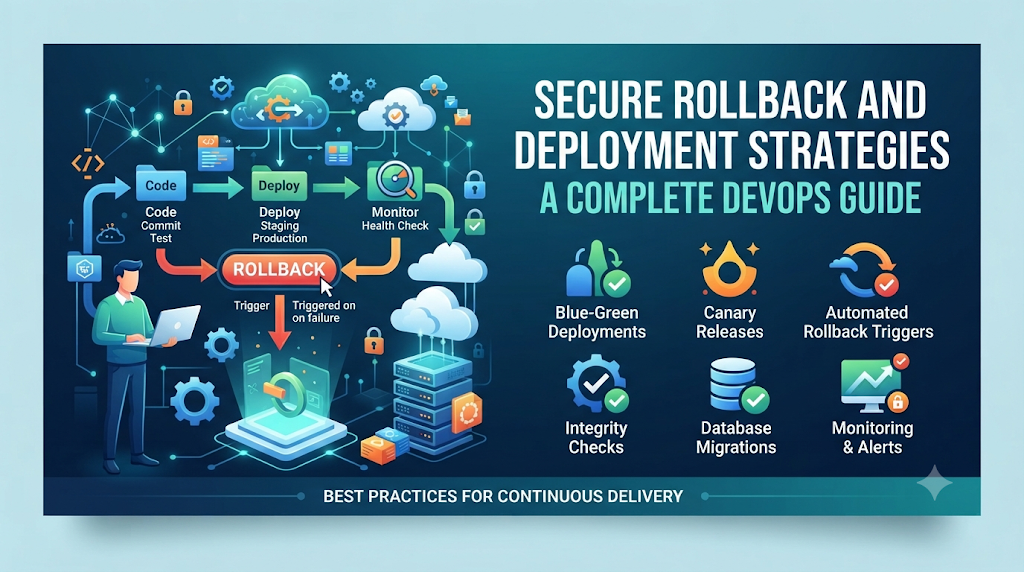
Every engineering team knows the sinking feeling of watching a build pipeline turn bright green, automated tests pass without a hitch, and a new release go live—only to see error rates spike minutes later. In many organizations, this triggers panicked manual intervention and rushed recovery commands that risk leaving corrupted data or broken dependencies behind. This chaotic reaction stems from treating deployment and recovery as separate worlds. Successful modern software delivery requires viewing release management and incident response as a single, unified lifecycle where every release is designed with a reliable, pre-tested rollback plan.
1. Understanding Deployment Safety and Rollback Fundamentals
Before building complex pipelines or configuring orchestration clusters, it is essential to establish a clear vocabulary around deployment safety and recovery.
Core Definitions
- Secure Deployment: The practice of releasing application changes into production while actively minimizing operational risk, protecting sensitive data, maintaining continuous service availability, and enforcing strict authorization boundaries.
- Rollback: The process of reverting an application and its environment to a previous, known-good state after a failed or problematic release.
- Roll-Forward: An alternative to rolling back where engineers quickly patch the defect by deploying a new hotfix version on top of the broken release.
- Redeployment: Reapplying an existing version of an application, often used to clear transient node failures rather than logic defects.
Why Deployment Failures Occur
Failures rarely happen because teams do not care; they occur because production environments are infinitely more complex than staging environments. Divergent configurations, unexpected traffic spikes, expired certificates, subtle race conditions, and third-party API changes routinely bypass pre-production testing.
Furthermore, rolling back application code does not automatically reverse database migrations, external API transactions, or asynchronous queue modifications. An application server can be downgraded in seconds, but a modified database schema or an external payment transaction cannot always be easily reversed. Recognizing this boundary is the foundation of a robust rollback strategy.
2. Identify Risks Before Releasing a Change
Mitigating deployment failures begins long before code touches production. By systematically evaluating change impact, engineering teams can catch vulnerabilities early.
- Application and Dependency Compatibility: Ensure that new libraries, runtime versions, and internal service dependencies match the target infrastructure capabilities.
- Database Schema Changes: Evaluate whether upcoming code modifications require structural changes to data tables and whether those changes break backward compatibility.
- Configuration Changes: Inspect environment variables, feature flags, secret keys, and configuration maps for missing parameters or syntax errors.
- Infrastructure Modifications: Verify that network policies, ingress controllers, load balancer rules, and resource quotas support the incoming release.
- Authentication and Authorization Risks: Check if token formats, permission scopes, or security policies have changed in ways that could lock out active users.
- Third-party Service Dependencies: Assess how upstream and downstream external services will react to altered request payloads or increased traffic volume.
- Performance and Resource Requirements: Analyze whether new code introduces memory leaks, inefficient database queries, or higher CPU utilization.
- Data Integrity and Availability: Confirm that migration scripts do not risk data loss or lock critical tables for extended periods.
Change impact analysis, rigorous release reviews, automated test suites, and pre-deployment readiness checks transform risk management from an ad-hoc chore into an engineering discipline.
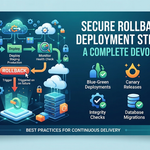
3. Select a Deployment Strategy Based on Application Risk
Different applications require different rollout models. Choosing the right strategy depends on your risk tolerance, infrastructure capabilities, and recovery requirements.
| Deployment Strategy | Operational Workflow | Key Benefits | Primary Limitations | Suitable Use Cases |
| Rolling Deployment | Gradually replaces existing instances with the new version batch by batch. | Resource-efficient; no extra hardware needed. | Mixed versions run simultaneously during rollout. | Stateless microservices, standard web apps. |
| Blue-Green Deployment | Maintains two identical environments (Blue and Green) and switches router traffic instantly. | Instantaneous cutover and rollback; clean isolation. | Requires double the production infrastructure capacity. | High-availability enterprise applications, mission-critical APIs. |
| Canary Deployment | Releases changes to a small subset of users or traffic before expanding. | Limits blast radius; real-world validation under live load. | Complex routing logic and monitoring required. | Large-scale platforms, high-traffic SaaS products. |
| Recreate Deployment | Stops all existing instances entirely before starting the new version. | Simple execution; no version overlap. | Causes noticeable downtime during transition. | Non-production environments, batch processing jobs. |
| Feature Flags | Deploys code hidden behind runtime switches; toggles functionality independently. | Decouples deployment from release; instant feature rollback. | Adds technical debt and code complexity if unmanaged. | Continuous delivery pipelines, gradual user rollouts. |
4. Design a Rollback Plan Before Production Deployment
A recovery plan written during an active incident is rarely effective. Every production release should include a pre-planned rollback procedure containing specific, repeatable elements:
- Known-Good Application Version: Explicitly define the exact container tag, binary hash, or commit SHA of the stable baseline version.
- Versioned Deployment Artifacts: Ensure that older build artifacts remain accessible in your container registry or artifact repository.
- Configuration Backups and Version History: Keep track of environment configuration states paired with each release version.
- Database Compatibility Assessment: Verify that the previous application version can successfully read and write to any modified database schema during a rollback.
- Rollback Triggers and Decision Ownership: Establish clear metrics (e.g., error rate exceeding 2% for 5 minutes) and designate who has the authority to trigger a rollback.
- Recovery Procedures: Document step-by-step instructions for executing the rollback.
- Communication and Escalation Process: Define how stakeholders, support teams, and customers are notified during an incident.
- Post-Rollback Validation: Outline the checks required to confirm that the service has returned to a healthy state.
- Documentation and Audit Records: Maintain logs of why the rollback occurred to feed into future post-incident reviews.
5. Implement Secure Deployment Controls in CI/CD
Building safety into your CI/CD deployment pipeline ensures that flawed or unauthorized code never reaches production environments in the first place.
- Source Code Validation: Require peer reviews, branch protection rules, and signed commits.
- Automated Unit and Integration Testing: Run comprehensive test suites to catch logic regressions early.
- Security and Dependency Scanning: Scan container images and source code dependencies for known vulnerabilities and hardcoded secrets.
- Artifact Verification: Use cryptographic signing and checksum verification to ensure artifacts have not been tampered with.
- Environment-Specific Configuration: Inject secrets and configuration dynamically via secure vaults rather than hardcoding them into build artifacts.
- Approval Gates for Sensitive Releases: Require explicit sign-off from technical leads or release managers before production promotion.
- Least-Privilege Deployment Permissions: Restrict deployment pipeline service accounts to only modify necessary resources.
- Secret Management: Never store API keys or passwords in plain-text configuration files.
- Controlled Production Access: Limit direct shell access to production nodes, relying instead on automated orchestration tools and centralized logging.
- Deployment Logs and Audit Trails: Maintain immutable records of who triggered a deployment, what version was deployed, and when it occurred.
To support teams looking to formalize these practices, educational platforms like DevOpsSchool provide structured training on building secure CI/CD pipelines and mastering automated deployment workflows.
6. A Practical Walkthrough: Deploy, Validate, and Roll Back
To understand how these concepts interact, let us walk through a typical deployment cycle for a containerized web application managed by a CI/CD pipeline.
Step-by-Step Workflow
- Prepare and Test: Developers merge code into the
mainbranch after passing local tests. - Create Artifact: The CI pipeline builds a container image tagged with the Git commit SHA (e.g.,
v1.4.2-abc1234). - Verify Artifact: Automated vulnerability scanners and dependency checks analyze the image.
- Deploy to Staging: The pipeline deploys the artifact to a staging environment mirroring production.
- Run Integration Tests: Automated smoke tests and API integration suites execute against staging.
- Release to Production: Using a rolling deployment strategy, the orchestrator updates the production cluster pods.
- Monitor Health: Prometheus metrics track HTTP 5xx error rates, response latency, and pod restart counts.
- Detect Failure: Ten minutes post-deployment, error rates climb above an acceptable threshold due to a memory leak.
- Decision Ownership: The SRE on-call evaluates the telemetry and decides to initiate a rollback rather than debugging live.
- Execute Rollback: The team directs the orchestrator to revert the deployment to the previous stable image tag (
v1.4.1). - Verify Recovery: Post-rollback checks confirm error rates return to baseline, and customer-facing services stabilize. The incident is logged for post-mortem analysis.
7. Managing Rollbacks in Kubernetes Environments
Kubernetes provides native primitives that make tracking and reverting application releases straightforward, provided your architecture adheres to stateless design principles.
Core Kubernetes Mechanisms
- Deployments and ReplicaSets: Manage pod lifecycles and maintain historical versions of pod templates.
- Rolling Updates: Control how many pods are updated simultaneously using
maxSurgeandmaxUnavailablesettings. - Rollout Status and History: Track ongoing updates and inspect previous revisions using built-in tooling.
- Readiness and Liveness Probes: Prevent traffic from routing to unhealthy pods during and after deployment.
Practical Command Example
If a deployment exhibits unexpected behavior, operators can inspect its history and roll back immediately using standard kubectl commands:
Bash
# Check the status of the current rollout
kubectl rollout status deployment/web-frontend

# View the revision history of the deployment
kubectl rollout history deployment/web-frontend

# Undo the latest deployment and revert to the previous revision
kubectl rollout undo deployment/web-frontend

# Roll back to a specific previous revision (e.g., revision 3)
kubectl rollout undo deployment/web-frontend --to-revision=3
Limitations of Kubernetes Rollback
Kubernetes rollbacks only revert the pod specification, container images, and associated Kubernetes resource configurations. They do not automatically revert external databases, persistent volume data, or asynchronous message queues. If a new application version modified the database schema in a way that breaks the older code version, a simple kubectl rollout undo will result in application crash loops.
8. Protecting Databases and Data During Rollbacks
Because data persistence outlives application containers, database changes require special care during deployment and rollback planning.
Best Practices for Data Safety
- Backward-Compatible Schema Changes: Ensure that any database migration (such as adding a new column) works correctly with both the old and new versions of the application code.
- Expand-and-Contract Migration Patterns: Split breaking schema changes into multiple safe steps:
- Expand: Add new columns or tables while keeping old ones active.
- Migrate: Populate data and deploy code that writes to both structures.
- Contract: Remove deprecated columns only after older application versions are fully retired.
- Database Backups and Recovery Testing: Always take point-in-time snapshots before applying major schema migrations.
- Version Compatibility: Verify that application rollback code is fully compatible with existing database schemas.
- Transaction Integrity: Use proper locking and transaction boundaries to prevent partial writes during migrations.
- Avoiding Destructive Rollbacks: Never rely on automatic database downgrades, as dropping columns or tables during a rollback can result in catastrophic data loss.
Restoring a full database backup should always be considered a last resort, as it incurs significant downtime and loses all legitimate transactions processed since the backup point.
9. Monitoring Releases and Defining Rollback Triggers
An automated or manual rollback is only as good as the telemetry driving it. Teams must monitor the right signals to make objective decisions.
- Error Rates: Track HTTP 4xx and 5xx response codes relative to total traffic volume.
- Response Latency: Measure p95 and p99 latency to catch performance degradations.
- Application Availability: Monitor health check endpoints and synthetic transaction success rates.
- Resource Utilization: Observe CPU, memory, and network I/O on application nodes.
- Failed Transactions: Count dropped database transactions, failed logins, or checkout failures.
- Queue Processing Deadlocks: Watch message queue depth and consumer lag in asynchronous worker systems.
- Database Performance: Track slow query logs, connection pool exhaustion, and lock contention.
- Security Alerts: Monitor unauthorized access attempts or suspicious token validation failures.
- User Experience Indicators: Review real-user monitoring (RUM) metrics and client-side error reports.
Combining Automated Alerts and Human Judgment
While automated rollbacks can react quickly to catastrophic failures, overly sensitive automation can cause flapping—repeatedly rolling back and redeploying unstable code due to transient network blips. Best practice involves combining automated health monitoring with clear threshold triggers and human approval gates for non-critical anomalies.
10. Common Rollback Mistakes and How to Prevent Them
Operational failures during incidents often stem from recurring procedural mistakes. Recognizing these pitfalls helps teams build resilience.
- Releasing Without a Tested Recovery Plan:
- Impact: Prolonged outages while engineers figure out how to downgrade.
- Prevention: Test rollback procedures in staging environments during every major release cycle.
- Assuming Code Rollback Reverses Database Changes:
- Impact: Crash loops due to schema mismatches after code reversion.
- Prevention: Enforce backward-compatible, multi-phase database migration patterns.
- Using Unverified Artifacts:
- Impact: Rolling back to a version that contains hidden bugs or missing dependencies.
- Prevention: Tag, sign, and archive all stable build artifacts immutably.
- Ignoring Configuration Differences:
- Impact: Environment-specific misconfigurations breaking services upon rollback.
- Prevention: Version-control and test environment configuration alongside application code.
- Triggering Automated Rollbacks on Noisy Alerts:
- Impact: Unnecessary service disruption caused by false-positive alarms.
- Prevention: Tune alerting thresholds and require sustained error durations before triggering automated recovery.
- Failing to Validate Service Recovery:
- Impact: Assuming a rollback worked without verifying customer-facing functionality.
- Prevention: Execute automated smoke tests immediately following any rollback action.
- Repeating the Same Deployment Failure:
- Impact: Making identical mistakes in subsequent release cycles.
- Prevention: Conduct thorough post-incident reviews and update CI/CD validation gates accordingly.
11. Building a Repeatable Deployment and Recovery Process
Achieving high deployment maturity requires embedding safety into everyday engineering workflows.
- Standardized Deployment Templates: Use reusable pipeline templates and infrastructure-as-code modules across teams.
- Automated Pre-Deployment Checks: Enforce automated linting, security scanning, and test coverage thresholds.
- Deployment Runbooks: Maintain up-to-date, step-by-step documentation for manual intervention when automation fails.
- Recovery Simulations and Game Days: Regularly practice simulated outages and emergency rollbacks in staging environments to test team readiness.
- Post-Incident Reviews: Foster a blameless culture focused on fixing systemic weaknesses rather than assigning fault.
- Clear Ownership and Escalation: Ensure every service has a clearly defined on-call rotation and escalation path.
- Regular Review of Deployment Metrics: Audit failure rates and recovery times quarterly to identify areas for improvement.
12. Measure Deployment and Recovery Effectiveness
You cannot improve what you do not measure. Tracking key delivery metrics helps organizations evaluate their deployment reliability over time.
- Deployment Frequency: How often successfully tested code reaches production.
- Change Failure Rate: The percentage of deployments that cause incidents requiring hotfixes or rollbacks.
- Mean Time to Restore Service (MTTRS): How long it takes to recover from a production failure, including rollback execution.
- Deployment Success Rate: The ratio of clean, error-free deployments to total deployment attempts.
- Rollback Frequency: How often releases require a rollback to maintain stability.
- Time to Detect (TTD): The duration between a faulty release going live and the detection of the anomaly.
- Time to Complete Recovery (TTCR): The duration required to execute the recovery procedure once initiated.
- Verified Rollback Percentage: The proportion of services with documented and recently tested rollback plans.
Interpreting Metrics Holistically
Metrics should never be optimized in isolation. For instance, striving for zero deployment failures by making release approvals excessively cumbersome will tank your deployment frequency and slow down business agility. The goal is to balance speed and safety, ensuring that when failures do occur, recovery is swift, predictable, and painless.
Conclusion: Make Every Deployment Recoverable
Secure deployment is not about eliminating risk entirely—an impossible goal in complex modern software systems. Instead, it is about controlling risk, protecting data integrity, maintaining service availability, and ensuring that your team can recover cleanly when the unexpected happens. By combining robust deployment strategies like blue-green and canary rollouts, rigorous CI/CD safety controls, careful database migration practices, and well-tested rollback procedures, engineering teams can build resilient delivery pipelines. As professionals expand their expertise in deployment automation and infrastructure reliability, resources like DevOpsSchool offer valuable educational pathways for mastering these essential engineering practices. Reliable software delivery depends not only on how confidently teams release changes, but also on how safely they can recover from unexpected outcomes. Design your pipelines for failure, test your recovery mechanisms before you need them, and ensure that every deployment is fully recoverable.



Leave a Reply
You must be logged in to post a comment.