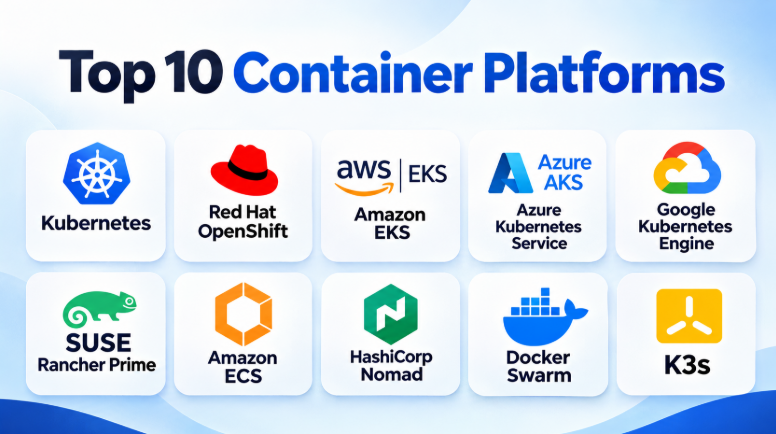
Container platforms help teams build, deploy, and manage modern applications. They package software into containers and run it across servers or cloud environments.
Some platforms use Kubernetes to manage large container clusters. Others offer simpler ways to run containers without Kubernetes. A few provide tools to manage many clusters from one place.
This guide compares ten established container platforms. It explains their main features, strengths, limitations, and best uses.
What Are Container Platforms?
A container platform provides tools to run and manage container-based applications. It helps teams deploy software, control resources, manage networks, and monitor application health.
Most platforms support some of these tasks:
- Container deployment and scheduling.
- Application scaling and recovery.
- Container networking and service discovery.
- Storage management.
- Access control and security policies.
- Monitoring, logging, and alerts.
- Automated application updates.
- Cluster management and administration.
Kubernetes is a major part of this market. It is an open-source system that manages containerized workloads across groups of machines. It supports scaling, service discovery, storage orchestration, and automated rollouts. However, Kubernetes does not provide every feature of a complete application platform by default. Kubernetes+1
Common Uses of Container Platforms
Organizations use container platforms for many types of workloads.
- Microservices: Run separate application services in independent containers.
- Cloud applications: Deploy software across cloud infrastructure.
- DevOps workflows: Connect application builds, testing, and deployment.
- Hybrid cloud: Manage workloads across cloud and local data centers.
- Edge computing: Run applications on smaller systems near users or devices.
- Development environments: Give developers consistent application environments.
- Batch processing: Run scheduled jobs and background tasks.
- Application modernization: Move suitable applications from older systems into containers.
How to Choose a Container Platform
The right platform depends on your infrastructure and team skills. Consider these points before choosing one.
- Orchestration: Decide whether you need Kubernetes or a simpler container scheduler.
- Deployment: Check support for public cloud, private cloud, data centers, and edge systems.
- Scalability: Review how the platform handles workload growth and resource limits.
- Security: Check access controls, image security, secrets, network policies, and audit logs.
- Automation: Review support for APIs, infrastructure as code, and deployment pipelines.
- Management: Consider cluster upgrades, monitoring, backups, and recovery.
- Cost: Include compute, storage, network traffic, licenses, support, and staff time.
- Portability: Check how much your applications depend on provider-specific services.
A managed service can reduce infrastructure work. A self-managed platform can provide more control. Neither approach removes the need for good security and operations.
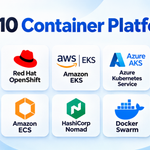
Top 10 Container Platforms
1. Kubernetes
Best for: Teams that need flexible container orchestration
Kubernetes is an open-source container orchestration platform. It helps teams run applications across multiple machines.
It uses a desired-state model. Administrators describe how applications should run. Kubernetes works to keep the actual environment close to that description.
Key Features
- Automated container scheduling across cluster nodes.
- Service discovery and load balancing.
- Application scaling and self-healing.
- Automated rollouts and rollbacks.
- Persistent storage orchestration.
- Configuration and secret management.
- Extensible APIs and a large tool ecosystem.
Pros
- Open-source and widely supported.
- Runs across cloud and on-premises environments.
- Offers extensive automation features.
- Supports many container and infrastructure tools.
Cons
- Requires Kubernetes administration skills.
- Networking and storage need careful planning.
- Monitoring and security tools may need separate setup.
- Can be excessive for small applications.
Platforms / Deployment: Public cloud, private cloud, data centers, and edge systems.
Best Uses: Microservices, large application clusters, platform engineering, and hybrid infrastructure.
Kubernetes provides the foundation for many other products in this list. It is important to remember that Kubernetes itself is not a complete, ready-made PaaS. Teams choose additional tools based on their needs. Kubernetes
2. Red Hat OpenShift
Best for: Enterprise application development and Kubernetes operations
Red Hat OpenShift builds an enterprise application platform around Kubernetes. It combines container orchestration with developer and administration tools.
OpenShift includes a web console, application deployment workflows, and Operator support. Operators help teams install and manage applications through Kubernetes resources.
It can suit organizations that need consistent application environments across data centers and cloud infrastructure. Its integrated features also reduce the need to assemble every platform component separately.
Key Features
- Kubernetes-based container orchestration.
- Web console for developers and administrators.
- Operator-based application management.
- Build and deployment workflows.
- Role-based access and security controls.
- Support for hybrid infrastructure.
- Enterprise support options.
Pros
- Combines developer and operations tools.
- Offers an integrated Kubernetes environment.
- Supports hybrid deployment needs.
- Has a broad enterprise ecosystem.
Cons
- Needs trained platform administrators.
- More features can increase operational complexity.
- Subscription and infrastructure costs need planning.
- Some workloads may need changes to meet security policies.
Platforms / Deployment: Supported data centers, private infrastructure, and public cloud environments.
Best Uses: Enterprise application development, hybrid cloud, regulated workloads, and internal developer platforms.
3. Amazon Elastic Kubernetes Service (EKS)
Best for: Organizations running Kubernetes on AWS
Amazon EKS is AWS’s managed Kubernetes service. It operates the Kubernetes control plane, which reduces some of the work involved in running a cluster.
Teams can choose different ways to provide compute capacity. These include Amazon EC2 and AWS Fargate. EKS also offers EKS Auto Mode, which manages more of the underlying infrastructure.
EKS is a natural option for teams already using AWS. However, customers still need to plan application configuration, permissions, networking, storage, and workload costs.
Key Features
- Managed Kubernetes control plane.
- EC2 and Fargate compute options.
- EKS Auto Mode for more automated infrastructure management.
- Integration with AWS IAM and networking.
- Kubernetes-compatible APIs and tools.
- Monitoring through AWS and supported ecosystem tools.
Pros
- Reduces control-plane administration.
- Fits existing AWS environments.
- Supports Kubernetes tools and applications.
- Offers several compute and management choices.
Cons
- Requires AWS knowledge.
- Workload infrastructure still needs management.
- Costs can include several connected services.
- AWS integrations can increase migration effort.
Platforms / Deployment: AWS, with related options for hybrid and on-premises Kubernetes environments.
Best Uses: Cloud-native applications, microservices, and Kubernetes workloads on AWS.
4. Azure Kubernetes Service (AKS)
Best for: Businesses using Microsoft Azure
Azure Kubernetes Service is Microsoft’s managed Kubernetes offering. It helps teams deploy and manage containerized applications on Azure.
AKS offers different levels of infrastructure management. Its Automatic mode handles more tasks through managed defaults. Standard mode provides more control over cluster and node settings.
The platform connects with Azure services for identity, networking, monitoring, and security. This can help teams that already use Microsoft cloud services.
Key Features
- Managed Kubernetes control plane.
- Automatic and Standard operating modes.
- Node pool and scaling controls.
- Integration with Azure identity services.
- Azure monitoring and networking options.
- Kubernetes-based application deployment.
Pros
- Reduces control-plane management work.
- Fits Microsoft cloud environments.
- Offers different levels of control.
- Connects with Azure services.
Cons
- Requires Azure and Kubernetes knowledge.
- Some operations still need cluster expertise.
- Connected services add to total costs.
- Azure-specific services can affect portability.
Platforms / Deployment: Microsoft Azure, with hybrid management options through related Azure services.
Best Uses: Enterprise applications, microservices, and container workloads built around Azure.
5. Google Kubernetes Engine (GKE)
Best for: Teams that want managed Kubernetes on Google Cloud
Google Kubernetes Engine is Google’s managed Kubernetes service. It helps teams deploy and operate containerized applications without managing every cluster component themselves.
GKE offers Autopilot and Standard operating modes. Autopilot manages more of the underlying infrastructure. Standard gives teams greater control over nodes and cluster settings.
This distinction helps teams choose the level of operational responsibility they want. Autopilot can suit teams focused on applications. Standard can suit workloads that need more infrastructure control.
Key Features
- Managed Kubernetes control plane.
- Autopilot and Standard modes.
- Node auto-scaling and repair options.
- Managed upgrade features.
- Google Cloud monitoring and logging.
- Fleet-based cluster management.
Pros
- Offers flexible operating models.
- Reduces infrastructure work in Autopilot.
- Integrates with Google Cloud services.
- Supports Kubernetes workloads and tools.
Cons
- Requires Google Cloud knowledge.
- Standard clusters need more administration.
- Some configurations have platform limits.
- Cloud-specific services can affect portability.
Platforms / Deployment: Google Cloud, with additional Google Cloud options for distributed environments.
Best Uses: Cloud applications, microservices, data platforms, and Kubernetes workloads on Google Cloud.
6. SUSE Rancher Prime
Best for: Managing Kubernetes across different environments
SUSE Rancher Prime provides centralized management for Kubernetes clusters. It helps teams manage clusters across cloud services, data centers, and edge locations.
Its main value is multi-cluster management. Teams can use Rancher Manager to provision, govern, and audit supported Kubernetes environments.
Rancher can manage SUSE distributions such as RKE2 and K3s. It can also manage certified Kubernetes distributions, including EKS, AKS, and GKE. This makes it useful for organizations that operate clusters in several places.
Key Features
- Centralized Kubernetes cluster management.
- Cluster provisioning and lifecycle controls.
- Access management and policy controls.
- Audit and governance features.
- Support for multiple Kubernetes distributions.
- Options for air-gapped environments.
Pros
- Provides a shared management layer.
- Helps govern clusters across providers.
- Supports different Kubernetes distributions.
- Offers enterprise support through SUSE.
Cons
- Adds another management layer.
- Requires planning for connectivity and access.
- Underlying clusters still need operations.
- Some features depend on the selected offering.
Platforms / Deployment: Public cloud, data centers, and edge environments.
Best Uses: Multi-cloud Kubernetes, hybrid infrastructure, and organizations managing many clusters.
7. Amazon Elastic Container Service (ECS)
Best for: AWS teams that do not need Kubernetes
Amazon ECS is a managed container orchestration service. It helps teams deploy and manage containers without operating a Kubernetes control plane.
ECS uses task definitions to describe how containers should run. Tasks are individual executions. Services help keep a chosen number of application tasks running.
Teams can use Amazon EC2 or AWS Fargate for compute. This gives them a choice between managing servers and using a more managed compute model.
ECS does not use the Kubernetes API. It has its own concepts and AWS integrations. That can simplify AWS-focused operations, but it creates a different migration path from Kubernetes.
Key Features
- Managed container orchestration.
- Task definitions and service scheduling.
- EC2 and Fargate compute options.
- Service auto-scaling.
- Integration with AWS networking and identity.
- Support for external instances through ECS Anywhere.
Pros
- No Kubernetes control plane to operate.
- Deep integration with AWS services.
- Supports server-based and serverless compute.
- Suitable for long-running services and batch tasks.
Cons
- Uses an AWS-specific operating model.
- Creates dependence on AWS services.
- Kubernetes tools do not transfer directly.
- Teams must learn ECS concepts and workflows.
Platforms / Deployment: AWS cloud and supported external infrastructure through ECS Anywhere.
Best Uses: AWS applications, background jobs, web services, and teams seeking simpler orchestration.
8. HashiCorp Nomad
Best for: Running containers and non-container workloads together
HashiCorp Nomad is a workload orchestrator. It schedules containers, batch jobs, and applications that run directly on host machines.
This makes it different from Kubernetes. Nomad can manage several workload types through one scheduling system.
Administrators define jobs and describe their resource needs. Nomad then places those jobs on available machines.
Nomad can suit organizations that want a focused scheduler for mixed workloads. Teams should still plan service discovery, networking, secrets, and monitoring. These needs may involve other tools.
Key Features
- Container and non-container workload scheduling.
- Declarative job specifications.
- Resource-aware scheduling.
- Support for batch and service workloads.
- Multi-operating-system client support.
- Integration with infrastructure tools.
Pros
- Handles different workload types.
- Supports containers and traditional applications.
- Uses a declarative job model.
- Can fit simpler orchestration designs.
Cons
- Uses a different ecosystem from Kubernetes.
- Some capabilities need companion tools.
- Teams must learn its job model.
- Kubernetes resources do not transfer directly.
Platforms / Deployment: Self-managed environments across supported operating systems and infrastructure.
Best Uses: Mixed workloads, batch processing, and organizations that do not need the full Kubernetes ecosystem.
9. Docker Swarm Mode
Best for: Smaller Docker-based clusters
Docker Swarm Mode is built into Docker Engine. It lets teams group Docker hosts into a cluster and deploy services across them.
Its main appeal is its connection with Docker Engine and the Docker CLI. Administrators can define services, set replica counts, and use overlay networks.
Swarm supports service discovery, load balancing, rolling updates, and encrypted node communication. It can be useful for smaller environments with straightforward requirements.
Key Features
- Cluster management built into Docker Engine.
- Declarative service deployment.
- Service scaling and scheduling.
- Overlay networking and service discovery.
- Rolling updates and rollback support.
- Encrypted node communication.
Pros
- Does not need a separate orchestration product.
- Uses familiar Docker commands.
- Supports multi-host container deployment.
- Offers basic scheduling and recovery features.
Cons
- Smaller ecosystem than Kubernetes.
- Fewer platform extensions and integrations.
- May not suit complex enterprise workflows.
- Growing requirements may call for another platform.
Platforms / Deployment: Self-managed Docker Engine hosts.
Best Uses: Small clusters, internal services, and teams that need basic container orchestration.
10. K3s
Best for: Edge computing and lightweight Kubernetes deployments
K3s is a lightweight Kubernetes distribution. It packages Kubernetes components into a smaller installation that works well on compact infrastructure.
It is designed for edge computing, Internet of Things projects, development systems, and small servers.
K3s uses standard Kubernetes concepts and APIs. This makes it useful when teams want Kubernetes compatibility without deploying a larger distribution.
It still needs proper operations. Teams must plan upgrades, backups, security, storage, and cluster recovery.
Key Features
- Lightweight Kubernetes distribution.
- Compact installation and packaging.
- SQLite as the default datastore.
- Support for other datastore choices.
- Built-in networking and DNS components.
- Support for ARM-based systems.
Pros
- Lower infrastructure demands than many full distributions.
- Uses standard Kubernetes APIs.
- Useful for edge and small deployments.
- Reduces installation complexity.
Cons
- Does not remove Kubernetes administration work.
- Production clusters still need careful design.
- Advanced features may need extra components.
- Teams must manage backups and upgrades.
Platforms / Deployment: Linux servers, supported ARM systems, edge devices, and cloud infrastructure.
Best Uses: Edge applications, IoT, development labs, and compact Kubernetes clusters.
K3s is a lightweight Kubernetes distribution, while Docker Swarm and Nomad use different orchestration models. K3s+2
Comparison Table: Top 10 Container Platforms
| Platform | Best For | Deployment | Main Strength | Main Limitation |
|---|---|---|---|---|
| Kubernetes | Flexible container orchestration | Self-managed or hosted | Large ecosystem and portability | Operational complexity |
| Red Hat OpenShift | Enterprise application platforms | Cloud and on-premises | Integrated developer and operations tools | Greater platform overhead |
| Amazon EKS | AWS-based Kubernetes | Managed cloud service | AWS integration | Cloud-specific dependencies |
| Azure AKS | Microsoft Azure workloads | Managed cloud service | Azure ecosystem integration | Azure dependency |
| Google GKE | Google Cloud workloads | Managed cloud service | Autopilot and Standard modes | Google Cloud dependency |
| SUSE Rancher Prime | Multi-cluster management | Management layer across environments | Centralized cluster governance | Adds a management layer |
| Amazon ECS | AWS container workloads | Managed service | AWS-native orchestration | AWS-specific model |
| HashiCorp Nomad | Mixed workloads | Self-managed | Containers and non-container scheduling | Separate ecosystem |
| Docker Swarm | Smaller Docker clusters | Self-managed | Simple Docker-based clustering | Smaller ecosystem |
| K3s | Edge and compact clusters | Lightweight self-managed Kubernetes | Small installation footprint | Requires Kubernetes operations |
Which Container Platform Is Right for You?
The best choice depends on your infrastructure, application needs, and team’s experience.
- For beginners and small teams: Start with Docker Swarm or a managed container service. Avoid Kubernetes complexity unless your workloads need it.
- For AWS users: Compare Amazon EKS and Amazon ECS. Choose EKS when you need Kubernetes compatibility. Choose ECS when AWS-native orchestration is enough.
- For Microsoft environments: Consider Azure Kubernetes Service for managed Kubernetes on Azure.
- For Google Cloud users: Evaluate GKE, especially its Autopilot and Standard operating models.
- For enterprise application teams: Consider Red Hat OpenShift for its integrated development and operations features.
- For multi-cloud operations: Evaluate SUSE Rancher Prime for centralized cluster management.
- For mixed workloads: Consider HashiCorp Nomad when you need to schedule containers and traditional applications.
- For edge systems: Consider K3s for lightweight Kubernetes deployments.
- For teams that want maximum flexibility: Use Kubernetes when your team can support its operational requirements.
Important Features to Check Before Buying
A platform’s feature list does not tell the whole story. Test how it handles your actual applications.
Application Deployment
Check how teams create, update, and roll back applications. Look for support for automated deployment pipelines and configuration management.
Cluster Management
Review how the platform handles node failures, upgrades, scaling, and cluster recovery. Also check which tasks remain your team’s responsibility.
Networking and Storage
Test service discovery, traffic routing, network policies, and persistent storage. These areas often create problems during production deployment.
Security and Access Control
Check image scanning, secrets, permissions, audit logs, and workload isolation. Confirm which controls are included and which need extra tools.
Monitoring and Logging
Make sure the platform provides useful information about application health and resource use. Check how it connects with your existing monitoring tools.
Integration and Automation
Review support for APIs, infrastructure as code, CI/CD tools, and Git-based deployment. Strong integration can reduce manual work.
Pricing and Support
Compare the full cost of running the platform. Include infrastructure, storage, network use, support, licenses, and staff time.
Benefits and Challenges of Container Platforms
Benefits
- Consistent deployment: Containers help applications run in similar environments.
- Better resource use: Multiple containers can share the resources of a host.
- Faster releases: Automation can make application updates more repeatable.
- Flexible scaling: Teams can increase or reduce application capacity.
- Improved recovery: Orchestration can restart failed workloads.
- Portability: Container images can run across compatible environments.
Challenges
- Operational complexity: Large clusters need skilled administrators.
- Security risks: Poor image and access controls can expose workloads.
- Network planning: Service communication needs careful design.
- Storage needs: Stateful applications need reliable persistent data.
- Cost control: Poor resource settings can waste compute capacity.
- Vendor dependency: Cloud-specific services can make migration harder.
Frequently Asked Questions
What is the difference between Docker and Kubernetes?
Docker provides tools to build and run containers. Kubernetes manages containerized applications across a cluster of machines.
Docker Swarm Mode also provides clustering through Docker Engine. It uses a different orchestration model from Kubernetes.
Is Kubernetes a container platform?
Yes. Kubernetes is an open-source platform for managing containerized workloads and services. It provides orchestration features, but teams often add tools for monitoring, security, networking, and application delivery.
Are container platforms free?
Some platforms are open source, including Kubernetes, K3s, and Docker Swarm. Managed cloud services and enterprise products can charge for infrastructure, support, or additional features.
Always check the full cost before choosing a platform.
Which container platform is easiest to manage?
The answer depends on your environment. AWS teams may find ECS simpler than operating Kubernetes. Small Docker clusters may work with Swarm. Managed Kubernetes services reduce some cluster work but still require technical knowledge.
Can container platforms run on private servers?
Yes. Kubernetes, OpenShift, Rancher-managed distributions, Nomad, Docker Swarm, and K3s support self-managed deployment models. Check the hardware and operating system requirements before installation.
Is Kubernetes suitable for small businesses?
It can be, but it may add more work than a small application needs. A managed container service or simpler orchestrator may be easier to operate.
What is the difference between EKS, AKS, and GKE?
All three provide managed Kubernetes services. EKS belongs to AWS, AKS belongs to Microsoft Azure, and GKE belongs to Google Cloud. Their integrations, management options, and costs differ.
Final Thoughts
Container platforms provide different ways to build and operate modern applications. Kubernetes offers a flexible foundation, while OpenShift adds an integrated enterprise environment. EKS, AKS, and GKE provide managed Kubernetes in their respective clouds.
Rancher Prime helps teams manage clusters across environments. ECS offers an AWS-native alternative. Nomad supports mixed workloads, while Swarm and K3s serve more focused needs.
Do not choose a platform only by its popularity or feature count. Test it with a real application. Check deployment, recovery, security, integrations, and total operating cost. Choose the platform your team can manage well as your workloads grow.


Leave a Reply
You must be logged in to post a comment.