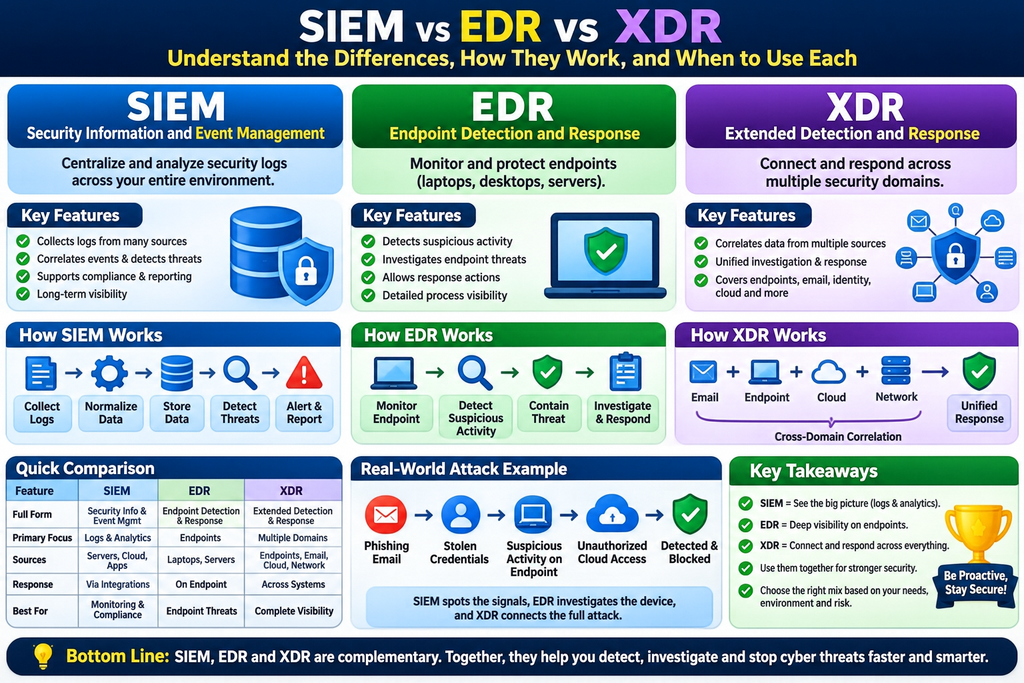
Understand the differences, how they work, real-world examples, architecture, use cases, and how to choose the right security solution.
Category: Cybersecurity / SOC / DevSecOps / Cloud Security
Level: Beginner to Advanced
Estimated reading time: 20–25 minutes
Last reviewed: November 2026
1. Introduction: Why Do We Need SIEM, EDR, and XDR?
Imagine this situation.
An employee receives an email that appears to be from the company’s IT department. It asks them to click a link and verify their account.
The employee clicks the link, enters their credentials, and continues working.
Nothing unusual happens on their screen.
But behind the scenes, an attacker may now have access to their account.
The attacker signs in from an unfamiliar location, executes suspicious commands on a compromised workstation, attempts to obtain additional privileges, and accesses sensitive business information.
Now comes the important question:
How will the company’s security team discover what happened, understand the full attack, and stop it?
This is where SIEM, EDR, and XDR become important.
These three technologies help organizations identify suspicious behavior, investigate security incidents, and respond to threats. However, they differ in the information they collect, how they detect threats, and where they can take action.
Think of them this way:
- SIEM: Helps security teams monitor and investigate events happening across an organization’s technology environment.
- EDR: Focuses on detecting, investigating, and responding to threats affecting individual endpoints such as laptops, desktops, and servers.
- XDR: Connects security information from multiple environments, such as endpoints, identities, email, cloud systems, and networks, to investigate and respond to attacks across those environments.
They overlap, and modern products increasingly combine capabilities. Understanding their core purposes helps organizations design stronger security systems instead of buying tools simply because they have impressive features.
2. SIEM vs EDR vs XDR: Quick Comparison
| Feature | SIEM | EDR | XDR |
|---|---|---|---|
| Full form | Security Information and Event Management | Endpoint Detection and Response | Extended Detection and Response |
| Main purpose | Centralized security monitoring and analysis | Endpoint threat detection and response | Cross-domain detection and response |
| Primary focus | Logs and security events | Endpoint activities | Multiple security domains |
| Typical sources | Servers, firewalls, IAM, cloud, applications | Laptops, desktops, servers | Endpoints, identity, email, cloud, network |
| Threat detection | Rules, correlations, analytics | Endpoint behavior and threat analytics | Cross-domain analytics and correlation |
| Automated response | Through native functions or integrations | Direct endpoint actions | Coordinated actions across supported systems |
| Historical investigation | Often a major strength | Endpoint-focused | Cross-domain, depending on retention |
| Typical users | SOC analysts, security engineers | Endpoint security and SOC teams | SOC teams, incident responders |
| Common challenge | Ingestion cost and alert noise | Limited visibility outside endpoints | Integration complexity and coverage gaps |
The most important difference: SIEM is primarily a broad security data and analytics platform, EDR provides deep endpoint visibility and response, and XDR connects detections and response workflows across multiple security domains.
3. What Is SIEM?
SIEM stands for Security Information and Event Management.
It is a cybersecurity solution that collects, processes, searches, analyzes, and correlates security data from different systems to help organizations identify threats and investigate incidents.
A simple real-world example
Imagine a company has:
- 500 employee laptops
- 100 Linux servers
- 50 Windows servers
- 20 firewalls and network security devices
- AWS and Azure cloud infrastructure
- Corporate email
- VPN and identity services
- Hundreds of business applications
Every system generates security-relevant information.
A Windows server may record unsuccessful sign-in attempts. A firewall may record blocked connections. AWS CloudTrail may record changes to IAM permissions. A VPN may record when an employee connects.
Without centralized monitoring, investigating these activities could mean searching through dozens of individual systems.
SIEM brings these records into a central analysis environment.
A security analyst can ask:
“Show me all suspicious login attempts, privilege changes, and cloud activities associated with this user during the last 24 hours.”
Rather than investigating every system separately, the analyst can correlate information through the SIEM.
How SIEM works
A typical SIEM workflow contains six stages.
Step 1 — Data collection
The SIEM receives logs and events from operating systems, cloud platforms, databases, security products, applications, and networking devices.
Step 2 — Parsing and normalization
Different technologies produce information in different formats. The SIEM extracts important fields such as timestamp, username, IP address, event category, and action.
Normalization makes it easier to analyze different log sources consistently.
Step 3 — Data storage and search
Security information is stored according to configured retention policies, supporting investigations and historical searches.
Step 4 — Detection and correlation
Detection rules analyze incoming data.
For example, multiple authentication failures followed by a successful login from the same account may deserve investigation.
Step 5 — Alert generation
The SIEM creates an alert or incident when specified conditions are met.
Step 6 — Investigation and response
Analysts investigate the event and take action, sometimes through integrated EDR, identity management, or SOAR tools.
SIEM architecture
       ENTERPRISE DATA SOURCES
                  |
    +-------------+-------------+
    |             |             |
 Servers       Cloud          Network
 Windows       AWS/Azure      Firewalls
 Linux         Kubernetes     VPN
    |             |             |
    +-------------+-------------+
                  |
           Log Collection
                  |
       Parsing / Normalization
                  |
             SIEM Platform
                  |
     +------------+------------+
     |            |            |
   Search      Detection     Reporting
     |            |            |
     +------------+------------+
                  |
           Security Alerts
                  |
           SOC Investigation
                  |
         Response / SOAR / EDR
This is a simplified architecture. Actual implementations may include log collectors, message queues, security data lakes, enrichment pipelines, threat intelligence, and multiple tiers of storage.
Popular SIEM platforms
Examples include:
- Microsoft Sentinel
- Splunk Enterprise Security
- Google Security Operations
- IBM QRadar SIEM
- Elastic Security
Some of these platforms also provide endpoint security, SOAR, or XDR capabilities.
Where SIEM is particularly useful
SIEM is valuable when an organization requires centralized security monitoring across different vendors and technologies, long-term security investigations, threat hunting, audit evidence, and customizable detection logic.
Important limitation: SIEM does not automatically provide deep endpoint visibility merely because endpoint logs are being collected. Its effectiveness depends on the quality of the underlying telemetry, detection rules, integrations, and response processes.
4. What Is EDR?
EDR stands for Endpoint Detection and Response.
An endpoint is a device or system where workloads or applications run, such as a laptop, desktop computer, or server.
EDR monitors activity on supported endpoints to identify malicious behavior and support investigation and containment.
A simple real-world example
Imagine an employee downloads a file that appears to be a PDF.
When opened, the file triggers a suspicious process that attempts to execute a script.
An EDR solution may observe the process execution, identify unusual behavior, collect supporting telemetry, and generate a detection.
Depending on its capabilities and policy configuration, it may also terminate the process, quarantine a malicious file, or isolate the computer from the network.
The security team receives an alert describing what happened.
The alert might contain:
- Affected computer
- Username
- Suspicious process
- Parent and child processes
- Command-line arguments
- File hashes
- Related network connections
- Detection reason
- Recommended response actions
This level of device-specific context is one of EDR’s major strengths.
How EDR works
EDR commonly uses an endpoint agent or sensor.
The agent observes relevant activities, such as process creation, file changes, system behavior, and network connections initiated by processes.
The collected information is analyzed locally, in a cloud platform, or through a combination of both.
When a detection occurs, the analyst may be able to trace the sequence of events and perform supported response actions.
EDR architecture
          EMPLOYEE LAPTOP
                  |
           EDR Agent/Sensor
                  |
    +-------------+-------------+
    |             |             |
 Processes      Files        Network
    |             |             |
    +-------------+-------------+
                  |
          Threat Detection
                  |
             EDR Console
                  |
     +------------+------------+
     |            |            |
 Investigate    Contain      Remediate
     |            |            |
 Process tree   Isolation    Quarantine
 Timeline       Kill process Remove threat
EDR versus traditional antivirus
Traditional antivirus is primarily designed to prevent or detect malicious software through techniques such as signatures, heuristics, and behavioral analysis.
Modern endpoint protection platforms already include much more than signature-based antivirus.
EDR builds on endpoint protection by emphasizing investigation, historical telemetry, threat hunting, and post-detection response.
| Traditional antivirus | EDR |
|---|---|
| Focuses on malware prevention and detection | Focuses on endpoint detection, investigation, and response |
| May rely on signatures and behavioral techniques | Uses endpoint telemetry and behavioral analytics |
| Typically emphasizes prevention | Emphasizes detection and response alongside protection |
| Often provides limited investigation context | Usually provides richer process and activity timelines |
Modern EDR products frequently include antivirus and next-generation endpoint prevention features. They are not necessarily separate agents or separate products.
Popular EDR platforms
Examples include:
- Microsoft Defender for Endpoint
- CrowdStrike Falcon endpoint detection and response capabilities
- SentinelOne endpoint detection and response capabilities
- VMware/Broadcom Carbon Black endpoint security offerings
What EDR cannot see easily
EDR is powerful, but its visibility is not unlimited.
An endpoint agent might detect suspicious activity on a laptop while having no direct understanding of a fraudulent email sent to that employee, an unauthorized cloud API operation, or a suspicious SaaS application login.
Those events require additional telemetry or integrations.
EDR coverage can also be incomplete for unmanaged devices, certain network appliances, and workloads where a conventional endpoint agent cannot run.
This is one reason organizations look beyond endpoint-only security.
5. What Is XDR?
XDR stands for Extended Detection and Response.
XDR extends threat detection and response across multiple security domains.
Instead of analyzing endpoint behavior alone, an XDR platform can combine evidence from supported email, identity, endpoint, network, cloud, and application security products.
The goal is to help analysts recognize connected attack activities and respond to them as a coordinated security incident.
A simple real-world example
An attacker begins with a phishing email.
The victim opens the email and enters credentials into a malicious website.
The attacker then signs in to a corporate account and attempts to access sensitive information.
A supported XDR platform might connect the following signals:
Email: A suspicious message was delivered.
Identity: The recipient’s account experienced unusual authentication activity.
Endpoint: The recipient’s device executed a suspicious process.
Cloud: The account performed an unexpected privileged action.
Instead of showing the analyst several unrelated alerts, an XDR system may associate these observations with one incident and provide a unified timeline.
This helps analysts understand the attack more quickly.
XDR architecture
             SECURITY DOMAINS
                    |
  +---------+-------+-------+---------+
  |         |       |       |         |
Endpoint  Identity Email  Network    Cloud
  |         |       |       |         |
  +---------+-------+-------+---------+
                    |
             XDR Platform
                    |
        Cross-Domain Correlation
                    |
          Unified Incident View
                    |
         Investigation / Hunting
                    |
        Coordinated Response
                    |
  +---------+-------+-------+---------+
  |         |       |       |         |
Isolate   Disable  Quarantine Block  Remediate
Device    Account  Email       IP    Cloud Access
These response actions are examples, not universal guarantees. The available actions depend on the product, connected services, permissions, licenses, and configuration.
How XDR differs from SIEM
This is where many people become confused.
Both SIEM and XDR may collect information from multiple systems. Both may correlate events. Both may generate incidents. Modern platforms may even use the same console.
The distinction is primarily one of product architecture and operational emphasis.
SIEM has traditionally emphasized flexible ingestion, security analytics, searching, custom detection engineering, and retention across a broad variety of systems.
XDR emphasizes integrating threat detection and response across supported security controls, frequently providing more closely connected investigation and remediation workflows.
An advanced SIEM can correlate endpoint, email, identity, and cloud events. An XDR platform can also ingest third-party data.
Therefore, XDR is not simply SIEM with automation, and SIEM is not merely a place to store logs.
Their capabilities overlap significantly.
Native XDR and open XDR
Two architectural approaches frequently appear in XDR discussions.
Native XDR emphasizes tightly integrated security capabilities, often within one vendor’s ecosystem.
Open XDR emphasizes integrations across security products from multiple vendors.
The terms are not enforced as universal technical standards, and vendors may use them differently.
An open integration model is useful only if the integrations actually provide the telemetry, context, and response actions an organization needs.
Popular XDR platforms
Examples include:
- Microsoft Defender XDR
- Palo Alto Networks Cortex XDR
- Trend Micro Vision One
- Other security platforms combining endpoint, identity, cloud, network, and incident response functions
Product capabilities should be evaluated individually rather than assumed from the XDR label.
6. Real-World Attack Scenario: How All Three Technologies Work Together
Consider a fictional company called GlobalTech Solutions.
It operates Windows laptops, Linux servers, Microsoft 365, and AWS infrastructure.
An attacker compromises an employee’s credentials and attempts to access internal systems.
The following timeline is illustrative, not a report of an actual incident.
| Time | Attack activity | Relevant security visibility |
|---|---|---|
| 09:00 | Phishing email arrives | Email security, XDR |
| 09:03 | Employee enters credentials | Identity logs, SIEM, XDR |
| 09:06 | Attacker signs in unexpectedly | Identity protection, SIEM, XDR |
| 09:08 | Suspicious script executes on a laptop | EDR, XDR |
| 09:10 | Attacker attempts privilege escalation | EDR, identity logs, SIEM, XDR |
| 09:12 | Unauthorized AWS API activity appears | Cloud security logs, SIEM, integrated XDR |
| 09:15 | Security team investigates and contains access | EDR, XDR, SIEM, response integrations |
How SIEM helps
The SIEM may correlate sign-in failures, account changes, VPN activity, firewall events, and AWS CloudTrail records.
It can also provide historical information that helps analysts determine whether the incident began earlier than originally suspected.
How EDR helps
The EDR can reveal suspicious scripts, process ancestry, executed commands, and network connections from the compromised workstation.
A responder may isolate the device or terminate a malicious process, depending on the available capabilities.
How XDR helps
An XDR platform may combine email, identity, endpoint, and cloud detections into a connected incident.
If the integrations support the necessary actions, security responders may quarantine the email, contain the device, and disable or restrict compromised credentials through coordinated workflows.
The lesson
The three technologies have overlapping but complementary strengths.
A well-integrated security environment can use EDR for endpoint visibility and containment, XDR for cross-domain incident investigation, and SIEM for broad security analytics and historical evidence.
The exact division of responsibilities varies by platform.
7. Hands-On Tutorial: Investigating SIEM and EDR Telemetry
Understanding definitions is useful. Working with real security data is much better.
This tutorial uses Microsoft Sentinel and Microsoft Defender XDR as examples because their Kusto Query Language (KQL) provides an accessible way to demonstrate the concepts.
You can apply similar ideas to other platforms using their native query languages.
Lab prerequisites
For the examples below, use an authorized test environment with the appropriate product access and data connectors.
You need:
- Access to a Microsoft Sentinel environment containing Microsoft Entra sign-in logs.
- Access to Microsoft Defender XDR advanced hunting with endpoint process telemetry.
- A test Windows computer onboarded to the supported endpoint security product.
- Permission to investigate test data.
You can complete the SIEM and EDR exercises independently if you have access to only one platform.
Lab 1: SIEM — Investigate failed sign-in attempts
Objective: Find accounts and source IP addresses generating repeated failed authentication attempts.
Open Microsoft Sentinel’s Logs query interface and run:
SigninLogs
| where TimeGenerated > ago(24h)
| where ResultType != "0"
| summarize
    FailedAttempts = count(),
    FirstSeen = min(TimeGenerated),
    LastSeen = max(TimeGenerated)
    by UserPrincipalName, IPAddress
| where FailedAttempts >= 10
| order by FailedAttempts desc
What this query does
It searches Microsoft Entra interactive sign-in events from the last 24 hours, filters unsuccessful attempts, and groups them by username and IP address.
It then displays combinations with at least 10 failed attempts.
The value of 10 is an illustrative threshold, not a universal security recommendation.
What to investigate
Look for repeated failures followed by a successful authentication, unexpected source addresses, unusual times, and other related signals.
Do not automatically classify every repeated failure as a brute-force attack. Forgotten passwords, stale applications, shared networks, and configuration problems can produce similar patterns.
What you learn: SIEM enables analysts to search security events and create rules from centrally collected data.
Lab 2: EDR — Investigate endpoint process execution
Objective: See how EDR records process execution and parent-child relationships.
On your authorized test Windows device, open PowerShell and execute a harmless command:
Get-Process | Select-Object -First 5This simply displays information about running processes.
Next, open Microsoft Defender XDR Advanced Hunting and run:
DeviceProcessEvents
| where Timestamp > ago(24h)
| where FileName in~ ("powershell.exe", "pwsh.exe")
| project
    Timestamp,
    DeviceName,
    AccountName,
    FileName,
    ProcessCommandLine,
    InitiatingProcessFileName
| order by Timestamp desc
| take 50
What this query does
It searches supported endpoint telemetry for PowerShell process creation events and shows the devices, users, command lines, and initiating processes.
A PowerShell command is not inherently malicious. The investigator needs to examine its context.
Important: This query shows process creation events, so an already-running PowerShell session might not generate a new event for every command you type. Start a new PowerShell process if you want to observe a fresh process creation event. Sensor configuration, licensing, onboarding, and data availability also affect results.
What you learn: EDR enables deeper investigation into activity happening on individual computers.
Lab 3: XDR — Investigate an incident across multiple sources
Objective: Understand how an XDR investigation connects security evidence across different domains.
This exercise requires relevant data and integrations. A single endpoint PowerShell event does not automatically create a cross-domain XDR incident.
Using an approved simulated incident or existing lab detection:
Step 1: Open the XDR incident queue.
Step 2: Select an incident containing evidence from more than one security domain, if your lab has one.
Step 3: Review the associated devices, accounts, alerts, and incident timeline.
Step 4: Examine which security products contributed evidence.
Step 5: Identify the available response actions, but do not execute disruptive actions against production systems.
Step 6: Document the suspected attack sequence, supporting evidence, and recommended containment actions.
What you learn: XDR helps analysts investigate related threat activity across supported security domains without reconstructing every connection manually.
Expected learning outcomes
After completing these exercises, you should be able to distinguish three different investigation questions:
- SIEM: What security events occurred across our environment?
- EDR: What exactly happened on this endpoint?
- XDR: How are these potentially malicious activities connected across systems?
8. SIEM, EDR, and XDR in AWS, Kubernetes, and DevSecOps
Cloud-native environments introduce an additional challenge.
Not everything in the infrastructure is a traditional computer that can run an endpoint security agent.
Consider an organization using:
- AWS EKS
- Amazon EC2
- AWS IAM
- Amazon S3
- Kubernetes workloads
- CI/CD pipelines
- Container registries
- SaaS identity services
How should security monitoring work?
SIEM in cloud-native environments
SIEM can centralize security information from sources such as:
- AWS CloudTrail
- AWS VPC Flow Logs
- Kubernetes audit logs
- Application authentication logs
- Cloud security findings
- CI/CD audit events
For example, suppose a cloud user suddenly creates a new access key and modifies an IAM policy.
A SIEM can correlate those events with authentication activity and other records to help investigators determine whether the changes were authorized.
EDR in cloud-native environments
EDR can provide visibility into supported EC2 instances, worker nodes, and other host systems.
However, a traditional endpoint sensor does not automatically monitor every container, managed Kubernetes control-plane component, or serverless workload.
Container and cloud workload security may require additional sensors, integrations, or specialized tooling.
XDR in cloud-native environments
An XDR platform with suitable cloud integrations may correlate suspicious identity behavior, endpoint execution, cloud findings, and other security signals.
For example:
Suspicious Cloud Login
          |
          v
Unexpected IAM Change
          |
          v
Suspicious EC2 Process Activity
          |
          v
Related Cloud Security Findings
          |
          v
Unified Incident Investigation
Whether this chain can be automatically correlated depends on the supported data sources and detections.
DevSecOps takeaway: EDR does not replace Kubernetes auditing, runtime security, or cloud security posture management. SIEM and XDR can use the evidence generated by those controls.
9. SIEM vs EDR vs XDR: Which One Should You Choose?
There is no single correct product combination for every organization.
The right decision depends on risk, existing technology, internal security expertise, required visibility, and operational budget.
| Organization or requirement | Practical starting point |
|---|---|
| Small company with managed laptops | Strong endpoint protection with EDR and managed response where needed |
| Organization standardized on one security ecosystem | Evaluate its integrated XDR capabilities |
| Enterprise using many cloud and security vendors | SIEM plus endpoint protection and suitable XDR integrations |
| Business requiring long-term security investigations | SIEM or another appropriate security data retention and analytics architecture |
| Organization facing frequent endpoint threats | Prioritize endpoint prevention, EDR coverage, and response readiness |
| Cloud-native engineering company | Combine cloud-native logs, runtime security, endpoint controls, and centralized investigation |
| SOC seeking faster cross-domain investigation | Evaluate XDR, incident correlation, and response integrations |
Does every organization need all three?
No.
Some organizations can begin with well-configured endpoint protection, identity controls, email protection, and managed detection and response.
Others already use a platform containing SIEM, EDR, and XDR functionality.
Large enterprises may maintain several specialized tools because they have diverse technology environments and complex security requirements.
The priority should always be closing real detection and response gaps, not maximizing the number of purchased products.
10. SIEM vs XDR vs SOAR vs MDR: Other Important Terms
These four terms are often mentioned together, but they describe different concepts.
SIEM — Security Information and Event Management
Centralizes security data for analysis, monitoring, detection, investigation, and reporting.
XDR — Extended Detection and Response
Correlates and responds to threats across supported security domains.
SOAR — Security Orchestration, Automation and Response
Provides workflows and automation that coordinate security activities across integrated systems.
MDR — Managed Detection and Response
A managed service in which external security professionals monitor, investigate, and help respond to threats, using one or more security technologies.
The important distinction is that MDR is a service delivery model, while SIEM, EDR, XDR, and SOAR describe technology capabilities.
An MDR provider might operate an organization’s SIEM, EDR, or XDR systems.
11. Common Mistakes Organizations Make
Mistake 1: Buying SIEM without a logging strategy
Collecting enormous volumes of data does not automatically create effective security monitoring.
Organizations need prioritized log sources, consistent timestamps, retention policies, and tested detections.
Mistake 2: Assuming EDR provides complete enterprise visibility
EDR protects and monitors supported endpoints, but threats may involve cloud identities, SaaS accounts, email systems, and network infrastructure that require separate telemetry.
Mistake 3: Assuming XDR replaces all SIEM requirements
XDR may be excellent for integrated threat investigation but might not meet every requirement for custom data ingestion, historical retention, audit reporting, or specialized analytics.
Mistake 4: Turning on every automated response action
Automatic device isolation or account disabling can interrupt legitimate business operations.
Response automation should consider confidence, asset criticality, approval requirements, and recovery procedures.
Mistake 5: Measuring success by the number of alerts
A SOC producing thousands of low-quality alerts is not necessarily more secure than a SOC producing fewer, meaningful incidents.
Detection quality, investigation speed, coverage, and successful containment matter more.
Mistake 6: Ignoring ongoing operational costs
Costs may include data ingestion, endpoint licensing, retention, storage, cloud processing, professional services, and analyst effort.
Evaluate the total operating cost rather than only the advertised license price.
12. Best Practices for Implementing SIEM, EDR, and XDR
A practical implementation should follow a measured sequence.
First, identify critical assets. Understand the systems, identities, applications, and information that would cause the greatest business impact if compromised.
Second, establish endpoint coverage. Make sure supported devices and servers have appropriate prevention and detection capabilities.
Third, prioritize security logs. Start with identity, endpoint, cloud administrative activity, key network controls, and high-value business systems.
Fourth, develop meaningful detections. Use realistic attack scenarios and trusted threat intelligence instead of relying on generic alert thresholds alone.
Fifth, connect investigations. Integrate the relevant SIEM, EDR, XDR, ticketing, and incident response workflows.
Sixth, test responses. Verify that analysts can investigate suspicious events, gather evidence, contain threats, and restore business operations.
Seventh, measure security outcomes. Track detection coverage, false positives, time to detect, time to contain, and incident response effectiveness.
A security platform is only as useful as the telemetry, processes, and people supporting it.
13. How to Evaluate Security Products Before Buying
Before selecting a solution, ask vendors to demonstrate the same realistic incident scenario.
For example, request a demonstration of an identity compromise followed by suspicious endpoint activity.
Evaluate the following areas.
| Evaluation area | What to verify |
|---|---|
| Detection coverage | Can the platform detect threats relevant to our environment? |
| Data sources | Which integrations are native, supported, or custom? |
| Investigation | Can analysts reconstruct the incident timeline? |
| Response | Which containment actions are available? |
| Automation | Can high-risk actions require approval? |
| Cloud support | Does it support our AWS, Azure, and Kubernetes environments? |
| Third-party integration | Can it ingest or act on data from existing products? |
| Retention | How long is telemetry accessible and searchable? |
| Data protection | How are access, encryption, and data residency handled? |
| Operational cost | What will ingestion, licensing, storage, and support actually cost? |
Do not evaluate a platform only by its feature checklist.
A practical proof of concept should demonstrate whether it can detect and investigate the attacks your organization is concerned about.
14. Important Security Metrics
Security teams should monitor outcomes rather than simply counting alerts.
Mean Time to Detect (MTTD): The average time required to discover a security incident.
Mean Time to Respond (MTTR): An often-used term for response duration, although organizations should define precisely whether it measures acknowledgement, containment, or resolution.
Mean Time to Contain (MTTC): The average time required to contain an identified threat.
Endpoint Coverage: The proportion of relevant endpoints reporting healthy security telemetry.
Detection Coverage: The degree to which important attack scenarios are covered by tested detections.
False Positive Rate: The proportion of detections incorrectly identifying benign activity as malicious.
These metrics should be interpreted alongside severity, operational context, and the quality of incident investigations.
15. Frequently Asked Questions
Is XDR better than SIEM?
Not universally. XDR can offer strong integrated detection and response capabilities, while SIEM can provide broad data ingestion, flexible analytics, and historical investigation. Their suitability depends on an organization’s requirements.
Can SIEM replace EDR?
Generally not by itself. SIEM can analyze endpoint logs, but deep endpoint telemetry and direct endpoint containment normally require endpoint-specific technology.
Can XDR replace EDR?
Some XDR platforms contain EDR functionality. Others depend on an integrated EDR product. Always verify endpoint coverage and supported response capabilities.
Do I need SIEM if I already have XDR?
Possibly. A separate SIEM may be useful for specialized data sources, audit requirements, extended retention, complex detections, and heterogeneous environments. Some unified products already provide sufficient SIEM functionality.
Is EDR only for Windows?
No. EDR technologies can support Windows, Linux, macOS, and other environments, depending on the vendor and available sensor capabilities.
Can SIEM detect ransomware?
Yes, if the required telemetry and detections are available. SIEM can recognize patterns associated with ransomware activity, while endpoint security tools may provide more direct visibility and prevention or containment on affected devices.
Does XDR automatically stop every cyberattack?
No. XDR improves detection, investigation, and response within its coverage, but it cannot guarantee prevention or detection of every threat.
Is SIEM required for compliance?
Compliance obligations depend on the applicable regulations, standards, contracts, and system scope. Centralized security monitoring and log retention may support those requirements, but owning a SIEM does not automatically establish compliance.
Which is best for a Security Operations Center?
A SOC benefits from reliable telemetry, usable detections, actionable incidents, response tools, and trained analysts. SIEM, EDR, and XDR may all contribute to those objectives.
What should a beginner learn first?
Start with operating system logs, authentication events, basic networking, and endpoint process behavior.
Then learn SIEM queries, EDR investigation techniques, MITRE ATT&CK, incident response, and cross-domain correlation.
Understanding the underlying security evidence is more valuable than memorizing vendor dashboards.
16. Final Verdict: SIEM, EDR, and XDR Are Complementary Security Capabilities
The future of enterprise cybersecurity is not about deciding whether SIEM, EDR, or XDR wins.
It is about making security information and response actions work together effectively.
SIEM helps an organization understand events across its infrastructure.
EDR helps investigate and contain malicious activity on supported endpoints.
XDR helps security teams connect evidence and coordinate investigation and response across multiple security domains.
Modern platforms increasingly bring these functions together.
However, no amount of integration can compensate for missing logs, unmanaged assets, poor security configuration, ineffective detections, or untested incident response procedures.
The best cybersecurity architecture is not the one with the most tools. It is the one that can reliably detect, investigate, contain, and recover from the threats that matter most to the organization.
17. Authoritative References and Further Reading
For deeper technical learning, use these resources:
- NIST SP 800-61 Revision 3 — Incident Response Recommendations (2025)
- Australian Cyber Security Centre — Best Practices for Event Logging and Threat Detection
- Australian Cyber Security Centre — Priority Logs for SIEM Ingestion
- MITRE ATT&CK — Data Components
- Microsoft Learn — Incident Response with XDR and Integrated SIEM
- Microsoft Learn — DeviceProcessEvents Advanced Hunting Schema
- Microsoft Learn — Microsoft Entra SigninLogs Reference
SEO Publishing Details
SEO Title: SIEM vs EDR vs XDR: Differences, Architecture, Examples & Tutorial
Meta Description: Understand SIEM vs EDR vs XDR with practical examples, security architectures, real-world attack scenarios, hands-on queries, and expert guidance.
Suggested URL Slug: siem-vs-edr-vs-xdr
Primary Keyword: SIEM vs EDR vs XDR
Secondary Keywords: SIEM vs XDR, EDR vs XDR, what is SIEM, endpoint detection and response, extended detection and response, SOC security tools, SIEM architecture, XDR architecture, cybersecurity monitoring, security operations center.
Suggested Article Category: Cybersecurity / SOC / DevSecOps
Suggested Tags: SIEM, EDR, XDR, SOC, Cloud Security, Threat Detection, Incident Response, Security Monitoring, DevSecOps, Cybersecurity Tutorial.
Suggested Internal Links: SIEM Tutorial, SOC Analyst Roadmap, MITRE ATT&CK Framework, AWS Security Monitoring, Kubernetes Security, Incident Response Best Practices, and DevSecOps Tools.
Recommended Structured Data: BlogPosting or TechArticle, plus BreadcrumbList where applicable. Use accurate author, date, and publisher information. Structured data does not guarantee Google rich results or improved rankings.









Leave a Reply
You must be logged in to post a comment.