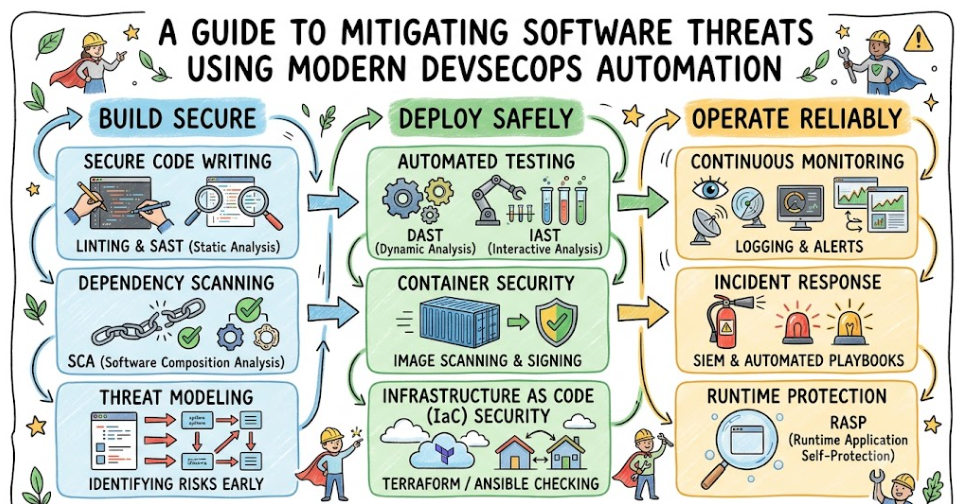
Introduction
Modern application development moves at an incredible speed. Software engineering teams ship updates multiple times a day, utilizing microservices, open-source dependencies, and cloud-native environments. While this speed allows organizations to deliver value to customers quickly, it also creates a massive challenge: security architectures are struggling to keep up with the pace of innovation.
When security checks are treated as an afterthought, applications are frequently deployed with structural weaknesses. Discovering software flaws late in the delivery cycle creates critical operational bottlenecks, delays product launches, and increases fixing costs. Traditional security frameworks that rely on manual assessments right before a major release can no longer protect modern applications. This operational tension is exactly why teams are transforming their approach to secure software development.
To solve this systemic challenge, forward-thinking organizations are embedding security directly into their continuous integration and continuous deployment pipelines. By shifting security practices to the earliest phases of development, software engineering teams can proactively address threats before they reach production servers.
For professionals and organizations aiming to master these essential modern frameworks, specialized platforms like DevOpsSchool offer comprehensive training architectures. These programs help teams bridge the gap between traditional IT operations, fast-paced software development, and modern cybersecurity practices. Understanding how to handle DevSecOps Security Vulnerabilities is no longer an optional specialized skill; it has become a fundamental operational requirement for sustainable software delivery.
What Are Security Vulnerabilities?
In software engineering, a security vulnerability is a structural flaw, misconfiguration, or bug within an application code or underlying infrastructure that malicious actors can exploit. These vulnerabilities compromise the confidentiality, integrity, or availability of the digital system and its associated user data.
To understand this concept clearly, consider a physical real-world analogy. Imagine constructing a large corporate office building. If the architects design the building with heavy steel doors and high-tech biometric scanners at the main entrance, but leave a ground-floor maintenance window unlocked and unmonitored, the building has a vulnerability. A malicious intruder does not need to break through the secure front door; they will simply exploit the weak, forgotten window to gain full access to the interior.
In the digital landscape, these unlocked windows take several distinct forms:
- Injection Flaws: These occur when unvalidated user input is passed directly to an interpreter, allowing attackers to execute unauthorized commands or access restricted databases.
- Broken Authentication: Weaknesses in session management and user identification systems that let malicious actors steal user identities or administrative privileges.
- Outdated Dependencies: Building applications using third-party open-source libraries that contain publicly documented security defects.
- Security Misconfigurations: Leaving default passwords active, keeping unnecessary cloud ports wide open, or enabling overly permissive access privileges.
Why Traditional Security Often Fails
The traditional legacy approach to software protection relies heavily on a perimeter-based gatekeeper model. In this setup, developers spend months writing code, building features, and assembling components inside their own development environment. Once the software package is fully assembled and deemed functionally complete, it is handed over to an isolated security compliance team for testing.
This end-of-cycle methodology creates several core operational problems:
[Development Phase] ---> [Testing Phase] ---> [Security Gatekeeper] ---> [Production]
                                                      |
                                           Vulnerability Found!
                                                      |
                                       (Code Sent Back to Start)
The Production Bottleneck
When the security team performs manual penetration tests or vulnerability assessments just days before a scheduled production launch, they inevitably find issues. This puts management in an unsustainable position: either delay the product release and lose market momentum, or ship the application with known bugs and accept the risk.
High Cost of Remediation
Fixing an architectural flaw or a deeply embedded code vulnerability when the application is fully compiled is incredibly expensive. Developers have already moved on to other projects, meaning they must spend days rebuilding context to fix the older code.
Inter-Team Friction
Because traditional security acts as an external auditor that slows down deployment, engineering teams begin to view security compliance as an operational roadblock. This lack of collaboration leads to hidden risks and uncoordinated code management.
What Is DevSecOps?
DevSecOps stands for Development, Security, and Operations. It is an intentional evolutionary expansion of standard DevOps practices that views security as a shared responsibility throughout the entire lifecycle of software engineering, rather than an isolated phase managed by an external team.
       [ Plan ] --------> [ Code ] --------> [ Build ]
          ^                                     |
          |               DEVSECOPS             |
          |              CONTINUOUS             v
       [ Monitor ]        SECURITY          [ Test ]
          ^                                     |
          |                                     |
          v                                     v
       [ Deploy ] <------ [ Release ] <----- [ Operate ]
Instead of treating security as a final inspection gate, DevSecOps injects automated guardrails, testing protocols, and defensive feedback loops directly into the daily engineering workflow. From the moment a developer writes a single line of code at their local workstation to the second that code boots up on a live production cloud server, automated checks are continuously validating the security posture of the application.
This shift fundamentally transforms the engineering culture. Security is no longer solely the responsibility of a dedicated security department. Instead, software developers, systems administrators, cloud operations specialists, and security analysts work together using shared automated tooling, unified dashboards, and common performance metrics.
How DevSecOps Helps Reduce Security Vulnerabilities
The implementation of DevSecOps practices systematically eliminates security flaws by introducing multi-layered verification into every single stage of the delivery pipeline. This ensures that errors are caught and resolved almost immediately after they are written.
| DevSecOps Practice | Security Benefit | Implementation Trigger |
| Shift-Left Security | Catches coding defects early when they are cheap and simple to fix. | Integrated directly into the Developer IDE and local commit hooks. |
| Automated Scanning | Provides continuous, repeatable validation of code quality without manual work. | Executed automatically on every single code branch commit. |
| Secure CI/CD Pipelines | Prevents compromised software builds from reaching production environments. | Enforced at the central build server during integration steps. |
| Infrastructure Security | Evaluates cloud configurations and blocks risky architectural patterns. | Applied during Infrastructure as Code (IaC) compilation. |
| Continuous Monitoring | Detects active live threats and anomalous operational behaviors in real-time. | Running constantly across production cluster environments. |
| Team Collaboration | Creates a shared responsibility model and eliminates operational silos. | Maintained via unified communication channels and shared goals. |
| Faster Remediation | Shortens exposure time to security risks through automated patching. | Triggered by automated tracking alerts and dependency monitors. |
Practice #1: Shift-Left Security
The concept of shift-left security means moving security assessments to the earliest stages of the software development lifecycle. In traditional models, security sat on the far right of the timeline, occurring right before release. By shifting left, security practices are integrated directly into the planning, design, and initial coding phases.
Traditional:  [Design] -> [Code] -> [Build] -> [Test] -> [SECURITY CHECK]
Shift-Left:   [Design + Security] -> [Code + Security] -> [Build] -> [Test]
Threat Modeling During Design
Before a developer writes any functional application code, architects evaluate the structural layout of the new feature. They analyze how data moves, identify potential entry points for attackers, and map out defenses ahead of time.
Real-Time IDE Feedback
Developers use software linting tools and lightweight plugins within their Integrated Development Environments (IDEs). As they write code, these local tools analyze their text in real-time. If a developer accidentally writes an unvalidated SQL query or embeds a hardcoded credential, the IDE highlights the line with an alert, allowing the programmer to fix the mistake before committing the code.
Local Commit Controls
Before code leaves a local workstation, git commit hooks run brief localized verification routines to ensure no sensitive files or malformed parameters are pushed to shared remote repositories.
Practice #2: Automated Security Scanning
Manual code reviews are slow, prone to human oversight, and difficult to scale across large corporate enterprises. DevSecOps overcomes this limitation by implementing automated security scanning engines directly into core integration loops.
                      +--> [ SAST Scan ] ----+
                      |                      |
[ Developer Push ] ---+--> [ SCA Scan ] -----+---> [ Evaluation Gate ]
                      |                      |
                      +--> [ Secrets Scan ] -+
Static Application Security Testing (SAST)
SAST tools inspect raw, uncompiled source code from the inside out. They scan line-by-line to find known anti-patterns, buffer overflow risks, cross-site scripting vulnerabilities, and improper logic handling. Because it operates on raw code, SAST pinpoints the exact file and line number causing the risk.
Software Composition Analysis (SCA)
Modern applications are rarely built entirely from scratch; they rely heavily on open-source packages. SCA tools scan the manifest files of an application to catalog every third-party library in use. It checks this list against global vulnerability databases to flag outdated dependencies containing public vulnerabilities.
Dynamic Application Security Testing (DAST)
While SAST looks at code from the inside, DAST tests the application from the outside during runtime. It launches automated, simulated attacks against a running test instance of the application, probing for injection points, broken authentication mechanisms, and server configuration flaws.
Practice #3: Secure CI/CD Pipelines
A Continuous Integration and Continuous Deployment (CI/CD) pipeline serves as the manufacturing assembly line for software. DevSecOps transforms this assembly line into a secure pathway by establishing automated validation gates that code must pass through to move forward.
[ Code Commit ]
       |
       v
[ Build Stage ] ---> Run Unit Tests & Linting
       |
       v
[ Scan Stage ]  ---> Run SAST, SCA, and Secret Checks
       |
       +-------> ( If Vulnerability Score > Threshold ) ---> [ BLOCK BUILD & ALERT ]
       |
       v
[ Deploy Stage ] --> Push Hardened Container to Staging Environment
Build Disruption Parameters
Organizations define security thresholds for their pipelines. For example, a policy can dictate that if an automated SCA scan identifies a high-criticality vulnerability within a dependency, the CI/CD pipeline immediately fails the build, blocks deployment, and alerts the engineering team.
Cryptographic Artifact Verification
As binary packages and container images pass through the automated deployment pipeline, they are cryptographically signed. This process guarantees that the exact code checked and approved by the automated scanners is the precise package deployed to live operational instances, preventing tampered software from slipping into production.
Clear Feedback Loops
When a build fails due to a security flaw, logs are generated and delivered directly to the developers. This automated feedback provides actionable insights, allowing engineers to quickly resolve the issue without waiting for a manual security audit.
Practice #4: Infrastructure Security
Modern applications rely on cloud environments, container systems, and software-defined networks. Securing the application code is ineffective if the underlying infrastructure is misconfigured. DevSecOps handles this by treating infrastructure orchestration with the exact same rigor as standard source code.
[ IaC Templates ] ---> [ Automated IaC Scanner ] ---> [ Policy Check ] ---> [ Cloud Launch ]
Infrastructure as Code (IaC) Scanning
Engineers define cloud systems using declaration files like Terraform, Ansible, or CloudFormation templates. DevSecOps tools scan these configuration blueprints before any live infrastructure is provisioned. The scanner flags issues such as unencrypted storage buckets, publicly open SSH ports, or overly permissive access policies.
Immutable Container Hardening
When working with containerized services like Docker, DevSecOps pipelines build containers using minimal, hardened base operating system images. They strip away unnecessary packages, tools, and shells, minimizing the attack surface available to potential intruders.
Continuous Configuration Enforcement
Once infrastructure configurations pass the initial automated checks, the deployment tools lock down administrative access settings, ensuring that manual, unapproved modifications cannot be made on live systems.
Practice #5: Continuous Monitoring
Security does not stop once software is successfully deployed to a live cloud environment. New vulnerabilities are discovered daily, and attack methods evolve constantly. DevSecOps addresses this reality by implementing continuous monitoring and visibility controls across production clusters.
[ Production App ] ---> [ Log Aggregator ] ---> [ Threat Detection Engine ] ---> [ Alerting ]
Real-Time Log Analysis
Continuous monitoring platforms aggregate log entries, network traffic details, and system calls from live application deployments. Machine learning engines parse this telemetry data to identify suspicious access behaviors, brute-force attempts, or data exfiltration footprints.
Drift Detection
Automated monitoring systems compare the active configurations of live cloud assets against the approved states defined in the Infrastructure as Code repositories. If a user manually changes a security group setting or opens a port in production, the monitoring system flags the configuration drift and can automatically revert the asset to its approved state.
Post-Deployment Dependency Audits
If a zero-day vulnerability is announced for a common open-source library, continuous monitoring tools scan active system inventories to immediately identify which live services are running that specific package, helping teams respond quickly.
Practice #6: Better Team Collaboration
Traditional organizational structures often separate development, operations, and security teams into isolated silos. This separation can lead to competing goals, where development focuses on speed, operations prioritizes stability, and security looks to eliminate risk at all costs.
Legacy Silos:     [ Developers ]  <--Friction-->  [ Security Officials ]
DevSecOps Union:  [ Developers + Security + Operations ]  ===> Shared Success Metrics
DevSecOps breaks down these barriers by fostering a culture of shared ownership. Security professionals move away from acting as external auditors and instead become active contributors who build automated tools, design secure patterns, and help engineers implement them effectively.
A common approach to improving this collaboration is the establishment of a Security Champions program. In this framework, selected developers within standard engineering teams receive advanced training in secure software development. These champions act as the primary security advocates within their respective feature teams, addressing common flaws early and identifying when to loop in core security specialists.
Practice #7: Faster Remediation
When a vulnerability is discovered in production using traditional development models, fixing it is often slow and complicated. The process involves manual meetings, long validation timelines, and uncoordinated code rollouts that leave the system exposed for days or weeks.
[ Threat Alert ] ---> [ Automated Patching Engine ] ---> [ Validate CI/CD ] ---> [ Deploy Fix ]
DevSecOps accelerates this timeline by utilizing automated remediation workflows and clear deployment paths. For instance, when a dependency vulnerability is logged by an SCA tool, advanced systems can automatically open a pull request that updates the library to its latest secure version and triggers the testing pipeline.
Because the CI/CD pipeline is fully automated and continually tested, engineering teams can deploy security patches quickly and reliably. The Mean Time to Repair (MTTR) is reduced from weeks to hours, significantly narrowing the window of opportunity for an attacker to exploit a flaw.
Real-World Example: Organization Without DevSecOps
To understand the difference this approach makes, consider Global Logistics Corporation, a fictional enterprise that relies on traditional, legacy development pipelines.
Month 1-5: [ Developers Build Code ] ---> Features written rapidly.
Month 6:   [ Manual Security Audit ] ---> Pen-testers find 47 critical flaws.
Result:    [ 6-Week Launch Delay ]   ---> Engineering chaos, emergency rewrites, lost revenue.
The Scenario
The engineering team spends five months building a new customer billing portal. They use multiple open-source packages to handle payment processing, user profile management, and invoice generation. The development team meets its functional milestones on time and hands the completed application over to the compliance security branch for an end-of-cycle review two weeks before the scheduled public launch.
The Problem
The security team runs a manual penetration test and deep-dive inspection. They discover that a core third-party library used for invoice generation contains a critical remote code execution vulnerability. Additionally, they find that the application code does not properly sanitize input on the login form, making it susceptible to SQL Injection attacks.
The Consequences
- The scheduled product launch is suspended indefinitely, impacting marketing plans and business timelines.
- Developers are pulled off new projects to perform emergency rewrites on code they haven’t touched in months.
- Fixing the SQL injection flaw requires restructuring database query modules, creating unexpected bugs across other platform features.
- The company incurs substantial financial costs due to extended engineering overtime and missed market opportunities.
Real-World Example: Organization Using DevSecOps
Now, let’s examine how the exact same project is handled at NextGen Logistics, an enterprise that has integrated comprehensive DevSecOps practices across its product teams.
Day 2:  [ Developer Writes Code ] ---> SAST tool catches SQL injection instantly -> Fixed in 5 mins.
Week 4: [ Automated SCA Scan ]   ---> Flags outdated library during build -> Auto-updated.
Launch: [ Smooth On-Time Delivery ] -> Secure container deployed safely with zero delays.
The Scenario
NextGen Logistics builds its customer billing portal using automated CI/CD security validation gates. Every developer has security linting extensions active within their local code editors, and the central repository runs automated scanning workflows on every code push.
The Mechanics
- On Day Two: A developer accidentally writes an unvalidated query that could allow a SQL injection. The local IDE tool highlights the line immediately. The developer reviews the warning, rewrites the block using a parameterized query, and commits the secure fix within five minutes.
- In Week Four: An engineer adds an open-source invoice library to handle document formatting. When the code is pushed to the repository, the automated SCA scanner notes that the selected package version contains an exploit. The pipeline automatically fails the integration build and alerts the team. The engineer switches to the patched version of the library that afternoon, and the build passes.
The Consequences
- The billing portal passes through all automated gates smoothly, maintaining high security standards without slowing down development.
- The application launches on the exact day scheduled, providing value to customers safely.
- The development team maintains its focus on building new features, avoiding emergency code refactoring.
- Executive management remains confident that the production environment is secure against documented security threats.
Benefits of DevSecOps for Security
Implementing an integrated DevSecOps framework delivers clear, measurable advantages to an organization’s overall security posture.
                     +---------------------------------------+
                     |    BENEFITS OF PRACTICAL DEVSECOPS     |
                     +---------------------------------------+
                     |  - 90% Reduction in Live Flaws        |
                     |  - Rapid Response to Zero-Day Threats |
                     |  - Continuous Regulatory Compliance   |
                     |  - Lower Engineering Remediation Cost |
                     +---------------------------------------+
Proactive Reduction of Live Vulnerabilities
By continuously scanning code and infrastructure throughout development, companies can block up to 90% of structural flaws before they ever reach a production environment. This significantly minimizes the application’s attack surface.
Accelerated Response to Zero-Day Threats
When new global vulnerabilities are discovered, DevSecOps teams can use their automated pipelines to identify affected systems, apply patches, test the updates, and deploy the fixes across production infrastructure within hours.
Continuous Regulatory Compliance
Industries like banking, healthcare, and e-commerce must comply with strict data protection standards such as PCI-DSS, HIPAA, and GDPR. DevSecOps provides automated, verifiable proof of compliance by logging every code scan, test result, and deployment step automatically.
Lower Engineering and Operational Costs
Fixing an error during the initial coding phase requires minimal effort from a developer. By catching issues early, organizations avoid the high costs, context-switching, and operational disruption associated with fixing critical flaws in production environments.
Challenges of DevSecOps Adoption
While the advantages of DevSecOps are clear, organizations often encounter practical challenges during implementation. Recognizing these hurdles allows teams to plan their transition more effectively.
[ Skill Deficits ] --------> [ Too Many Disconnected Tools ] --------> [ Cultural Resistance ]
Significant Specialized Skill Gaps
DevSecOps requires professionals who understand both software development workflows and core cloud security principles. Finding engineers with this combined expertise can be difficult, which is why structured training programs are essential for upskilling internal teams.
Tool Fatigue and False Positives
Deploying automated security scanners without fine-tuning can lead to an overwhelming volume of alerts. If a SAST tool generates hundreds of false positives, developers may experience alert fatigue and begin ignoring critical warnings. Teams must invest time into calibrating their tools to reflect their specific application contexts.
Cultural Resistance to Change
Developers may worry that adding security checks will slow down their code deployments, while traditional security teams may feel uncomfortable trusting automated pipelines to run critical compliance checks. Overcoming these concerns requires strong leadership and a cultural shift toward shared responsibility.
Common Security Mistakes Teams Make
When rushing to adopt DevSecOps methodologies, organizations often fall into predictable traps that can undermine their security goals.
The Automated Tool Dump
Many teams assume that buying expensive security software and adding it to their pipeline instantly makes them secure. Tools are ineffective without clear policies, proper configuration, and an engineering team that understands how to act on the resulting data.
Treating Security as a Secondary Priority
If a pipeline flags a high-priority vulnerability, but managers routinely override the warning to hit feature deadlines, the security framework fails. Security guardrails must be respected across all levels of management.
Insufficient Access Controls and Privileges
Teams sometimes focus so heavily on scanning their application code that they neglect to protect the CI/CD pipeline itself. If automated build tools run with overly permissive cloud privileges, a compromise of the repository can give attackers full control over the production environment.
Poor Logging and Telemetry Tracking
Failing to centralize, protect, and analyze system alerts leaves teams blind to active attacks. Automated scanning must be paired with clear, continuous visibility into production logs.
Practical Mistakes Checklist
- [ ] Installing security scanners without adjusting them to filter out false positives.
- [ ] Allowing administrative users to manually modify production configurations outside of approved IaC pipelines.
- [ ] Storing secret keys, database passwords, or API credentials directly within public code repositories.
- [ ] Skipping regular security training and updates for core development groups.
Best Practices for Secure DevSecOps
To build a reliable and scalable DevSecOps architecture, engineering organizations should adopt a step-by-step, structured implementation strategy.
Step 1: Automate Core Checks -> Step 2: Empower Developers -> Step 3: Monitor Constantly
1. Automate Core Security Checks Safely
Start by integrating basic, lightweight security checks into your main CI/CD pipelines, such as secret detection and dependency scanning. Ensure these tools are tuned to minimize false positives, so developers can trust the alerts they receive.
2. Empower and Educate the Development Team
Provide developers with the tools and training they need to fix security flaws early in their workflows. Integrating security feedback directly into the IDE helps engineers learn secure coding practices as part of their daily routines.
3. Implement Continuous, Real-Time Monitoring
Ensure your security model extends into production with robust logging, runtime application self-protection, and automated configuration monitoring. This provides visibility into potential threats and helps prevent configuration drift.
4. Focus on Gradual, Iterative Improvements
Do not attempt to implement every security scan and strict blocking policy all at once. Begin by tracking vulnerabilities silently, build confidence in your tooling, and then gradually introduce mandatory blocking gates as your team’s workflows mature.
Actionable DevSecOps Checklist
- [ ] Integrate automated secret scanning across all code repositories to prevent credential leaks.
- [ ] Add Software Composition Analysis (SCA) to build pipelines to catch outdated dependencies automatically.
- [ ] Implement automated scanning for all Infrastructure as Code (IaC) templates prior to cloud deployment.
- [ ] Establish a Security Champions program to foster collaboration between development and security teams.
- [ ] Centralize production logs into a secure monitoring platform for real-time threat detection.
Role of DevOpsSchool in Learning DevSecOps
Building secure, automated software pipelines requires a practical understanding of multiple disciplines, including cloud architecture, software configuration, and modern cybersecurity practices. Because DevSecOps requires a balanced mix of development and security skills, structured hands-on learning is often the most effective way for teams and individuals to build capability.
Educational institutions like DevOpsSchool focus on providing hands-on training designed around real-world deployment challenges. Their programs help students move beyond theoretical definitions and gain practical experience by configuring active integration pipelines, managing automated scanning engines, and working with cloud-native infrastructure environments.
+-------------------------------------------------------------------------+
|                      DEVOPSHOOL LEARNING PIPELINE                       |
+-------------------------------------------------------------------------+
| [Hands-On CI/CD Labs] -> [Configure Scanners] -> [Hardening Cloud IaC]  |
+-------------------------------------------------------------------------+
| Mastery of practical engineering tools over abstract theory             |
+-------------------------------------------------------------------------+
By focusing on practical engineering scenarios, these educational paths show professionals how to select, configure, and maintain automated tools without disrupting development velocity. Learners practice setting up SAST tools, configuring dependency alerts, securing container baselines, and managing infrastructure policies. This specialized, hands-on training helps engineers effectively manage DevSecOps Security Vulnerabilities within their organizations, ensuring security practices scale smoothly alongside modern software production.
Career Importance of DevSecOps Skills
As companies across the globe move away from legacy deployment setups, the demand for technology professionals with strong security skills continues to grow rapidly. Organizations need engineers who can deliver software quickly without compromising security.
                         +--------------------------+
                         |   HIGH-DEMAND ROLES      |
                         +--------------------------+
                         | - DevSecOps Architect    |
                         | - Cloud Security Engineer|
                         | - Security Automator     |
                         | - SRE Security Liaison   |
                         +--------------------------+
DevSecOps Engineer
These specialists focus on building, maintaining, and optimizing automated security gates within corporate CI/CD pipelines. They help bridge the operational gap between developer teams and security compliance divisions.
Security Engineer
Modern security engineers look beyond manual penetration testing. They write automation scripts, configure policy-as-code frameworks, and build scalable defense tools that integrate smoothly into continuous software delivery lifecycles.
Cloud Security Engineer
These professionals specialize in securing cloud infrastructure, managing identity and access controls (IAM), configuring virtual networks, and ensuring that Infrastructure as Code models comply with organizational security policies.
Site Reliability Engineer (SRE)
SREs focus on system uptime, performance, and resilience. By incorporating DevSecOps principles, they help ensure that applications are protected against malicious traffic overloads, denial-of-service attempts, and unauthorized configuration changes.
Core Skill Expectations for Professionals
- Proficiency in configuring modern automated pipelines using tools like Jenkins, GitHub Actions, or GitLab CI.
- Experience managing container security platforms and container orchestration environments like Kubernetes.
- A strong understanding of vulnerability management, including how to read scan data, triage alerts, and apply patches.
- Practical knowledge of cloud infrastructure providers and automation frameworks like Terraform.
Industries Where DevSecOps Matters
The adoption of DevSecOps practices is crucial across various sectors, particularly those that handle highly sensitive user data or operate under strict regulatory requirements.
+--------------------+--------------------+--------------------+
|  Banking & Finance |     Healthcare     |   SaaS Platforms   |
|  Strict Compliance |  Patient Privacy   |  Continuous Uptime |
|  Securing Wealth   |  Protecting Lives  |  Defending Tenancy |
+--------------------+--------------------+--------------------+
Banking and Finance (FinTech)
Financial institutions handle massive volumes of sensitive transactions, credit records, and personal account details daily. Because they are prime targets for cyberattacks and operate under strict compliance mandates like PCI-DSS, FinTech organizations rely on DevSecOps to continuously scan code and secure financial transaction channels automatically.
Healthcare and Medical Technology
Modern healthcare relies heavily on digital portals, connected medical devices, and cloud-hosted patient databases. Security failures in this sector can directly impact patient privacy and care safety. DevSecOps helps medical technology providers secure code updates continuously, protecting patient data in line with regulations like HIPAA.
Enterprise SaaS Platforms
Software-as-a-Service (SaaS) providers manage multi-tenant cloud architectures hosting business data for thousands of corporate clients. A single vulnerability could expose data across multiple organizations, leading to significant financial and reputational damage. DevSecOps allows SaaS providers to deploy new features daily while ensuring tenant data remains isolated and secure.
Future of DevSecOps Security
The field of software security is constantly evolving as new technologies and methodologies emerge to counter increasingly sophisticated threats.
[ AI Remediation ] -------> [ Policy as Code ] -------> [ Cloud-Native Security ]
AI-Assisted Threat Detection and Remediation
Artificial intelligence is playing a growing role in parsing complex system logs, identifying subtle attack patterns, and helping engineers remediate vulnerabilities. AI-driven security tools can analyze context to suggest precise, code-level fixes for discovered flaws, streamlining the patch management workflow.
Scalable Policy as Code (PaC)
Organizations are increasingly defining compliance rules as executable code using frameworks like Open Policy Agent (OPA). This approach allows teams to evaluate cloud assets, repository permissions, and deployment steps against a single, version-controlled source of truth, making security compliance easily testable and repeatable.
Shift to Cloud-Native Security Architectures
As applications move toward serverless computing, service meshes, and ephemerally hosted containers, traditional security perimeters are becoming obsolete. The future of DevSecOps centers on zero-trust architectures, where every service, API call, and data transfer is continuously verified and authenticated, regardless of its location in the network.
FAQs (15 Questions)
1. What is DevSecOps?
DevSecOps is the practice of integrating security processes, automated testing tools, and shared compliance responsibilities directly into every stage of the software development and operations lifecycle, rather than treating security as a final review gate.
2. How does DevSecOps reduce vulnerabilities?
It reduces vulnerabilities by introducing automated scanning tools, linting engines, and configuration checks early in the development cycle. This allows teams to find and fix security defects almost immediately after they are introduced, preventing flaws from reaching production environments.
3. What is shift-left security?
Shift-left security means moving security testing, threat modeling, and code compliance checks to the earliest phases of software creation—such as the design and coding stages—instead of performing them right before production deployment.
4. Can automation improve security?
Yes. Automation ensures that security tests are run consistently on every code change, eliminating human error and manual oversights. It provides fast, repeatable verification across large codebases, allowing teams to scale their security practices efficiently.
5. Is DevSecOps only for large enterprises?
No. Organizations of all sizes benefit from DevSecOps. Small teams and startups can use lightweight, automated scanning tools to protect their applications early on, helping them avoid expensive security fixes and compliance bottlenecks as they grow.
6. What tools are commonly used?
Common tools include SonarQube and Snyk for static analysis (SAST) and dependency scanning (SCA), OWASP ZAP for dynamic testing (DAST), and platforms like GitHub Actions or GitLab CI to coordinate automated security pipelines.
7. Does DevSecOps slow down software development?
When implemented correctly, DevSecOps actually accelerates long-term software delivery. While setting up automated gates requires an initial investment of time, catching bugs early prevents the lengthy product delays, emergency hotfixes, and unexpected rewrites that occur when critical flaws are found late.
8. Can beginners learn DevSecOps?
Yes. Beginners with a foundational understanding of basic programming, Linux administration, or cloud concepts can learn DevSecOps by following structured learning paths that cover CI/CD pipelines, container management, and automated security tools.
9. What is the difference between DevOps and DevSecOps?
DevOps focuses primarily on breaking down silos between development and operations teams to improve delivery speed and system stability. DevSecOps extends this model by embedding automated security practices into those same workflows as a shared responsibility.
10. What is Software Composition Analysis (SCA)?
SCA is an automated security practice that scans an application’s manifest files to identify all third-party open-source libraries in use. It cross-references these components against vulnerability databases to alert developers to outdated or risky dependencies.
11. What are false positives in security scanning?
A false positive occurs when an automated scanner flags a piece of code as a security risk when, in reality, the implementation is safe due to surrounding controls or context. Teams need to regularly tune their scanning tools to minimize these misleading alerts.
12. How does Infrastructure as Code (IaC) scanning help?
IaC scanning checks configuration scripts (like Terraform or Ansible blueprints) before they are used to deploy live cloud infrastructure. This helps catch misconfigurations, such as open ports or unencrypted storage buckets, before the assets are provisioned.
13. What is a Security Champion?
A Security Champion is a developer who receives additional training in secure coding and architecture. They serve as an internal advocate within their engineering team, helping to address security questions early and bridge the gap with core security specialists.
14. How does continuous monitoring help post-deployment?
Continuous monitoring tracks live system behavior, logs, and user access patterns in production. This allows teams to detect active security threats, flag unauthorized configuration changes, and respond quickly to newly discovered zero-day exploits.
15. Why should I get certified in DevSecOps?
Earning a professional certification validates your ability to design secure pipelines, manage automated testing tools, and implement cloud security best practices. This technical skillset is highly valued by modern engineering organizations worldwide.
Final Thoughts
The rapid evolution of modern software development requires a fundamental shift in how we approach application security. Relying on isolated, end-of-cycle security reviews is no longer sufficient for cloud-native, fast-moving deployment pipelines.
True security cannot be achieved simply by running a checklist of automated scanners right before a release. It requires building a culture of shared responsibility, where development, operations, and security teams work together to address risks throughout the entire lifecycle of an application.
By adopting practical DevSecOps methodologies—such as shifting security checks left, automating vulnerability scans, and securing infrastructure configurations—organizations can systematically eliminate code defects when they are easiest and cheapest to fix. This proactive approach allows engineering teams to maintain high deployment velocities while ensuring their production systems remain resilient against evolving security threats.






Leave a Reply
You must be logged in to post a comment.