Picture a typical fast-paced engineering team. Developers push code to version control, automated unit tests pass in minutes, integration tests run successfully, and the continuous integration server gives the green light. The build artifact is compiled, zipped, and automatically pushed straight to a production server. To everyone watching the dashboard, the release is a complete success. Yet, beneath the surface, that deployment pipeline has just exposed the organization to severe risk. The build script used an expired but still active administrative token hardcoded in a configuration file, pulled an unverified third-party dependency containing a critical remote code execution vulnerability, and executed on a shared build agent with overly permissive cloud access policies. The application works flawlessly, but the delivery path itself has left the front door wide open. This scenario highlights a fundamental truth of modern software engineering: a working build does not equal a secure release. Traditional continuous integration and continuous deployment (CI/CD) systems were built for speed and velocity, focusing primarily on compilation errors and test coverage. However, as modern applications rely heavily on complex cloud-native architectures, third-party libraries, and automated deployment automation, the pipeline itself has become a high-value target for attackers.
Securing software delivery requires protecting the entire software delivery process, not just the application runtime. When engineering teams build a DevSecOps pipeline, they expand their defensive perimeter beyond production servers to encompass source code repositories, build runners, dependency registries, secrets storage, infrastructure definitions, and deployment credentials. This guide explores how to design and implement secure deployment pipelines that balance high-velocity delivery with robust security controls.
1. Understand the Security Boundaries of a Deployment Pipeline
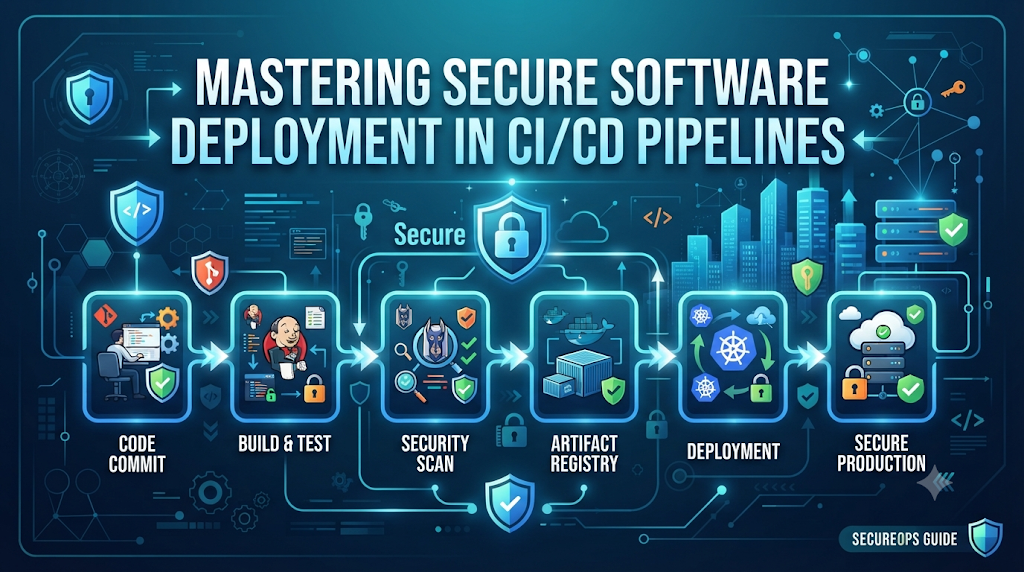
A deployment pipeline is an automated orchestration engine that transforms source code into running production software. Understanding where security risks emerge requires looking at the pipeline as a sequence of distinct trust boundaries and operational stages.
Major Pipeline Stages
- Source Code Management (SCM): Where developers commit code changes, manage branches, and create pull requests.
- Code Review and Approval: Human or automated gates checking code quality and policy compliance.
- Dependency Installation: Pulling external libraries, packages, and modules required by the application.
- Build and Compilation: Transforming raw source code into binary executables, scripts, or container images.
- Automated Testing: Executing unit, integration, and functional test suites.
- Security Scanning: Analyzing code, dependencies, containers, and configurations for vulnerabilities.
- Artifact Creation and Storage: Packaging the compiled output into version-controlled repositories.
- Deployment Configuration: Defining infrastructure changes and environment-specific parameters using Infrastructure as Code (IaC).
- Production Release: Distributing and activating the verified artifact in the target environment.
- Post-Deployment Monitoring: Observing application health, runtime logs, and infrastructure telemetry.
Application Security vs. Pipeline Security
It is essential to distinguish between application security and pipeline security. Application security focuses on vulnerabilities inside the software itself—such as SQL injection, cross-site scripting, or weak authorization logic.
Pipeline security, conversely, focuses on the integrity of the delivery mechanism. An attacker who cannot find an application vulnerability may instead target the CI/CD platform. By injecting malicious code into a build script, stealing long-lived cloud credentials from a runner, or tampering with a build artifact before it reaches the registry, an attacker can compromise thousands of production instances without ever touching the application source code. Protecting the delivery path is therefore just as vital as securing the code it carries.
2. Map the Threats Before Designing Security Controls
Before implementing technical safeguards, engineering and security teams must understand the threat landscape. A robust secure CI/CD workflow anticipates how malicious actors or compromised accounts might exploit automation tools.
Key Threat Vectors
- Stolen CI/CD Credentials: Attackers compromise user accounts or integration tokens to gain administrative control over build servers.
- Exposed API Keys and Passwords: Credentials left inside repository files, commit histories, or build logs.
- Malicious Dependencies: Public package registries hosting typosquatted or compromised open-source modules.
- Compromised Build Agents: Shared runners lacking isolation, allowing malicious build steps to access host resources or adjacent workloads.
- Unauthorized Workflow Modifications: Attackers modifying pipeline configuration files in a pull request to execute arbitrary code.
- Untrusted Code Execution: Pull requests from external contributors running build scripts automatically with access to secrets.
- Artifact Tampering: Unauthorized modification of container images or binaries after security scans have completed.
- Excessive Deployment Permissions: CI/CD roles with broad cloud access that can modify IAM policies or spin up unauthorized resources.
- Supply Chain Attacks: Upstream compromises affecting base operating system images or foundational build tools.
- Uncontrolled Production Access: Direct, unmonitored human or pipeline access to production environments.
Practical Threat Modeling Approach
Teams can perform lightweight threat modeling by mapping assets (e.g., production database credentials, signing keys), potential actors (external attackers, malicious insiders, compromised third-party dependencies), trust boundaries (where code moves from public to private networks), entry points (webhooks, pull request triggers), and potential business impacts.
For instance, consider an open-source project accepting pull requests from external contributors. If a pipeline automatically executes build scripts containing secrets whenever a pull request is opened, a malicious contributor can submit a pull request that runs a curl command to exfiltrate those secrets to an external server. Threat modeling helps teams identify such gaps before writing automation code.
3. Design a Secure Pipeline Architecture
Designing a secure pipeline architecture requires shifting security left—integrating validation, scanning, and verification directly into the continuous delivery workflow rather than treating security as an external manual gate at the end of the line.
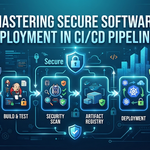
[ Source Code ] ──> [ Branch Protection & PR Review ] ──> [ Dependency Verification ]
                                                                     │
                                                                     ▼
[ Production Validation ] <── [ Controlled Deployment ] <── [ Artifact Signing ] <── [ Build, Test & Scan ]
Practical Pipeline Architecture Stages
- Source Validation: Enforce signed commits and strict branch protections on main branches.
- Code Review and Branch Protection: Require peer reviews and successful status checks before merging.
- Dependency Verification: Validate checksums and lockfiles against trusted internal mirrors or verified registries.
- Build and Test: Compile code and run test suites within isolated, ephemeral execution environments.
- Security Scanning: Execute automated SAST, SCA, and secret scanning checks on clean build outputs.
- Artifact Creation: Package validated code into immutable binaries or container images.
- Artifact Signing and Verification: Apply cryptographic signatures to prove artifact origin and integrity.
- Controlled Deployment: Push artifacts to staging and production using temporary, scoped credentials and approval gates.
- Production Validation: Verify health checks, synthetic transactions, and error rates post-release.
Integrating security into the workflow ensures that vulnerabilities are caught immediately when they are cheapest to fix, maintaining velocity without sacrificing safety.
4. Control Who and What Can Access the Pipeline
Identity and access management (IAM) forms the bedrock of pipeline security best practices. Without strict access controls, even the most sophisticated vulnerability scanners can be bypassed by an authenticated attacker modifying pipeline configurations.
Core Access Principles
- Role-Based Access Control (RBAC): Assign permissions based on operational roles rather than individual identities.
- Least-Privilege Permissions: Grant users, service accounts, and pipeline runners only the exact permissions required to perform their specific tasks.
- Dedicated Service Identities: Avoid sharing user credentials with CI/CD systems; use distinct service principals or managed identities for each pipeline.
- Short-Lived Credentials: Eliminate permanent API tokens and passwords in favor of credentials that expire automatically after a build job completes.
- Multi-Factor Authentication (MFA): Enforce strong authentication for all human access to SCM platforms and CI/CD control planes.
- Environment-Specific Permissions: Restrict production deployment jobs so they can only be triggered by dedicated service roles associated with authorized release pipelines.
- Protected Branches: Restrict who can push directly to production or staging branches, enforcing pull request reviews for all changes.
Developers, build agents, and deployment processes should never automatically receive unrestricted production permissions. For example, a build runner compiling a frontend JavaScript application has no business possessing permissions to modify cloud IAM users or delete database snapshots.
Practical Least-Privilege Example
When configuring a deployment job in a CI/CD platform, scope the execution role strictly to the target resource:
YAML
# Illustrative configuration snippet showing least-privilege permission scoping
job:
  name: deploy-to-staging
  permissions:
    contents: read
    id-token: write # Required for secure OIDC token exchange
    cloud-deploy: write # Restricted exclusively to staging container registry and ECS cluster
  steps:
    - name: Authenticate and Deploy
      run: ./scripts/deploy.sh staging
5. Protect Secrets Without Hardcoding Credentials
Hardcoding passwords, database connection strings, private keys, and API tokens inside source code repositories or plain-text CI/CD configuration files is one of the most common causes of security breaches. Once committed to version control, secrets are notoriously difficult to purge completely from history.
Best Practices for Secrets Management
- Centralized Secrets Management: Store all sensitive data in dedicated secret storage systems (e.g., HashiCorp Vault, cloud native secret managers) rather than repository files.
- Encrypted Secret Storage: Ensure secrets are encrypted both at rest and in transit.
- Credential Rotation: Regularly rotate API keys, database credentials, and signing certificates.
- Secret Masking in Logs: Configure CI/CD platforms to automatically redact sensitive environment variables from build console logs.
- Access Auditing: Maintain detailed audit logs tracking which pipeline, user, or service accessed specific secrets and when.
- Environment-Specific Secrets: Isolate development, staging, and production secrets so that a compromised test environment cannot expose production keys.
- Avoiding Artifact Leakage: Ensure build scripts do not copy secret files into final container images or deployment tarballs.
OpenID Connect (OIDC) Federation
Modern secure software deployment relies increasingly on OpenID Connect (OIDC) federation rather than long-lived cloud access keys. Instead of storing a permanent cloud secret inside CI/CD environment variables, the pipeline requests a short-lived JSON Web Token (JWT) from the CI/CD provider and exchanges it directly with the cloud provider for temporary, scoped credentials.
[ CI/CD Pipeline ] ──( 1. Requests OIDC Token )──> [ CI/CD Provider ]
        │                                                  │
        │ <──( 2. Issues Short-Lived JWT )─────────────────┤
        │                                                  │
        └──( 3. Exchanges JWT for Cloud Credentials )────> [ Cloud IAM Provider ]
This approach eliminates static credentials entirely, drastically reducing the window of opportunity if a pipeline configuration is ever exposed.
6. Secure the Code and Dependencies Before Building
Detecting security flaws before application code becomes a deployable artifact prevents vulnerable software from ever reaching staging or production environments.
Automated Scanning Controls
- Static Application Security Testing (SAST): Scans source code for insecure coding patterns, hardcoded secrets, and logic flaws without executing the program.
- Software Composition Analysis (SCA): Analyzes direct and transitive third-party dependencies against vulnerability databases.
- Dependency Vulnerability Scanning: Identifies outdated libraries with known Common Vulnerabilities and Exposures (CVEs).
- License Checks: Ensures third-party packages comply with organizational intellectual property and open-source licensing policies.
- Secret Scanning: Scans commits, pull requests, and file additions for accidental credential leaks.
- Container Image Scanning: Evaluates base images and OS packages inside Dockerfiles or built container layers.
- Pull Request Validation: Automatically runs security checks on every pull request before code can be merged into protected branches.
Prioritizing and Managing Findings
Security scanners frequently generate alerts, requiring teams to establish clear prioritization based on severity, exploitability, network exposure, and application context. Not every medium-severity vulnerability poses an immediate threat if the affected function is never called by the application.
Furthermore, scanners can produce false positives. Organizations must define a structured review and exception process where security engineers can verify findings, document business justifications, and approve time-bound exceptions without bypassing core security guardrails.
7. Protect Build Environments and Pipeline Runners
Build agents and pipeline runners execute arbitrary build scripts, compile code, and handle sensitive deployment credentials. If a runner is compromised, the entire delivery pipeline falls with it.
Hardening Build Runners
- Isolated Build Environments: Execute each build job in a clean, ephemeral container or virtual machine that is destroyed immediately after completion.
- Ephemeral Runners: Avoid long-lived persistent runners that accumulate residual state, configuration drift, or lingering cached credentials.
- Trusted Runner Images: Use hardened, minimal base images maintained and updated regularly by the security team.
- Restricted Network Access: Prevent build runners from accessing internal corporate networks or unauthorized external endpoints.
- Secure Build Dependencies: Verify the integrity of build tools, compilers, and package managers installed on runner images.
- Workspace Cleanup: Ensure build workspaces, temporary files, and environment caches are wiped clean after every job.
- Runner Patching: Apply security patches promptly to runner host operating systems and container runtimes.
- Untrusted Pull Request Isolation: Run external pull request validation jobs on completely separate, unprivileged worker pools that have zero access to production secrets or write permissions.
Separating untrusted validation jobs from privileged release jobs ensures that an untrusted contribution cannot exfiltrate deployment credentials or manipulate production infrastructure.
8. Verify Artifacts Before They Reach Production
A critical tenet of software supply chain security is that production environments should deploy the exact same immutable artifact that successfully passed all automated tests and security scans—rather than rebuilding the application from source code during the release phase.
Establishing Artifact Trust
- Immutable Build Artifacts: Ensure binaries and container images are tagged with unique cryptographic identifiers (such as SHA-256 digests) rather than mutable tags like
latest. - Artifact Repositories: Store built artifacts in secure, access-controlled artifact registries (e.g., Artifactory, container registries with vulnerability scanning enabled).
- Cryptographic Signing: Digitally sign build artifacts using cryptographic keys (using tools like Cosign or Notation) to verify their origin.
- Signature Verification: Configure deployment gates to reject any artifact that lacks a valid, trusted digital signature.
- Software Bills of Materials (SBOMs): Generate machine-readable inventories (such as SPDX or CycloneDX) detailing every component, library, and license included in the build.
- Provenance and Build Metadata: Attach cryptographically verifiable provenance attestations proving how, where, and from which commit an artifact was built.
- Artifact Retention and Traceability: Maintain strict audit trails linking every running production container back to its exact SCM commit hash and build pipeline execution ID.
Artifact verification ensures that even if an attacker manages to tamper with an artifact repository after a build completes, the deployment pipeline will refuse to install the compromised package.
9. Secure Infrastructure and Deployment Configuration
Application code and build artifacts represent only part of the release process. Modern cloud-native deployments rely heavily on Infrastructure as Code (IaC) and configuration manifests that define networking rules, IAM policies, and compute resources.
Infrastructure Validation Controls
- Infrastructure as Code Validation: Treat Terraform, OpenTofu, CloudFormation, and Ansible scripts as first-class source code requiring peer review and automated testing.
- Configuration Review: Scan IaC files for misconfigurations (such as public S3 buckets, overly permissive security groups, or unencrypted storage volumes).
- Policy as Code: Enforce organizational compliance rules automatically using policy engines (such as Open Policy Agent or Checkov) before infrastructure changes are applied.
- Cloud Security Configuration Checks: Continuously audit active cloud environments for drift and security posture violations.
- Kubernetes Manifest Validation: Validate Kubernetes YAML manifests for security best practices (e.g., preventing privileged containers, enforcing read-only root filesystems, and setting resource limits).
- Network Access Restrictions: Ensure deployment automation scripts communicate with cloud APIs over encrypted, private network paths.
- Secure Defaults: Establish pre-approved, hardened infrastructure templates that developers can use safely out of the box.
Illustrative Policy Enforcement Example
When an engineer submits an infrastructure change that attempts to open a database port to the public internet, a Policy as Code check in the pipeline blocks the deployment immediately:
Code snippet
# Illustrative Open Policy Agent snippet blocking public database security group rules
deny[msg] {
    resource := input.resource.aws_security_group[name]
    ingress := resource.ingress[_]
    ingress.cidr_blocks[_] == "0.0.0.0/0"
    ingress.from_port <= 5432
    ingress.to_port >= 5432
    msg := "Security group rule allows public access to PostgreSQL port 5432"
}
10. Introduce Controlled Production Deployment
Moving software into production requires striking the right balance between velocity and risk mitigation. While manual approval gates on every single deployment create bottlenecks, entirely unmanaged automatic deployments to production can propagate bad code or misconfigurations unchecked.
Production Release Controls
- Environment Protection Rules: Configure CI/CD platforms to require specific conditions (such as passing staging health checks or approval from designated team leads) before deploying to production.
- Required Approvals: Implement separation of duties where code authors cannot approve their own production deployments.
- Deployment Windows: Restrict high-risk production releases to specified operational windows when engineering support is available.
- Progressive Delivery: Roll out changes gradually using feature flags, canary deployments, or blue-green deployments rather than sudden all-at-once cutovers.
- Canary Deployments: Route a small percentage of production traffic to the new version first, monitoring error rates and latency before expanding traffic.
- Blue-Green Deployments: Maintain two identical production environments, allowing instant rollbacks by switching DNS or load balancer routing if issues arise.
- Rollback Readiness: Ensure automated rollback mechanisms are tested and ready to execute if health metrics degrade.
- Change Records and Audit Trails: Automatically log deployment metadata to ticketing or compliance systems for traceability.
11. Make Security Checks Effective Without Slowing Delivery
One of the most common pushbacks against implementing a DevSecOps pipeline is the fear that security controls will grind delivery to a halt. When security checks take hours to run or fail developers with opaque error messages, teams bypass them or grow frustrated.
Strategies for Fast and Effective Security
- Parallel Security Checks: Run SAST, SCA, container scanning, and infrastructure checks concurrently across independent pipeline jobs rather than sequentially.
- Incremental Scanning: Scan only modified files and changed dependencies during pull request checks, reserving deep full-scan analysis for main branch merges and nightly builds.
- Dependency Caching: Cache downloaded modules and vulnerability databases securely to avoid redundant network fetches during every build run.
- Risk-Based Policy Enforcement: Distinguish between blocking vulnerabilities (e.g., remote code execution in production code) and non-blocking warnings (e.g., minor style issues or low-risk dev dependencies).
- Clear Failure Messages: Ensure security tools output actionable remediation guidance (e.g., “Upgrade library X from version 1.2 to 1.5 to resolve CVE-2026-XXXX”) rather than raw error dumps.
- Defined Vulnerability Thresholds: Set explicit policies (e.g., zero critical vulnerabilities, maximum two medium vulnerabilities with approved exceptions).
- Time-Bound Security Exceptions: Allow temporary risk acceptances that expire automatically after 30 days, forcing teams to remediate technical debt.
- Regular Review of Pipeline Execution Time: Monitor build and scan durations regularly, optimizing bottlenecks to keep total pipeline feedback loops under ten minutes for standard pull requests.
12. A Practical Secure Deployment Pipeline Walkthrough
To see how these concepts fit together, let us walk through an end-to-end secure deployment pipeline for a cloud-native web application.
Step A – Code Submission
A developer pushes a feature branch and opens a pull request. The SCM platform enforces branch protection rules, requiring at least one peer review and successful automated status checks.
Step B – Build and Test
The CI/CD platform triggers an ephemeral build runner. The application code is compiled, and unit and integration test suites execute within an isolated container environment.
Step C – Security Validation
In parallel, the pipeline executes automated security scans:
- Secret Scanning: Verifies no API keys or passwords were added in the commit diff.
- SCA: Analyzes dependency lockfiles against known vulnerability databases.
- SAST: Scans source code for security anti-patterns.
- IaC Scanning: Validates any accompanying Terraform or Kubernetes manifests against security policies.
Step D – Artifact Creation
Once all tests and scans pass, the build runner packages the application into an immutable container image, pushes it to a secure container registry, generates an SBOM, and attaches cryptographic provenance metadata.
Step E – Artifact Verification
Before staging or production deployment, the pipeline verifies the container image’s cryptographic signature and checks that its SBOM contains no unmitigated critical vulnerabilities.
Step F – Deployment Authorization
The pipeline requests temporary cloud credentials via OIDC federation. Environment protection rules verify that staging tests completed successfully and that a designated release manager has approved the production gate.
Step G – Production Release
The verified container image is deployed to production using a canary rollout strategy, routing 5% of user traffic to the new version initially.
Step H – Post-Pedployment Checks
Automated health checks monitor HTTP error rates, CPU utilization, and latency metrics for ten minutes. If error rates remain within normal thresholds, the canary deployment scales to 100%. If anomalies are detected, the pipeline automatically triggers an instant rollback to the previous stable release.
Note: While this walkthrough illustrates a comprehensive workflow, specific implementation details—such as YAML syntax, credential storage mechanisms, and container orchestrators—vary across different CI/CD platforms and cloud providers.
13. Monitoring, Auditing, and Responding to Pipeline Security Incidents
Even with robust preventative controls in place, organizations must maintain continuous monitoring and incident response capabilities specifically tailored for their CI/CD infrastructure.
Key Audit and Telemetry Sources
- Pipeline Execution Logs: Monitor for unauthorized build modifications, unexpected script executions, or failed authentication attempts.
- Authentication and Authorization Events: Track who logs into the CI/CD control plane and when administrative permissions are modified.
- Secrets Access Records: Audit every instance where a secret or token is requested or injected into a build job.
- Deployment History: Maintain immutable records of what was deployed, by whom, from which commit, and with what approval.
- Artifact Repository Activity: Monitor for unexpected artifact deletions, tag overwrites, or pushes from untrusted sources.
- Unexpected Workflow Changes: Alert security teams immediately if
.github/workflows/,Jenkinsfile, or.gitlab-ci.ymlfiles are modified outside of standard pull request review processes. - Failed Verification Events: Track instances where artifact signatures or policy checks fail, as these often indicate attempted tampering or misconfigured builds.
Incident Response Playbook for Pipeline Compromises
When a security incident occurs—such as a compromised deployment credential, a suspected artifact tampering event, or a compromised build runner—teams should execute a structured response:
- Containment: Immediately disable compromised user accounts, revoke leaked API keys and OIDC trust relationships, and isolate affected build runners from the network.
- Revocation and Rotation: Rotate all secrets, database credentials, and signing keys that may have been exposed during the incident window.
- Forensic Investigation: Analyze pipeline execution logs, SCM audit trails, and runner disk images to determine the scope of compromise and identify how the attacker gained access.
- Remediation and Recovery: Rebuild trusted runner images, patch underlying vulnerabilities, re-verify artifact repositories, and restore pipeline configurations from known-good backups before resuming deployments.
For professionals seeking to master these operational security practices, comprehensive training programs provided by DevOpsSchool offer structured learning paths covering DevOps, CI/CD, and DevSecOps engineering principles.
14. A Security Maturity Roadmap for Deployment Pipelines
Transforming an insecure or ad-hoc deployment process into a hardened DevSecOps pipeline cannot happen overnight. Organizations achieve the best results by following a phased maturity roadmap.
Phase 1 – Establish Visibility
- Inventory all pipeline tools, SCM repositories, build runners, artifact registries, and deployment targets.
- Identify all users, service accounts, and long-lived credentials with access to production environments.
Phase 2 – Secure Access
- Enforce multi-factor authentication across all engineering and CI/CD platforms.
- Implement least-privilege RBAC and transition from static API keys to short-lived credentials or OIDC federation.
- Protect main branches with mandatory peer reviews and required status checks.
Phase 3 – Add Automated Validation
- Integrate secret scanning, SAST, and SCA into pull request workflows.
- Implement automated container and infrastructure scanning before artifact creation.
Phase 4 – Establish Artifact Trust
- Adopt immutable artifact repositories and versioning practices.
- Implement cryptographic signing, verification, and Software Bills of Materials (SBOMs) for all production releases.
Phase 5 – Improve Governance
- Define automated Policy as Code guardrails and risk-based vulnerability thresholds.
- Establish structured exception handling processes and comprehensive audit logging.
Phase 6 – Review Continuously
- Regularly measure security coverage and pipeline execution times.
- Conduct tabletop exercises for pipeline compromise scenarios and update incident response playbooks continually.
Frequently Asked Questions
1. What is a secure deployment pipeline?
A secure deployment pipeline is an automated CI/CD workflow engineered with built-in security controls that protect source code, dependencies, build environments, secrets, artifacts, and infrastructure throughout the software delivery lifecycle.
2. How does DevSecOps improve CI/CD security?
DevSecOps embeds security practices, automated testing, and compliance checks directly into every stage of the CI/CD pipeline, ensuring vulnerabilities and misconfigurations are caught early without sacrificing delivery speed.
3. Why should secrets never be hardcoded in pipeline files?
Hardcoded secrets in repositories or pipeline configurations can be easily extracted by anyone with read access to the codebase or build logs, leading to unauthorized access, data breaches, and compromised cloud infrastructure.
4. How does OIDC improve deployment credential security?
OpenID Connect (OIDC) federation allows CI/CD pipelines to request short-lived, temporary tokens directly from cloud providers, eliminating the need to store static, long-lived access keys in pipeline environment variables.
5. What is the role of an SBOM in a deployment pipeline?
A Software Bill of Materials (SBOM) provides a comprehensive, machine-readable inventory of all third-party libraries, packages, and components included in a build, enabling rapid vulnerability impact analysis.
6. Why is artifact signing important?
Cryptographic artifact signing proves the origin and integrity of a build artifact, ensuring that production environments only deploy verified packages that have not been tampered with after scanning.
7. How can CI/CD runners be protected?
CI/CD runners can be protected by using isolated, ephemeral execution environments, minimal trusted base images, restricted network access, and separate unprivileged worker pools for external pull requests.
8. How do teams balance pipeline security with deployment speed?
Teams balance security and speed by running checks in parallel, performing incremental scans, caching dependencies, defining clear vulnerability thresholds, and automating policy enforcement.
9. Should every production deployment require manual approval?
Not necessarily. While high-risk or major production releases benefit from manual approval gates, routine or low-risk deployments can be automated safely using progressive delivery strategies, automated health checks, and rigorous pre-release validation.
10. What are the first steps toward securing an existing deployment pipeline?
The initial steps include conducting a comprehensive inventory of all pipeline users and credentials, enforcing multi-factor authentication, implementing least-privilege access, and adding basic automated secret and dependency scanning to existing workflows.
Conclusion: Make Security a Property of Every Release
Building secure deployment pipelines requires protecting every link in the software delivery chain—from source code repositories and third-party dependencies to build runners, cryptographic artifacts, infrastructure configurations, and production access controls.
By embracing least-privilege permissions, centralized secrets management, automated security scanning, artifact signing, and progressive deployment strategies, engineering teams can eliminate single points of failure and prevent supply chain compromises. Ultimately, a truly secure deployment pipeline does more than prove that software compiles and tests successfully; it provides unwavering confidence that every release is trusted, verified, authorized, and ready for the real world.






Leave a Reply
You must be logged in to post a comment.