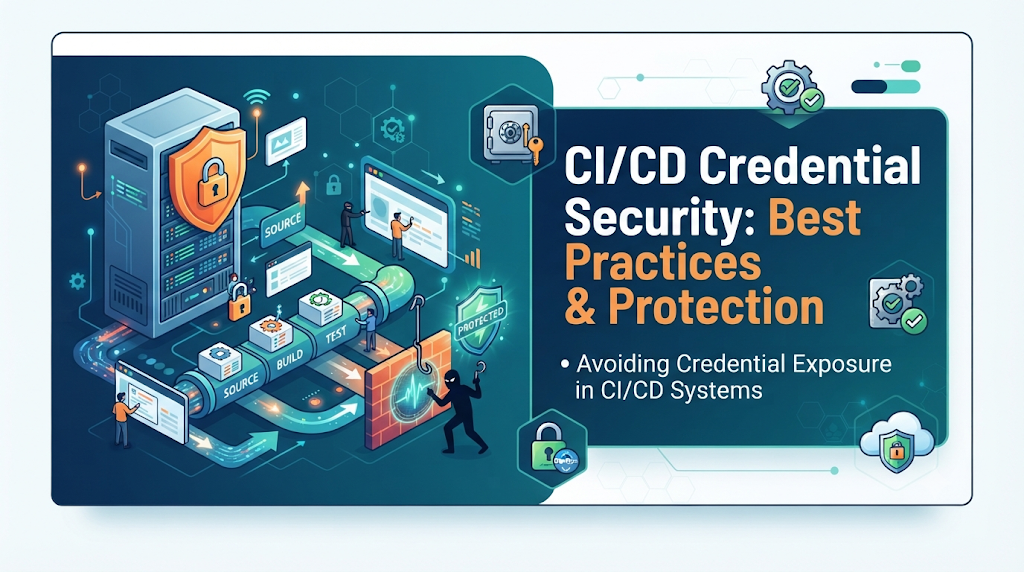
Modern automated delivery pipelines wield immense privileges to build, test, and deploy software, making them prime targets if sensitive tokens, passwords, or API keys are mishandled. When developers inadvertently hardcode secrets or leave verbose debugging enabled, exposed credentials can grant attackers unauthorized access to cloud infrastructure, sensitive data, and production environments. Establishing robust pipeline security is therefore critical from day one, helping engineering teams protect their software delivery lifecycle. For professionals looking to master these security standards, educational resources like DevOpsSchool provide structured guidance on modern DevOps and CI/CD security.
Understand What Counts as a CI/CD Credential
Automated systems rely on a wide variety of sensitive tokens, keys, and passwords to authenticate against external platforms. Recognizing what constitutes a credential is the first step toward securing them. Common types of sensitive information used in CI/CD environments include:
- Cloud Access Keys: Long-lived access key IDs and secret access keys used to authenticate with major cloud providers.
- API Tokens: Authentication tokens issued by third-party SaaS platforms, monitoring tools, and notification services.
- Database Usernames and Passwords: Direct connection strings or credentials used by migration tools and integration tests.
- SSH Private Keys: Cryptographic keys used for secure remote server login, repository cloning, and server provisioning.
- Container Registry Credentials: Username and password combinations or identity tokens required to pull or push private container images.
- Kubernetes Service Account Tokens: Long-lived tokens granting API access within a Kubernetes cluster.
- Deployment Credentials: Passwords or tokens utilized by deployment agents to communicate with target environments.
- Signing Keys and Certificates: Code-signing keys, SSL/TLS certificates, and cryptographic assets used to verify software integrity.
- Third-Party Service Tokens: Authentication secrets for package managers, vulnerability scanners, and code quality tools.
Credentials with excessive permissions introduce disproportionate risks. For example, a deployment token that possesses full administrator privileges across an entire cloud subscription can compromise all resources if leaked, whereas a scoped token restricted to a single storage bucket severely limits the blast radius of an accidental exposure.
Trace the Common Paths Through Which Credentials Leak
Secrets can find their way out of secure boundaries through numerous inadvertent pathways during pipeline execution. Identifying these vulnerabilities helps engineering teams patch structural weaknesses before exploitation occurs.
1. Hardcoded Credentials in Source Code
Embedding API keys or passwords directly into application code or configuration files is a frequent oversight. Even if the code is stored in a private repository, internal staff members, contractors, and compromised developer workstations gain access to plain-text secrets.
2. Secrets Committed to Git History
Even if a developer removes a hardcoded secret from the latest commit, the credential remains permanently embedded in the Git version history unless the history is rewritten or the secret is immediately revoked.
3. Plain-Text Pipeline Variables
Many CI/CD systems allow defining environment variables at the project or pipeline level. When these variables are stored as plain text without encryption or masking, anyone with permissions to view pipeline configurations can read them.
4. Credentials Printed in Job Logs
Build tools, package managers, and testing frameworks often print verbose output. If a command echoes environment variables or fails during authentication, raw credentials can appear directly in the execution logs.
5. Debug Output and Verbose Commands
Enabling verbose logging (such as set -x in shell scripts or debug flags in build runners) prints every executed command and evaluated variable to the console, exposing sensitive parameters.
6. Unprotected Build Artifacts
When build tools package compiled applications, documentation, or configuration bundles, they may inadvertently include environment files or configuration keys inside the artifact archive, making them accessible via download links.
7. Docker Image Layers
Passing secrets as standard build arguments (--build-arg) during Docker image creation leaves them cached inside the image layers. Anyone who pulls the container image can inspect the history and extract the plain-text credentials.
8. Insecure Configuration Files
Storing configuration files containing plain-text database credentials in shared file shares or unencrypted shared volumes exposes them to unauthorized workloads.
9. Untrusted Pipeline Scripts
Incorporating third-party pipeline plugins or external shell scripts from untrusted repositories can introduce malicious code designed to harvest and exfiltrate environment variables.
10. Over-Permissioned CI/CD Runners
If a CI/CD runner is hosted on shared infrastructure with loose isolation boundaries, a compromised build job can inspect memory, local caches, or shared volumes to steal credentials used by concurrent jobs.
Establish a Secure Credential Storage Architecture
To eliminate hardcoded secrets, organizations must implement a centralized, secure credential storage architecture. Storing secrets securely is distinct from controlling when a pipeline is allowed to access them.
+-------------------------------------------------------+
|                CI/CD Pipeline Engine                  |
|                                                       |
|  [ Job Step: Deploy ] ---> Requests Token via OIDC    |
+-------------------------------------------------------+
                           |
                           v
+-------------------------------------------------------+
|             Dedicated Secrets Manager                 |
|                                                       |
|  - Encrypted at Rest                                  |
|  - Role-Based Access Control                          |
|  - Automated Audit Logging                            |
+-------------------------------------------------------+
CI/CD Platform Secret Variables
Most modern CI/CD platforms provide native encrypted variable storage. These secrets are encrypted at rest and injected into the pipeline runner environment variables only at runtime. While convenient, native variables should be restricted using environment-level access controls to prevent development branches from accessing production secrets.
Dedicated Secrets Management Systems
For enterprise environments, integrating a dedicated secrets manager (such as HashiCorp Vault, AWS Secrets Manager, Azure Key Vault, or Google Secret Manager) provides advanced security controls. These systems offer:
- Encrypted Storage: Secrets are cryptographically protected at rest and in transit.
- Access-Controlled Retrieval: Pipelines must authenticate against the secrets manager using verified identities before retrieving specific secrets.
- Centralized Credential Ownership: Security teams manage secret lifecycles independently of application codebases.
- Audit Logging: Comprehensive logs record who accessed what secret, when, and from which pipeline.
Use Short-Lived Credentials Instead of Permanent Secrets
Long-lived access keys increase the impact of credential exposure because an attacker has an indefinite window of opportunity to exploit them. Transitioning to short-lived credentials and identity federation fundamentally alters this security dynamic.
OpenID Connect (OIDC) and Workload Identity Federation
Instead of provisioning a permanent cloud access key and storing it in pipeline settings, modern CI/CD systems can leverage OpenID Connect to establish trust with cloud providers.
The mechanism operates through a secure trust relationship:
- The CI/CD platform generates a short-lived, cryptographically signed OIDC token for the specific job execution, containing claims about the repository, branch, and workflow.
- The pipeline presents this OIDC token to the cloud provider’s Identity and Access Management (IAM) service.
- The cloud provider validates the token signature and claims against configured trust policies.
- Upon successful validation, the cloud provider issues a temporary, short-lived session token with strictly scoped permissions, eliminating the need to store static credentials anywhere in the repository or CI/CD platform.
Apply Least Privilege to Every Pipeline
Reducing the blast radius of a compromised pipeline requires enforcing the principle of least privilege across all execution tiers.
- Job-Specific Permissions: Ensure that a build job only has access to the exact secrets and infrastructure components required for its specific task. A frontend linting job has no business accessing production database credentials.
- Repository-Level Access Controls: Restrict who can trigger pipelines, modify pipeline definitions, or access deployment environments.
- Read-Only Credentials: Where full administrative access is unnecessary, configure pipelines to use read-only database and repository accounts.
- Separate Environment Identities: Isolate development, staging, and production environments using distinct service accounts and authentication credentials.
- Protected Branches and Tags: Configure CI/CD platforms to restrict deployment jobs to run exclusively on protected main or release branches.
- Approval Controls: Implement manual approval gates for production deployments, requiring authorized team members to inspect changes before release tokens are released to the pipeline runner.
Prevent Secrets From Appearing in Logs and Build Artifacts
Even when secrets are stored securely in vault systems, insecure scripting practices can echo them into build logs. Teams must implement active prevention and masking controls.
- Masking Protected Variables: Most CI/CD tools provide variable masking features that automatically replace sensitive string values with asterisks (
***) in console outputs. However, masking is a defense-in-depth layer, not a substitute for preventing secret access. If a secret is base64 encoded or transformed before printing, masking may fail to catch it. - Avoiding Unsafe Commands: Do not use commands that print configuration parameters or dump environment variables during startup.
- Disabling Verbose Debugging: Ensure debug logging (
set -x) is disabled in production deployment scripts. - Redacting Log Data: Implement log-scrubbing filters within CI/CD runners to catch regex patterns matching common API key formats.
Protect Credentials Across Docker and Kubernetes Workflows
Containerized workflows introduce unique security vectors. Building images inside pipelines requires careful handling to prevent secrets from being baked into static image layers.
- Avoiding Secrets in Dockerfiles: Never use instructions like
ENVorRUNwith hardcoded credentials inside aDockerfile. - Secure Build-Time Handling: Utilize modern container build features (such as Docker BuildKit secrets) to mount credentials into the build environment securely without persisting them in final image layers.
- Image Layer Inspection: Regularly scan container images using automated tools to verify that no sensitive keys, configuration files, or tokens are present in intermediate layers.
- Kubernetes Secrets and Limitations: Understand that standard Kubernetes Secrets are base64-encoded rather than encrypted by default. Pair Kubernetes deployments with external secret operators that synchronize secrets securely from enterprise vaults directly into ephemeral pod memory.
- Restricting Pod Permissions: Apply strict security contexts and non-root user execution flags to Kubernetes workloads to prevent local container escapes from accessing host-level secrets.
Add Automated Secret Detection to the CI/CD Pipeline
Catching credential leaks before code reaches shared repositories or production pipelines saves teams from costly incident response cycles. Automated secret detection should operate at multiple checkpoints:
- Pre-Commit Hooks: Lightweight client-side checks (such as GitGuardian or TruffHog hooks) scan code locally on developer workstations before commits are finalized.
- Repository Scanning: Continuous scanning tools inspect existing codebases and commit histories for accidentally committed keys, passwords, and tokens.
- Pull Request Checks: CI/CD pipelines should run automated secret scanners on every pull request, blocking merges immediately if a high-confidence credential match is detected.
- Git History Inspection: Perform periodic deep scans of full repository histories to uncover dormant secrets introduced months or years prior.
Build a Practical Secure CI/CD Credential Workflow
Implementing a secure credential workflow involves a structured, step-by-step approach across the software delivery pipeline.
- Identify Required Credentials: Audit the application and pipeline to catalog every external service, database, and API requiring authentication.
- Remove Hardcoded Secrets: Purge all plain-text secrets from source code repositories and rewrite Git history if necessary.
- Configure Secure Storage: Migrate all sensitive values into an approved secrets management system or encrypted CI/CD vault.
- Enforce Restricted Access: Set up role-based access controls ensuring pipelines only access variables designated for their specific environment.
- Adopt Identity Federation: Replace long-lived cloud keys with OIDC-based workload identity federation.
- Integrate Secret Scanning: Enable automated pre-commit and pipeline-level secret detection tools.
- Separate Deployment Permissions: Isolate staging and production deployment credentials, requiring manual approvals for sensitive releases.
- Validate Artifact Cleanliness: Ensure build artifacts and container images undergo automated scanning to confirm zero credential inclusion.
- Monitor and Audit: Regularly review pipeline execution logs and secret access audit trails for anomalous behavior.
Rotate and Revoke Credentials Without Breaking Delivery
Credential lifecycles must be managed actively. Relying on static keys indefinitely creates an expanding window of vulnerability.
- Regular Rotation Policies: Establish automated schedules for rotating database passwords, API tokens, and service account keys.
- Automated Rotation: Utilize secrets management systems that support programmatic rotation, updating downstream services automatically when credentials change.
- Emergency Revocation: Maintain documented procedures to instantly revoke compromised keys without halting entire organizational engineering workflows.
- Managing Overlapping Credentials: During rotation cycles, support temporary overlapping validity windows where both old and new credentials function briefly to prevent pipeline deployment failures during transition phases.
- Validating Functionality: Run automated health checks immediately following credential rotation to ensure pipelines authenticate successfully.
Respond When a Credential Is Exposed
Despite preventive measures, exposure incidents can still occur. A rapid, structured incident response plan minimizes potential damage.
- Confirm Exposure Scope: Quickly identify which specific credential was leaked, where it appeared (logs, repository, artifacts), and when the exposure occurred.
- Revoke Immediately: Disable or delete the compromised credential in the target system to cut off unauthorized access.
- Issue Replacement: Generate and configure new secure credentials for affected services.
- Inspect Audit Logs: Review cloud provider, database, and system access logs for any unauthorized activity, data exfiltration, or resource modification during the exposure window.
- Expand Investigation: Check repository commit histories, pipeline logs, and build artifacts to ensure no secondary secrets were exposed.
- Notify Stakeholders: Inform security teams, engineering leadership, and impacted stakeholders following established organizational protocols.
- Post-Incident Review: Document the root cause of the leak and implement additional automated controls to prevent recurrence.
Common Credential Security Mistakes to Avoid
- Treating Masked Variables as Insecurely Bulletproof: Relying solely on UI masking while storing plaintext secrets in insecure configurations.
- Using Permanent Administrator Keys: Granting full root access to routine CI/CD pipeline jobs.
- Sharing Secrets Across Environments: Using production database passwords inside staging or development test suites.
- Printing Sensitive Values for Debugging: Leaving verbose logging enabled in production deployment scripts.
- Storing Secrets in Docker Layers: Passing credentials via
--build-argin container builds. - Ignoring Old Git Commits: Believing that deleting a secret in the latest commit resolves historical exposure.
- Failing to Rotate Exposed Credentials: Assuming quick deletion from public view makes past exposure safe.
Create a CI/CD Credential Security Checklist
- All hardcoded secrets removed from source code repositories.
- Sensitive values migrated to a centralized secrets manager or encrypted vault.
- Long-lived cloud keys replaced with OIDC workload identity federation where possible.
- Least-privilege permissions applied to every pipeline job and runner.
- Pipeline variables masked and verbose debugging disabled in production scripts.
- Automated secret scanning active in pre-commit hooks and pull request pipelines.
- Staging and production environments isolated with separate authentication credentials.
- Container images built using secure build-time secret mounting without layer caching.
- Regular credential rotation schedules established and tested.
- Comprehensive audit logging enabled across secrets managers and cloud platforms.
- Incident response playbook ready for rapid credential revocation and log inspection.
Final Thoughts: Make Credential Protection Part of Every Pipeline
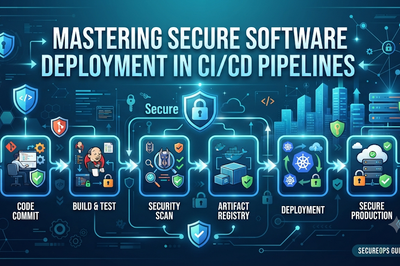
Ultimately, securing automated pipelines against credential leaks cannot rely solely on developer vigilance; it demands a resilient architecture built on centralized secret storage, short-lived identity federation, least-privilege permissions, and automated detection. By replacing static keys with dynamic tokens, securing container workflows, and maintaining a clear incident response playbook, organizations can effectively eliminate exposure risks. When implemented correctly, these comprehensive DevSecOps controls ensure that your CI/CD systems maintain high-speed delivery without ever compromising security.







Leave a Reply
You must be logged in to post a comment.