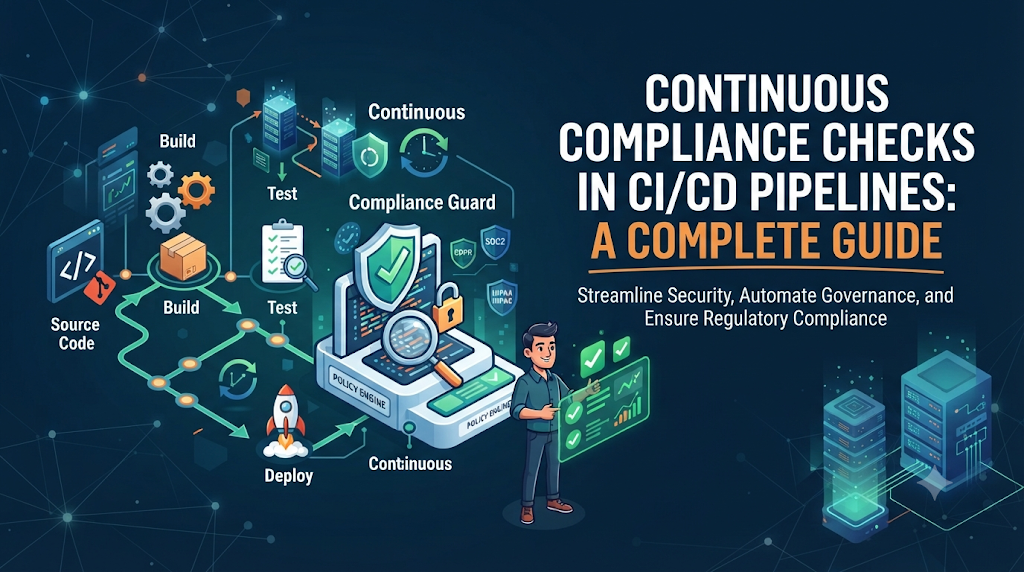
Modern software delivery moves fast. Through continuous integration and continuous deployment (CI/CD) pipelines, engineering teams push new features, bug fixes, and infrastructure adjustments into production multiple times a day. However, this velocity introduces a major governance challenge: how do organizations maintain rigorous security, regulatory compliance, and operational standards without slowing down development? Traditionally, compliance was treated as a manual, end-of-cycle gate. Teams compiled evidence, filled out spreadsheets, and reviewed configuration logs weeks or months after code was written. This approach often created friction, delayed releases, and failed to catch misconfigurations introduced deep within modern cloud environments.
To solve this, organizations are adopting Continuous Compliance Checks in Pipelines. By shifting compliance left—embedding automated policy enforcement, security validation, and audit evidence collection directly into the software delivery lifecycle—teams can catch and fix issues before code ever reaches production. This article explores how to design, implement, and scale continuous compliance within your engineering workflows.
1. Bringing Compliance Into Everyday Software Delivery
Software delivery has evolved from monolithic, scheduled releases to rapid, incremental deployments. In a traditional model, an audit team would review a system right before a major release. If a vulnerability or compliance gap was found, the release was delayed, triggering expensive rework.
Manual reviews performed exclusively before production releases struggle to keep pace with modern delivery for several reasons:
- Speed and Scale: Code changes happen continuously across microservices, containers, and serverless functions, making manual tracking impossible.
- Configuration Complexity: Modern cloud infrastructure is defined through code, meaning security posture changes whenever an infrastructure configuration file is updated.
- Delayed Feedback: Catching a misconfiguration months after code is committed makes root-cause analysis difficult and costly.
Continuous compliance transforms compliance from a periodic bottleneck into an automated, everyday engineering practice. It integrates policy validation directly into the tools developers already use, ensuring that security and governance requirements are met continuously rather than verified sporadically.
For individuals and teams looking to master these modern workflows, platforms like DevOpsSchool offer practical educational resources and training programs designed to help engineers build real-world DevOps and DevSecOps capabilities.
2. Understanding Continuous Compliance in CI/CD Pipelines
Continuous compliance is the practice of automating the validation of security, operational, and regulatory rules throughout the entire software delivery lifecycle. Unlike periodic audits—which provide a static, point-in-time snapshot of system posture—continuous compliance evaluates your code, artifacts, and infrastructure continuously.
Core Components of Continuous Compliance
- Compliance Requirements and Technical Controls: Translating high-level regulatory mandates (such as SOC 2, HIPAA, or ISO 27001) or internal security policies into specific, testable technical rules.
- Continuous Validation: Automatically testing every code commit, build artifact, and infrastructure plan against defined policies.
- Automated Policy Enforcement: Using machine-readable rules to evaluate configurations without human intervention.
- Compliance Evidence: Automatically gathering audit logs, test results, and approval records to prove that controls are operating effectively.
- Preventive and Detective Controls: Stopping non-compliant changes before deployment (preventive) while continuously monitoring active environments for drift (detective).
DevSecOps and Governance
Continuous compliance bridges the gap between development speed and governance. It ensures that security and compliance requirements are treated as functional constraints rather than administrative hurdles.
Important Note: Passing an automated check in a pipeline does not automatically guarantee complete regulatory compliance. Automated checks validate specific technical controls, but compliance also encompasses operational processes, physical security, access governance, and administrative policies that extend beyond CI/CD pipelines.
3. Mapping Compliance Requirements to Pipeline Controls
To automate compliance, organizations must translate high-level rules into concrete, testable technical controls. This requires close collaboration between security, compliance, and engineering teams.
The following table illustrates how common compliance domains map to technical pipeline controls:
| Compliance Domain | High-Level Requirement | Technical Pipeline Control |
| Access Management | Enforce least privilege across environments | Static analysis scanning for hardcoded credentials and overly permissive IAM roles |
| Encryption | Protect data at rest and in transit | Infrastructure scanning for unencrypted storage buckets and databases |
| Secure Configuration | Prevent default or insecure settings | Policy checks validating container security contexts and network firewall rules |
| Vulnerability Management | Prevent known vulnerabilities in software | Software Composition Analysis (SCA) and container image vulnerability scanning |
| Logging & Monitoring | Ensure traceability and auditability | Checks verifying that application logging libraries and audit trails are enabled |
| Change Management | Ensure proper review before production | Automated checks enforcing required peer code reviews and protected branches |
When defining these controls, security and compliance teams must work directly with engineers. If technical controls are impractical or generate excessive false positives, developers will seek workarounds. Collaborative control design ensures security is balanced with engineering productivity.
4. Where Compliance Checks Belong in a CI/CD Pipeline
A secure and compliant pipeline evaluates code at multiple stages, ensuring that issues are caught as close to the developer as possible.
[Source] ──> [Build] ──> [Test] ──> [Infrastructure] ──> [Artifact] ──> [Deployment] ──> [Post-Deployment]
1. Source Stage
- Focus: Repository protection and early feedback.
- Checks: Branch protection rules, required peer reviews, secret detection (scanning for API keys or passwords in commit history), and static code analysis.
2. Build Stage
- Focus: Dependency integrity and compilation security.
- Checks: Software Composition Analysis (SCA) for open-source libraries, dependency license checks, and build provenance verification.
3. Testing Stage
- Focus: Functional security and policy validation.
- Checks: Dynamic and Static Application Security Testing (DAST/SAST), unit tests verifying security logic, and early Policy as Code evaluations.
4. Infrastructure Stage
- Focus: Infrastructure as Code (IaC) governance.
- Checks: Scanning Terraform, CloudFormation, or Kubernetes manifests for misconfigurations, public exposure risks, and missing resource tags.
5. Artifact Stage
- Focus: Container and binary security.
- Checks: Container image vulnerability scanning, Software Bill of Materials (SBOM) generation, and artifact signing to ensure immutability.
6. Deployment Stage
- Focus: Release gatekeeping and environment authorization.
- Checks: Verification of short-lived deployment credentials, segregation of duties, environment restriction checks, and mandatory change-window validations.
7. Post-Deployment Stage
- Focus: Runtime security and drift detection.
- Checks: Cloud security posture management (CSPM), runtime vulnerability monitoring, configuration drift detection, and automated audit logging.
Handling Pipeline Failures
Not all checks should halt a pipeline. Organizations should categorize checks into three distinct levels:
- Blocking Checks: Critical security flaws, hardcoded secrets, or major compliance violations that immediately fail the pipeline.
- Warning Checks: Moderate vulnerabilities or stylistic policy deviations that notify developers and log findings without blocking the build.
- Manual Approvals: High-risk production deployments that require formal sign-off from authorized engineering or compliance managers.
5. Implementing Policy as Code for Automated Enforcement
Policy as Code is the practice of writing compliance and security rules in a human-readable, machine-executable format. Instead of relying on static PDF policy documents that manual auditors check once a year, teams write policies in languages like Rego or YAML, storing them in version-controlled repositories alongside application code.
Core Characteristics of Policy as Code
- Version Control: Policies evolve alongside application code, with full audit histories showing who changed a policy and why.
- Automated Evaluation: CI/CD tools evaluate infrastructure plans and build artifacts against these policies automatically.
- Reusable Policy Libraries: Centralized compliance teams can publish approved policy modules for engineering teams to consume.
- Defined Enforcement Levels: Policies can be configured to warn, log, or block deployments depending on severity.
Illustrative Policy Example
Consider a policy rule written in a declarative policy language designed to ensure that cloud storage buckets are never created with public read access:
Code snippet
package cloud.storage

default allow = false

# Deny storage buckets that allow public read access
deny[msg] {
    input.resource_type == "cloud_storage_bucket"
    input.settings.public_access_blocked == false
    msg := "Violation: Cloud storage bucket is configured with public read access allowed."
}
When an engineer commits an infrastructure change that provisions a public storage bucket, the pipeline evaluates this policy. If the bucket settings violate the rule, the pipeline blocks the deployment and returns the exact error message, giving the developer immediate feedback to remediate the issue.
6. Continuous Compliance for Infrastructure as Code
As infrastructure is increasingly defined through code (IaC) using tools like Terraform, OpenTofu, Kubernetes manifests, and Helm charts, compliance checks can be executed before physical cloud resources are provisioned.
Key Infrastructure Checks
- Misconfiguration Detection: Identifying overly broad firewall rules, unencrypted disks, or missing logging configurations.
- Required Resource Tags: Ensuring all provisioned resources include mandatory cost-center, owner, and environment tags.
- Network Exposure Restrictions: Validating that databases and internal services are never exposed directly to the public internet.
- Identity and Permission Policies: Checking IAM roles and policies for privilege escalation risks.
- Infrastructure Plan Validation: Running policy scans against dry-run execution plans to catch errors before
applycommands execute.
Practical Scenario: Preventing Unsafe Infrastructure
Imagine a developer updates a Terraform script to deploy a database instance, accidentally setting publicly_accessible = true.
- The developer opens a pull request.
- The CI/CD pipeline triggers an automated IaC security scan and Policy as Code evaluation.
- The policy engine flags the
publicly_accessibleparameter. - The pipeline blocks the merge, posts a comment on the pull request explaining the violation, and requires the developer to set the parameter to
falsebefore proceeding.
This prevents vulnerable infrastructure from ever touching a staging or production environment.
7. Automating Security and Dependency Compliance Checks
Security vulnerabilities in application code and third-party libraries are common vectors for compliance breaches. Automated pipelines must incorporate specialized security testing tools to maintain compliance posture.
Essential Security Tooling
- Static Application Security Testing (SAST): Scans source code for security flaws, injection vulnerabilities, and insecure coding patterns.
- Software Composition Analysis (SCA): Analyzes open-source dependencies and third-party libraries against known vulnerability databases (e.g., CVE databases).
- Secret Scanning: Detects accidental commits of passwords, private SSH keys, and cloud API tokens.
- Container Image Scanning: Inspects base images and application layers for known OS and package vulnerabilities.
- License Compliance Checks: Verifies that third-party library licenses comply with organizational legal policies.
- Software Bill of Materials (SBOM) Generation: Automatically generates a comprehensive inventory of all components used in a software build.
Managing Noise and False Positives
One of the greatest challenges in pipeline security is alert fatigue. If a security tool floods developers with false positives, teams will begin ignoring scan results. To prevent this:
- Establish clear severity thresholds (e.g., block only on High and Critical vulnerabilities).
- Implement structured exception handling mechanisms for verified false positives.
- Continuously tune scanning rules to align with the organization’s actual risk profile.
8. Enforcing Identity, Access, and Deployment Controls
Compliance frameworks place heavy emphasis on identity management, access control, and segregation of duties. CI/CD pipelines provide an ideal control point to enforce these requirements.
Key Identity and Deployment Checks
- Least-Privilege Permissions: Ensuring CI/CD runners and deployment agents only possess the minimum required permissions to deploy specific services.
- Short-Lived Credentials: Eliminating long-lived static cloud keys in favor of token-based, short-lived authentication mechanisms (e.g., OpenID Connect federation).
- Secrets Management: Ensuring application secrets are retrieved dynamically from vault systems at runtime rather than stored in plain text configuration files.
- Multi-Factor Authentication (MFA): Requiring MFA and verified human identities for high-privilege operations.
- Protected Branches and Signatures: Enforcing that production deployments can only originate from signed commits on protected main branches.
- Segregation of Duties: Ensuring that the engineer who wrote a code change cannot independently approve and deploy it to production without peer review.
9. Collecting Audit Evidence Automatically
Audits require proof. Traditional compliance audits required engineering teams to spend weeks gathering screenshots, deployment logs, and sign-off emails. Continuous compliance pipelines generate this evidence automatically as a byproduct of normal operations.
Types of Automated Evidence
- Workflow Execution Records: Timestamps, commit hashes, and build logs proving that code went through required build and test steps.
- Security Scan Reports: Output logs from SAST, SCA, and container scans proving vulnerabilities were checked and addressed.
- Approval History: Records of who approved a pull request or authorized a production deployment.
- Artifact Metadata: Cryptographic checksums and SBOMs ensuring artifact integrity.
- Policy Evaluation Results: Logs proving that Infrastructure as Code and deployment configurations complied with organizational policies.
Protecting Audit Evidence
To satisfy compliance standards, audit evidence must be trustworthy:
- Traceability: Every piece of evidence must link directly to a specific commit, build ID, and deployment instance.
- Retention Policies: Evidence must be stored in immutable, write-once-read-many (WORM) storage or secure artifact repositories for required retention periods (e.g., 1 to 7 years).
- Access Restrictions: Evidence storage must be restricted to authorized compliance officers and auditors, preventing unauthorized tampering or deletion.
10. Monitoring Compliance After Deployment
A pipeline deployment is not the end of the compliance lifecycle. Cloud environments are dynamic; resources can be modified manually out-of-band, new vulnerabilities in existing libraries can be discovered days after deployment, and configurations can drift over time.
Post-Deployment Governance
- Cloud Security Posture Management (CSPM): Continuously inspects running cloud environments for configuration drift and security misconfigurations.
- Runtime Vulnerability Updates: Continuously re-scanning running container images and workloads as new CVEs are published.
- Continuous Policy Evaluation: Running scheduled policy scans against live environments to catch unauthorized manual changes.
- Access Reviews: Regularly auditing user and service account permissions in production environments.
Remediation Scenario
Suppose an engineer manually modifies a cloud firewall rule in the production console, opening port 22 to the public internet for emergency debugging and forgetting to close it.
- Detection: During a scheduled post-deployment CSPM scan (or continuous policy evaluation), the cloud environment is evaluated against the organization’s security policies.
- Investigation: The scanner flags the unauthorized firewall change, linking it to the specific resource and user account responsible.
- Remediation: An automated notification is sent to the security team and the engineering owner. Depending on organizational policy, an automated remediation script reverts the firewall rule or opens an urgent ticket requiring immediate fix.
11. Practical Implementation: Building a Compliance-Aware CI/CD Pipeline
To understand how these concepts fit together, consider a hypothetical implementation scenario for a cloud-native microservice.
Pipeline Workflow Scenario
- Source Control Validation: A developer pushes code to a feature branch. The CI/CD system runs branch protection checks, requires two peer reviews, and executes a secret scanning tool. If a hardcoded API key is detected, the pipeline fails instantly.
- Build and SCA Scan: Upon merging to the main branch, the pipeline builds the application artifact and runs Software Composition Analysis. If a critical vulnerability is found in an open-source dependency, the build fails.
- Infrastructure Policy Check: The pipeline evaluates Terraform scripts using a Policy as Code engine. It verifies that all S3 buckets have encryption enabled and public access blocked.
- Artifact Generation & Signing: The container image is built, scanned for OS vulnerabilities, assigned an SBOM, and cryptographically signed.
- Deployment Gate: The deployment stage requires an automated check verifying that the target environment is a staging cluster and that the deployment actor possesses the correct OIDC token.
- Post-Deployment Monitoring: Once deployed, CSPM tools continuously monitor the environment for configuration drift.
Sample Pipeline Configuration (Pseudocode)
YAML
name: Compliance-Aware CI/CD Pipeline

on:
  push:
    branches: [main]

jobs:
  security_and_compliance:
    runs-on: ubuntu-latest
    steps:
      - name: Checkout Code
        uses: actions/checkout@v4

      - name: Secret Scan
        run: trufflehog filesystem --baseline=.

      - name: Static Analysis (SAST)
        run: semgrep --config=auto

      - name: Policy as Code Check (IaC)
        run: conftest test terraform/

      - name: Build and Scan Container Image
        run: |
          docker build -t myapp:${{ github.sha }} .
          trivy image myapp:${{ github.sha }} --exit-code 1 --severity CRITICAL

      - name: Generate SBOM
        run: syft myapp:${{ github.sha }} -o spdx-json > sbom.json
In this pipeline, every check acts as an automated quality and compliance gate. If any step fails, the process stops, generating structured evidence while preventing non-compliant code from progressing.
12. Choosing Compliance Tools and Integrations
Selecting the right toolchain is critical for successful continuous compliance. Organizations should choose tools that integrate smoothly into existing developer workflows rather than forcing teams to use isolated, cumbersome security portals.
Tool Categories and Examples
- CI/CD Platforms: GitHub Actions, GitLab CI, Jenkins, Argo Workflows.
- Policy as Code Engines: OPA (Open Policy Agent) / Rego, HashiCorp Sentinel, Checkov.
- Infrastructure Scanners: TFLint, Terraform Compliance, KubeLinter.
- Secret and Dependency Scanners: Trivy, Snyk, Semgrep, TruffleHog.
- Container Security Tools: Aqua Security, Prisma Cloud, Grype.
- Audit & Reporting Systems: GRC (Governance, Risk, and Compliance) platforms with API integrations.
Evaluation Criteria
When evaluating compliance tools, consider:
- Policy Coverage: Does the tool support your specific cloud providers, frameworks, and compliance standards?
- Maintainability: Can policies be written and updated easily by your engineering and security teams?
- Reporting and Evidence Export: Can the tool export structured logs, JSON reports, and audit trails directly to your evidence storage?
- Performance: Do scans run quickly enough not to frustrate developers?
- Workflow Compatibility: Does the tool integrate directly into pull requests and CI/CD dashboards?
13. Handling Exceptions Without Weakening Governance
In real-world software engineering, rigid rules can occasionally block legitimate business needs. For example, an emergency hotfix might require bypassing a standard approval gate, or a legacy dependency might trigger an unresolvable vulnerability warning that requires time to refactor.
To maintain governance without grinding engineering to a halt, organizations must implement a formal exception management process.
Characteristics of a Healthy Exception Process
- Documented Business Justification: Every exception must include a clear explanation of why the exception is required.
- Risk Assessment: Security and compliance teams must evaluate the risk associated with the exception.
- Named Ownership: A specific individual or engineering manager must take accountability for the exception.
- Time-Limited Approvals: Exceptions must have hard expiration dates (e.g., valid for 14 or 30 days) rather than remaining open indefinitely.
- Compensating Controls: If a security check is bypassed, compensating controls (such as enhanced network monitoring or WAF rules) should be implemented.
- Audit Trails: All exception requests, approvals, and expirations must be logged for audit review.
Warning: Permanent, undocumented exceptions undermine continuous compliance. If rules are routinely bypassed without formal tracking, the pipeline ceases to be a reliable compliance mechanism.
14. Measuring the Effectiveness of Continuous Compliance
To ensure continuous compliance programs deliver value, organizations must track meaningful metrics. Avoid measuring success solely by the number of passing checks; instead, focus on risk reduction, velocity, and process maturity.
Key Metrics to Track
- Percentage of Pipelines with Compliance Checks: The proportion of active repositories and services covered by automated policy gates.
- Policy Violation Rate: The frequency with which commits or infrastructure plans trigger compliance failures.
- Critical Findings Before Deployment: The number of high-risk vulnerabilities or misconfigurations caught in the pipeline versus those found in production.
- Mean Time to Remediate (MTTR): How quickly developers fix compliance failures once flagged by the pipeline.
- Exception Age and Volume: The number of active exceptions and how long they remain open.
- Compliance Evidence Completeness: The percentage of deployments that successfully generate and archive automated audit evidence.
- Configuration Drift Incidents: The frequency of unauthorized changes occurring in production environments post-deployment.
Using these metrics, engineering and compliance leaders can refine policies, eliminate noisy checks, and continuously improve their software delivery governance.
15. Common Implementation Mistakes and Practical Lessons
Implementing continuous compliance is a journey, and organizations frequently encounter common pitfalls. Being aware of these mistakes helps engineering teams avoid them:
- Treating Compliance as a Final Release Gate: Adding automated checks only at the very end of the pipeline defeats the purpose of shifting left. Compliance checks should begin at the commit and pull-request stage.
- Creating Too Many Blocking Checks: Turning every minor warning into a blocking gate overwhelms developers and encourages shadow IT or pipeline workarounds. Balance blocking controls with warning-level notifications.
- Ignoring Policy Ownership: Writing policies without consulting engineering teams leads to impractical rules that do not align with architectural realities.
- Storing Evidence Insecurely: Collecting audit logs without proper access controls, encryption, or immutability invalidates their usefulness during formal audits.
- Failing to Update Policies: Stagnant policies that do not evolve with cloud technology or business requirements quickly become obsolete.
- Overlooking Post-Deployment Drift: Assuming that passing pipeline checks guarantees long-term compliance without monitoring runtime environments.
- Using Exceptions Without Expiration Dates: Allowing open-ended exceptions that quietly turn into permanent security blind spots.
16. A 30-Day Roadmap for Introducing Continuous Compliance
Adopting continuous compliance is most effective when approached incrementally. The following 30-day roadmap provides a structured adoption plan for engineering teams.
Week 1 – Assess
- Objective: Establish a baseline of current practices and identify gaps.
- Actions: Inventory existing CI/CD pipelines, review current regulatory requirements, identify manual audit bottlenecks, and map out existing security scanning tools.
- Deliverables: A compliance gap assessment report and a prioritized list of target pipelines for initial rollout.
Week 2 – Define
- Objective: Translate priority requirements into testable policies.
- Actions: Collaborate with security and engineering teams to draft initial Policy as Code rules (e.g., restricting public S3 buckets, enforcing encryption). Agree on enforcement levels (blocking vs. warning).
- Deliverables: A version-controlled policy repository and defined pipeline gate criteria.
Week 3 – Integrate
- Objective: Add automated checks to selected pilot pipelines.
- Actions: Integrate secret scanning, SCA, and IaC policy checks into pilot CI/CD workflows. Test pipeline behavior with both compliant and non-compliant code commits.
- Deliverables: Operational automated compliance checks running in pilot pipelines and developer documentation.
Week 4 – Measure
- Objective: Review findings, refine controls, and establish evidence collection.
- Actions: Analyze initial scan results and false-positive rates. Refine policy rules, establish the formal exception management process, and verify that automated audit evidence is archiving correctly.
- Deliverables: A reviewed exception workflow, an operational evidence archive, and a plan for expanding continuous compliance across remaining engineering teams.
17. Final Thoughts: Making Compliance Part of Continuous Delivery
Continuous compliance is not a one-time audit activity or a software purchase; it is an ongoing engineering practice. By embedding automated policy enforcement, infrastructure validation, security testing, and audit evidence collection directly into CI/CD pipelines, organizations can achieve unprecedented velocity without sacrificing security or governance. Shifting compliance left transforms security from a stressful bottleneck into a natural, collaborative part of everyday software development. By treating policies as code, automating evidence collection, and maintaining rigorous post-deployment monitoring, engineering teams can deliver secure, compliant software with confidence. For professionals eager to deepen their expertise in modern DevSecOps, automation, and cloud governance, exploring structured learning pathways at DevOpsSchool provides an excellent foundation for building practical, industry-aligned skills.






Leave a Reply
You must be logged in to post a comment.