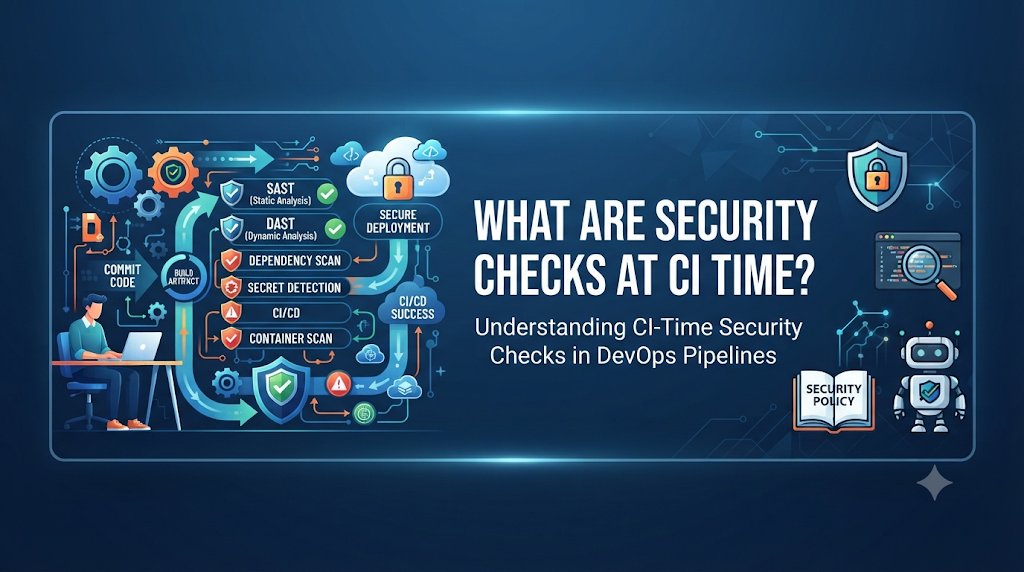
Modern software delivery moves at an unprecedented pace. Organizations push updates, features, and patches to production multiple times a day. However, this velocity introduces significant risk if security is treated as an afterthought. Vulnerabilities can enter a software project through multiple entry points: raw source code written by developers, third-party open-source dependencies, configuration files, container base images, and cloud infrastructure definitions. Historically, security testing occurred late in the software development lifecycle (SDLC), often right before deployment or even after applications went live. Finding a critical vulnerability at that stage is expensive, disruptive, and stressful. Remediation requires context-switching, delaying releases, and rushing fixes under pressure. To break this cycle, modern engineering teams adopt “shift-left” security, moving validation earlier into the development process. Instead of waiting until deployment or production, security checks occur at Continuous Integration (CI) time—while code is actively being built, compiled, and tested. Catching bugs and vulnerabilities at CI time provides rapid feedback to developers, ensuring that security flaws are addressed when the code is freshest in the author’s mind.
Understanding Security Checks at CI Time
CI-time security checks refer to automated security scans, audits, and policy evaluations that run automatically every time code is integrated into a shared repository. When a developer pushes commits or opens a pull request, the CI server spins up a build pipeline, runs unit tests, and simultaneously executes security validations.
These checks act as an automated safety net. They evaluate source code, dependencies, and configuration artifacts for known vulnerabilities, misconfigurations, or leaked credentials before the code is ever packaged into a release artifact or deployed to a staging environment.
It is important to distinguish CI-time checks from other forms of security testing:
- CI-Time Checks: Run automatically during the build and integration phase on every code change. They focus on static analysis, dependency evaluation, and configuration correctness.
- Pre-Deployment / Staging Checks: Run after the build artifact is created, often including dynamic application security testing (DAST) or interactive testing on a running instance in a test environment.
- Runtime Security Monitoring: Operates in production or live environments to detect active threats, anomalous behavior, and infrastructure intrusions.
For professionals starting their journey into modern engineering workflows, understanding how these layers interconnect is essential. Platforms like DevOpsSchool offer comprehensive guidance and learning resources for practitioners looking to master DevOps, CI/CD, and DevSecOps practices, helping bridge the gap between traditional development and secure operations.
Inside a Secure CI Pipeline
To understand where security fits, let us walk through a typical continuous integration pipeline. A well-designed pipeline integrates security checks smoothly without turning into a bottleneck.
- Code Commit and Pull Request: A developer writes code locally and pushes it to a version control system like GitHub, GitLab, or Bitbucket. This action triggers the CI pipeline.
- Source-Code Compilation and Build: The pipeline fetches the source code and attempts to compile it, verifying syntax and structural integrity.
- Automated Testing: Unit tests and integration tests execute to verify functional correctness.
- Dependency and License Validation: The system inspects package manifests to identify third-party libraries, checking them against vulnerability databases and organizational license policies.
- Static Analysis and Secret Scanning: Scanners analyze the source code for insecure coding patterns and check for accidentally committed API keys, passwords, or tokens.
- Container or Artifact Creation: If the build passes compilation and initial checks, the application is packaged into a container image or binary artifact.
- Artifact Scanning: Container images and Infrastructure as Code (IaC) definitions are scanned for OS-level vulnerabilities and cloud misconfigurations.
- Security Policy Evaluation: The pipeline aggregates all scan results against predefined quality gates.
- Build Approval or Rejection: If critical thresholds are breached, the build fails, blocking the code from merging or proceeding. Otherwise, it receives a green light.
The Main Security Checks Every Team Should Understand
Securing a CI pipeline requires a combination of specialized automated tools, each designed to detect a specific class of risk.
SAST (Static Application Security Testing)
- Purpose: Identifies insecure coding patterns, logic flaws, and vulnerabilities directly in proprietary source code without executing the application.
- Working Approach: SAST tools parse source code into abstract syntax trees (AST) and analyze data flows to find issues like SQL injection, cross-site scripting (XSS), and hardcoded cryptographic flaws.
- Examples: Spotting an unvalidated input parameter directly concatenated into a database query string.
- Limitations: SAST tools analyze code statically, meaning they often generate false positives and lack runtime context regarding how application frameworks handle data.
SCA (Software Composition Analysis)
- Purpose: Finds vulnerable, outdated, or risky third-party open-source libraries and dependencies used by the application.
- Working Approach: SCA tools scan package manifest files (such as
package.json,pom.xml, orrequirements.txt) and compare version numbers against vulnerability databases like the National Vulnerability Database (NVD). - Examples: Detecting that an application imports an older version of a logging library known to have a remote code execution vulnerability.
- Limitations: SCA relies heavily on vulnerability databases; newly discovered zero-day vulnerabilities in open-source packages will not be flagged until advisories are published.
Secret Scanning
- Purpose: Detects exposed API keys, database passwords, private SSH keys, and authentication tokens accidentally committed to the repository.
- Working Approach: Secret scanners use regular expressions, pattern matching, and entropy analysis to sweep commit history and staging files for credential strings.
- Examples: Finding an AWS access key ID and secret access key left inside a configuration file.
- Limitations: Scanners can trigger false positives on random strings or mock test keys, requiring careful rule tuning and exception management.
Container Image Scanning
- Purpose: Checks base operating system packages, libraries, and binaries embedded inside container images for known vulnerabilities.
- Working Approach: The scanner unpacks the container image layer by layer, catalogs all installed packages, and compares them against security advisories.
- Examples: Identifying an outdated OpenSSL package inside a Docker base image.
- Limitations: Container scans can only detect vulnerabilities for packages explicitly tracked by package managers within the image; compiled binaries or custom scripts require separate analysis.
IaC (Infrastructure as Code) Security Scanning
- Purpose: Identifies risky configurations in cloud provisioning scripts, Terraform files, Kubernetes manifests, and CloudFormation templates.
- Working Approach: Scanners evaluate declarative configuration files against security baselines and compliance frameworks.
- Examples: Detecting an AWS S3 bucket configuration where public read access is enabled.
- Limitations: IaC scans check the intended state of infrastructure but cannot predict runtime configuration drift or complex multi-resource interactions.
License Compliance Checks
- Purpose: Detects open-source dependencies carrying licensing conditions that conflict with organizational legal or commercial policies.
- Working Approach: Scanners inspect software licenses associated with project dependencies (e.g., GPL, MIT, Apache) and flag restricted copyleft licenses.
- Examples: Warning legal and engineering teams when a proprietary commercial project imports a strict copyleft dependency.
- Limitations: License scanning depends on accurate metadata in package registries; incorrectly tagged or custom licenses may be misclassified.
Configuration and Policy Checks
- Purpose: Validates security-related build settings, CI/CD pipeline definitions, and deployment manifests against hardening standards.
- Working Approach: Lints pipeline configuration files and deployment scripts to ensure permissions are restricted and best practices are followed.
- Examples: Verifying that CI runner tokens are stored securely as secrets rather than plain text.
- Limitations: Focuses strictly on configuration syntax and predefined rules, missing contextual logic errors.
A Practical Walkthrough: Adding Security to a Sample Pipeline
To see how these checks operate in practice, consider a typical web application project managed via GitHub Actions. When a developer pushes changes to a feature branch, the pipeline executes a sequence of jobs.
YAML
name: Secure CI Pipeline

on:
  push:
    branches: [ main, develop ]
  pull_request:
    branches: [ main ]

jobs:
  security-and-build:
    runs-on: ubuntu-latest
    steps:
      - name: Checkout Code
        uses: actions/checkout@v4
        with:
          fetch-depth: 0

      - name: Run Secret Scan
        uses: gitleaks/gitleaks-action@v2

      - name: Set up Node.js
        uses: actions/setup-node@v4
        with:
          node-version: '20'

      - name: Install Dependencies
        run: npm ci

      - name: Run SCA (Dependency Check)
        run: npm audit --audit-level=high

      - name: Run SAST Scanner
        uses: github/codeql-action/analyze@v3

      - name: Build Application
        run: npm run build
How the Pipeline Responds to Findings
- Successful Execution: If all tools report zero critical vulnerabilities, the pipeline completes successfully, and the pull request is marked ready for human code review.
- Secret Detection Failure: If the secret scanner detects an exposed API key in the commit history, the job fails immediately. The developer receives a notification, revokes the credential, rewrites git history, and pushes a clean commit.
- Vulnerable Dependency Warning: If SCA detects a high-severity vulnerability in an installed package, the pipeline fails the build, preventing vulnerable code from propagating further downstream.
What Happens When a Security Check Fails?
Introducing automated security checks inevitably leads to moments where a pipeline fails. Managing these failures effectively is critical to team morale and delivery speed.
- Build Failures vs. Warnings: Organizations typically configure quality gates. Critical and high-severity findings block builds, while low-severity issues generate warnings or create tracking tickets without stopping the pipeline.
- Severity Levels: Tools categorize findings using severity ratings (Critical, High, Medium, Low). Teams must calibrate these thresholds to match their risk appetite.
- False Positives: No automated tool is 100% accurate. Security scanners frequently flag safe code patterns as vulnerabilities. A clear process for reviewing, tuning, and suppressing false positives is essential.
- Vulnerability Exceptions: When a vulnerability cannot be fixed immediately, teams need a formal exception workflow with expiration dates and risk sign-offs.
- Remediation Ownership: Clear accountability ensures that developers understand how to fix identified issues rather than treating security scan outputs as noise.
Choosing the Right Tools for CI-Time Security
Selecting tools for a CI/CD pipeline requires balancing coverage, integration ease, and team familiarity.
- SonarQube: Widely used for combined code quality and SAST analysis across multiple programming languages.
- Semgrep: A fast, customizable static analysis tool popular for writing custom security rules and detecting code patterns.
- OWASP Dependency-Check / Snyk: Industry standards for scanning third-party dependencies and open-source libraries for known vulnerabilities (SCA).
- Trivy: An open-source scanner capable of auditing container images, filesystems, and Infrastructure as Code configurations.
- Checkov: A specialized static analysis tool for inspecting Terraform, Kubernetes, and cloud infrastructure code.
- Gitleaks: A lightweight, high-performance tool dedicated to detecting hardcoded secrets and credentials in git repositories.
- GitHub Advanced Security: Native platform-integrated tooling offering built-in secret scanning, dependency review, and CodeQL static analysis.
When choosing tools, teams should prioritize native pipeline integration, speed of execution, low false-positive rates, and clear remediation guidance.
Keeping Security Checks Fast and Reliable
One of the greatest risks of implementing CI-time security checks is slowing down the developer workflow. If a pipeline takes 45 minutes to run, developers lose focus and productivity suffers.
- Incremental Scanning: Instead of scanning the entire codebase on every minor commit, configure tools to analyze only changed files and diffs during pull requests, reserving full repository scans for nightly builds.
- Caching: Cache dependency databases, compiler outputs, and scanner rule definitions across pipeline runs to minimize download overhead.
- Parallel Execution: Run independent security checks concurrently rather than sequentially. For example, run SAST, SCA, and secret scanning in parallel jobs.
- Reusable Pipeline Templates: Standardize security configurations into reusable workflow templates so individual development teams do not have to reinvent pipeline security rules.
- Severity-Based Gates: Only fail builds on actionable, high-severity findings to prevent developer fatigue caused by trivial warnings.
- Regular Rule Updates: Keep vulnerability databases and scanning rule sets updated to minimize inaccurate results and ensure coverage of emerging threats.
Common Implementation Mistakes
Implementing CI-time security checks is a journey, and teams often encounter predictable pitfalls along the way.
- Enabling Too Many Checks at Once: Turning on every available rule and tool on day one overwhelms developers with hundreds of alerts, leading to alert fatigue and ignored findings.
- Ignoring Scan Results: Treating security reports as compliance checkboxes without actively fixing or tracking vulnerabilities defeats the purpose of CI checks.
- Relying Only on Vulnerability Databases: Assuming that a clean scan means absolute security ignores custom business logic flaws and architectural design vulnerabilities.
- Allowing Permanent Exceptions: Granting open-ended exceptions for difficult vulnerabilities without a remediation timeline creates invisible security debt.
- Exposing Secrets in Logs: Accidentally configuring scanning tools to print sensitive environment variables or configuration secrets into pipeline execution logs.
- Treating Automated Scans as a Replacement for Code Review: Relying entirely on tools while skipping peer code reviews and architectural threat modeling.
Building a Sustainable CI-Time Security Practice
Securing a software delivery pipeline is not a one-time project; it is an ongoing cultural and technical practice. Successful organizations foster a shared responsibility model where development, DevOps, and security teams work collaboratively.
- Define Clear Policies: Establish organization-wide standards for what constitutes a blocking vulnerability versus a warning.
- Assign Ownership: Ensure development teams own the remediation of security findings in their respective microservices or codebases.
- Review Exceptions Regularly: Audit vulnerability exceptions and temporary waivers periodically to ensure risks are actively managed.
- Measure Trends: Track key metrics over time, such as mean time to remediate (MTTR) vulnerabilities, total open findings, and pipeline scan duration.
- Iterate and Improve: Continuously refine scanning rules, eliminate persistent false positives, and adapt security gates as the technology stack evolves.
Frequently Asked Questions
What does CI-time security mean?
CI-time security refers to automated security checks, scans, and policy evaluations that run inside a continuous integration pipeline whenever code is built and tested, catching vulnerabilities before code is merged or deployed.
Why should security checks run during CI?
Running security checks during CI provides rapid feedback to developers, ensuring vulnerabilities are identified and fixed when the code is fresh, avoiding expensive remediation efforts in production.
Is SAST enough to secure a CI/CD pipeline?
No. SAST only analyzes proprietary source code. A secure pipeline also requires SCA for dependencies, secret scanning, container scanning, and IaC security checks.
What is the difference between SAST and SCA?
SAST (Static Application Security Testing) analyzes custom source code for security flaws, while SCA (Software Composition Analysis) inspects third-party open-source libraries and dependencies for known vulnerabilities.
Can security checks stop a build?
Yes. Security checks can be configured with quality gates that fail the build and block pull requests from merging if critical or high-severity vulnerabilities are detected.
How do teams handle false positives?
Teams handle false positives by tuning scanning rules, suppressing known benign findings through configuration files, and establishing review processes with security engineers.
Do small development teams need CI-time security checks?
Yes. Lightweight scanners and secret detection tools can be implemented easily in small teams, preventing accidental credential leaks and dependency vulnerabilities from day one.
How can security scanning affect pipeline speed?
Scans can increase build times if they analyze large repositories sequentially. This can be mitigated through incremental scanning, caching, and parallel job execution.
Are CI-time checks a replacement for penetration testing?
No. Automated checks detect known patterns and standard vulnerabilities, whereas penetration testing involves human expertise to uncover complex business logic flaws and multi-step attack vectors.
How often should security rules and scanning tools be updated?
Scanning rules and vulnerability databases should be updated continuously or automatically with every pipeline run to ensure protection against newly discovered threats.
Final Perspective: Make Security Part of Every Code Change
Ultimately, implementing CI-time security checks transforms application security from a stressful bottleneck into a seamless, automated part of everyday development. By catching vulnerabilities, misconfigurations, and leaked credentials during the build phase, teams protect their applications, reduce technical debt, and accelerate delivery safely. When automated scanning works alongside secure coding habits, peer reviews, and a collaborative team culture, security becomes a shared responsibility that makes software delivery both faster and remarkably more secure.




Leave a Reply
You must be logged in to post a comment.