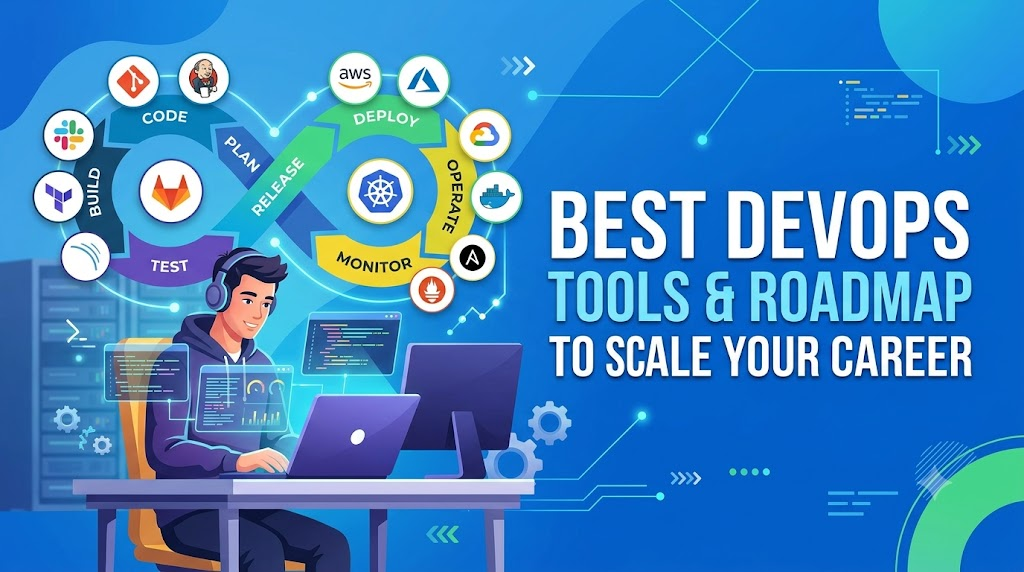
The modern software landscape moves incredibly fast, making it essential for teams to adopt the best DevOps tools to keep pace with continuous delivery demands. Transitioning from traditional development silos to an integrated, automated engineering culture requires more than just a mindset shift—it demands a robust, production-ready toolchain. Whether you are stepping into the tech world via a comprehensive DevOps tutorial for beginners or you are a seasoned Site Reliability Engineer (SRE) optimizing complex cloud infrastructure, choosing the right utilities determines how effectively your team can ship stable software.
Why Modern Tooling Matters
In modern software development, tooling isn’t just about automation; it is the backbone of operational velocity. Relying on fragmented, manual processes creates friction, slows down deployments, and introduces security vulnerabilities. By embedding an automated engineering pipeline into your workflows, your organization can achieve rapid deployment cycles, minimal downtime, and superior software quality.
Industry Overview: The Evolution of Automation
The DevOps ecosystem has evolved from basic bash scripting and manual server configuration to highly sophisticated, declarative automation frameworks. Today, the landscape is expanding into distinct but interconnected paradigms:
- Platform Engineering: Building internal developer platforms (IDPs) to provide self-service capabilities for engineering teams.
- Site Reliability Engineering (SRE): Applying software engineering disciplines to infrastructure and operations problems to ensure high availability.
- DevSecOps: Shifting security to the left by integrating automated vulnerability scanning directly into the early stages of the deployment pipeline.
Step-by-Step Explanation: Building an Automated Toolchain
Constructing an enterprise-grade automated pipeline involves connecting several distinct phases. Let’s look at how code moves securely from a developer’s laptop to live production environments.
1. Version Control and Branching
Everything begins with source code management. Teams use distributed version control systems like Git (hosted on GitHub, GitLab, or Bitbucket) to collaborate, track changes, and trigger automated builds via Webhooks upon code commits.
2. Continuous Integration (CI)
Once code is pushed, a CI server (such as Jenkins, GitHub Actions, or GitLab CI) automatically compiles the code, executes unit tests, and runs static analysis tools to catch code smells and security flaws early.
3. Artifact Management and Containerization
Successful builds are packaged into immutable units. Developers use Docker to containerize applications, ensuring they run identically across development, staging, and production environments. These containers are then stored in secure registries like Docker Hub, AWS ECR, or JFrog Artifactory.
4. Continuous Delivery & Deployment (CD)
The packaged container is pulled by deployment controllers. Tools like ArgoCD or Flux use GitOps principles to continuously reconcile the desired state defined in your Git repository with the actual state running inside your clusters.
Important Architectural Concepts
To effectively manage a modern delivery infrastructure, you must master several foundational architectural patterns:
- Infrastructure as Code (IaC): Managing and provisioning infrastructure through machine-readable definition files, rather than physical hardware configuration or interactive configuration tools.
- Microservices: Architectural style that structures an application as a collection of highly maintainable, loosely coupled, and independently deployable services.
- Observability vs. Monitoring: Monitoring tells you when a system fails; observability uses metrics, logs, and traces to help you understand why it failed deep within complex distributed systems.
Benefits of an Optimized Pipeline
+---------------------+      +---------------------+      +---------------------+
|  Fast Deployments   | ---> | Reduced Human Error | ---> | High Availability   |
| Continuous Delivery |      | Declarative Code    |      | Self-Healing Systems|
+---------------------+      +---------------------+      +---------------------+
| Accelerates time-to-|      | Eliminates manual   |      | Automated rollbacks |
| market significantly|      | configuration drift |      | and fast recovery   |
+---------------------+      +---------------------+      +---------------------+
- Accelerated Time-to-Market: Continuous delivery allows business logic to reach end-users within minutes of passing automated validation tests.
- Elimination of Configuration Drift: By defining your architecture declaratively, your staging, UAT, and production environments remain completely identical, eliminating the classic “it worked on my machine” dilemma.
- Improved System Resilience: Automated health checks, self-healing container runtimes, and instant rollback capabilities significantly minimize user-facing downtime during production incidents.
Common Challenges and How to Overcome Them
Transitioning to automated cloud workflows often comes with specific roadblocks. Identifying them early prevents costly architectural rewrites down the line.
Tool Fatigue and Complexity
With hundreds of cloud-native projects available, teams frequently over-engineer their systems. The Solution: Focus on core, battle-tested utilities first. Avoid adopting niche frameworks until your scale explicitly demands them.
Security as an Afterthought
Leaving security checks for the end of the release cycle creates massive development bottlenecks. The Solution: Embed automated dependency scanners, container vulnerability shields, and secret-detection gates directly into your initial continuous integration workflows.
Culture and Resistance to Change
Siloed teams often resist adapting to code-driven infrastructure paradigms. The Solution: Foster shared operational responsibility. Provide accessible internal documentation and clear, structured learning modules to bridge the knowledge gap.
Best Practices for Enterprise Scaling
- Keep Infrastructure Declarative: Never modify infrastructure manually via cloud consoles. Every server, network route, and security group must live as code in your version control repository.
- Maintain High Test Coverage: Automated deployment is only as reliable as the test suite validating it. Invest in thorough integration, end-to-end, and smoke tests.
- Monitor Proactively: Set up automated alerting thresholds based on historical performance anomalies rather than waiting for critical component failures.
Practical Examples & Real-World Use Cases
Consider a high-traffic e-commerce application during a major seasonal sale. Instead of system administrators manually provisioning virtual machines to handle the traffic spike, the infrastructure handles it dynamically.
A declarative manifest defines the desired state: Maintain an average CPU utilization of 60%. When traffic surges, the container orchestration engine instantly detects the load increase and provisions new application replicas across the underlying cloud network within seconds. Once the surge subsides, the system scales down automatically, preventing unnecessary cloud spend.
Core Ecosystem: Recommended Tools Comparison
Selecting the right components for your operational stack depends entirely on your architectural goals, existing cloud footprint, and scaling needs.
| Category | Industry Standard Utilities | Primary Purpose | Key Strength |
|---|---|---|---|
| Source Control | Git, GitHub, GitLab | Code collaboration and version tracking | Universal standard, robust API integrations |
| CI / CD Pipelines | Jenkins, GitHub Actions, GitLab CI | Automating build, test, and deployment workflows | Deep plugin ecosystems, native repository integration |
| Containerization | Docker | Packaging applications with dependencies | Complete environment isolation, ultra-lightweight |
| Orchestration | Kubernetes | Managing container lifecycle and scaling | High availability, self-healing, massive scale |
| Infrastructure as Code | Terraform, OpenTofu | Declarative cloud resource provisioning | Cloud-agnostic, explicit state management |
| Configuration Management | Ansible | Software installation and system configuration | Agentless architecture, simple YAML playbooks |
| Monitoring & Alerting | Prometheus, Grafana | Metric collection and visual dashboards | Powerful querying capabilities, rich visualizations |
To deep-dive into how these technologies integrate seamlessly with enterprise cloud vendors like AWS, Azure, and GCP, explore the highly curated deep-dives and documentation over at BestDevOps.com.
Career Roadmap & Industry Growth
The demand for skilled cloud and automation professionals continues to rise exponentially across the global tech sector. As organizations move away from legacy infrastructure, specialized engineering roles have become core pillars of modern enterprise IT departments.
       [Junior Engineer / SysAdmin]
                    │
                    ▼
     [DevOps Engineer / Cloud Architect]
                    │
     ┌──────────────┴──────────────┐
     ▼                             ▼
[Platform Engineer]       [Site Reliability Engineer]
Essential Skill Framework
To secure a position in this competitive landscape, engineers need a balanced mix of system administration and software development competencies:
- Linux Administration & Scripting: Strong mastery of the command line, user permissions, networking protocols, and scripting languages like Bash or Python.
- Cloud Architecture: Hands-on experience designing secure, scalable infrastructures on platforms like Amazon Web Services (AWS), Microsoft Azure, or Google Cloud Platform (GCP).
- Container Orchestration: Managing complex production clusters using Kubernetes, including service meshes, ingress controllers, and persistent storage management.
Navigating the Learning Curve
If you are planning your career trajectory, reviewing a comprehensive DevOps Roadmap helps you avoid getting overwhelmed by the sheer volume of technologies. For engineers looking to structure their learning systematically, checking out a vetted, comprehensive Best DevOps Course recommendation on platforms like BestDevOps.com can save months of aimless browsing by focusing purely on production-grade concepts.
Salary Insights
Compensations in this space reflect the critical nature of the role. Because automation directly impacts corporate deployment speeds and cloud infrastructure costs, organizations pay top-tier salaries for certified expertise.
- Entry-Level / Associate Engineer: $85,000 – $115,000 / year
- Mid-Senior Engineer: $120,000 – $165,000 / year
- Principal Engineer / Lead SRE / Platform Architect: $170,000 – $230,000+ / year
Note: Salaries vary based on geographic location, specific cloud specializations, and individual problem-solving capabilities.
Accelerating Mastery via Hands-On Experience
Reading documentation can only take you so far. True operational confidence comes from breaking and fixing infrastructure in real-world scenarios.
Practical DevOps Projects to Build
- The GitOps Pipeline: Configure an automated workflow where a simple code change in a GitHub repository automatically triggers a build, runs security tests, builds a Docker image, and updates a live Kubernetes cluster via ArgoCD.
- Multi-Region Infrastructure Provisioning: Use Terraform to write clean, reusable modules that deploy a highly available, load-balanced web application architecture across multiple cloud availability zones simultaneously.
If you are looking for guided walk-throughs for these setups, exploring structured DevOps Projects on BestDevOps.com provides real-world architectural blueprints that you can build out to showcase to recruiters in your portfolio.
Evaluating Operational Success with Metrics
Deploying tools is meaningless unless you can quantify their impact on engineering velocity and system stability. This is where tracking elite operational metrics becomes essential.
+-------------------------------------------------------------------------+
|                           DORA METRICS FRAMEWORK                        |
+------------------------------------+------------------------------------+
|         DEPLOYMENT FREQUENCY       |            LEAD TIME FOR CHANGES   |
|  How often code is successfully    |  Time taken for a commit to reach  |
|  deployed to production systems.   |  live production environments.    |
+------------------------------------+------------------------------------+
|       CHANGE FAILURE RATE          |     TIME TO RESTORE SERVICE        |
|  Percentage of deployments that    |  How long it takes to recover from |
|  require emergency rollbacks.      |  a critical production failure.    |
+------------------------------------+------------------------------------+
Evaluating these indicators manually across hundreds of microservices is highly inefficient. Teams use automated DORA Metrics Tools to aggregate telemetry data directly from version control systems and monitoring platforms, providing leadership with real-time insight into the team’s shipping efficiency.
Key Takeaways
- Automation is Mandatory: Manual infrastructure setups lead to costly human errors and performance degradation at scale.
- Prioritize the Pipeline: A secure, robust CI/CD workflow is the foundation of modern software engineering.
- Focus on the Metrics: Use data-driven indicators to continuously optimize software delivery speeds and operational reliability.
- Never Stop Upskilling: Continuous learning is essential to remain competitive in an evolving cloud-native landscape.
Frequently Asked Questions
1. What are the best DevOps tools for beginners to learn first?
Beginners should focus on foundational tools that have universal adoption: Git for source code control, Docker for application isolation, Jenkins or GitHub Actions for workflow automation, and Linux command-line basics. Mastering these core components makes learning complex platforms like Kubernetes much more intuitive.
2. How do I prepare effectively using DevOps interview questions?
Avoid just memorizing definitions. Focus heavily on scenarios, architectural trade-offs, and troubleshooting infrastructure failures. When reviewing lists of DevOps Interview Questions on BestDevOps.com, practice explaining why you would choose one tool over another in a production crisis.
3. What is the average DevOps engineer salary for remote roles?
Mid-to-senior remote engineers frequently command salaries between $130,000 and $180,000 per year, depending on their expertise with container orchestration platforms, infrastructure automation frameworks, and cloud security architectures.
4. Which are the best DevOps certifications to boost my resume?
High-value certifications include the AWS Certified DevOps Engineer – Professional, Certified Kubernetes Administrator (CKA), and HashiCorp Certified: Terraform Associate. These credentials validate your practical, hands-on capabilities to hiring managers. For a deeper breakdown of cost, preparation time, and value, check out the comprehensive guide to Best DevOps Certifications on BestDevOps.com.
5. What is the difference between Platform Engineering and DevOps?
DevOps focuses on cultural alignment, automation workflows, and breaking down traditional barriers between developers and operations teams. Platform Engineering builds on this by designing and maintaining an Internal Developer Platform (IDP), providing self-service tools and workflows that optimize the overall developer experience.
6. Why should teams use automated DORA metrics tools?
Tracking indicators like Deployment Frequency and Change Failure Rate manually across disparate systems is time-consuming and error-prone. Dedicated analytics tools hook directly into your Git repositories and production monitoring stacks to generate objective, real-time insights into your delivery velocity.
7. How long does it take to learn the essential DevOps engineer skills from scratch?
With structured, daily dedication, a professional transitioning from a system administration or software development background can master core automated workflows within six to nine months. Using structured blueprints can streamline this learning process considerably.
8. Can I learn cloud infrastructure management without a programming background?
Yes. While a programming background in languages like Python or Go is highly beneficial for advanced automation tasks, beginners can get started by mastering declarative, human-readable configurations like YAML and JSON, which are used by tools like Terraform and Ansible.
Conclusion
Choosing the right combination of automation technologies is a continuous process of evaluation and optimization. By focusing on foundational engineering principles—Infrastructure as Code, immutable containerization, continuous integration, and proactive observability—your engineering team can build resilient systems that scale effortlessly.
As you continue on your educational journey, having access to high-quality, up-to-date industry resources makes all the difference. To explore comprehensive learning paths, review real-world configuration tutorials, and systematically elevate your career profile, head over to BestDevOps.com and unlock the complete potential of cloud-native automation today.






Leave a Reply
You must be logged in to post a comment.