Introduction
Traditional security models often treated security as a final gatekeeper step before software deployment. Security teams conducted manual code reviews, penetration testing, and compliance audits right before a release. However, modern software engineering moves too quickly for this approach. With organizations deploying code updates daily or even hourly across complex cloud-native environments, manual processes cannot keep up.
When security checks rely on manual approvals, they create major bottlenecks. Development teams end up waiting weeks for security sign-offs, forcing organizations to choose between speed and safety. This tension is where DevSecOps comes in. By embedding security practices directly into every phase of the software delivery lifecycle, teams can build secure applications without sacrificing velocity. At the heart of this integration is DevSecOps automation. Automation turns security from a manual roadblock into a continuous, invisible fabric supporting every deployment.
What Is DevSecOps?
DevSecOps is the philosophy and practice of integrating security testing and validation into every phase of the software development lifecycle (SDLC), from initial design to production deployment and monitoring.
In a traditional DevOps model, development and operations teams focus on speed and agility, while security teams operate separately, often reviewing code only after it is written. DevSecOps bridges this gap by making security a shared responsibility across all teams. Instead of bolting security on at the end, DevSecOps bakes security into the process from day one.
What Is Automation in DevSecOps?
DevSecOps automation refers to the use of software tools and scripts to execute security checks, compliance validations, vulnerability scans, and policy enforcement automatically without requiring human intervention for every routine step.
Automation fits seamlessly into every part of the development lifecycle:
- Development: Automated checks run inside local environments or code repositories.
- Testing & CI/CD Pipelines: Security scans execute automatically whenever code is committed or built.
- Infrastructure Provisioning: Configuration and compliance policies are validated before infrastructure changes are applied.
- Operations & Monitoring: Runtime environments are continuously observed for anomalies, unauthorized access, or configuration drift.
Why Manual Security Processes Are Not Enough
Relying entirely on manual security reviews creates severe operational friction in modern engineering organizations. Some of the most common challenges include:
- Repetitive security checks: Forcing engineers to run manual scans wastes valuable engineering hours on mundane tasks.
- Slow vulnerability identification: Waiting until code is finished to look for flaws means bugs are discovered late, making them expensive and difficult to fix.
- Human error: Manual checks are prone to oversights, missed configurations, and inconsistent execution.
- Inconsistent security controls: Different teams might apply security guidelines differently if manual enforcement is left to personal discretion.
- Delayed feedback: Developers might wait weeks to learn about a security flaw introduced in their code, breaking their context and slowing productivity.
- Difficulty scaling security practices: As organizations grow and release more applications, manual security teams quickly become overwhelmed.
- Security becoming a release bottleneck: When security teams must manually sign off on every deployment, software delivery grinds to a halt.
Why Automation Is Critical in DevSecOps
Automation transforms security from a reactive barrier into a proactive enabler. The primary reasons automation is critical include:
- Speed: Automated scans execute in seconds or minutes, allowing security validation to keep pace with rapid CI/CD pipelines.
- Consistency: Automated controls apply the exact same security rules every single time, eliminating human inconsistency.
- Scalability: Automated tools can scan thousands of repositories, container images, and cloud resources simultaneously without requiring a massive expansion of the security team.
- Early detection: Catching vulnerabilities during the coding and build phases prevents costly production incidents.
- Repeatability: Standardized automated security workflows ensure that testing procedures are reproducible across all projects and environments.
- Continuous security validation: Security is checked continuously rather than assessed at a single point in time.
Automating Security Throughout the CI/CD Pipeline
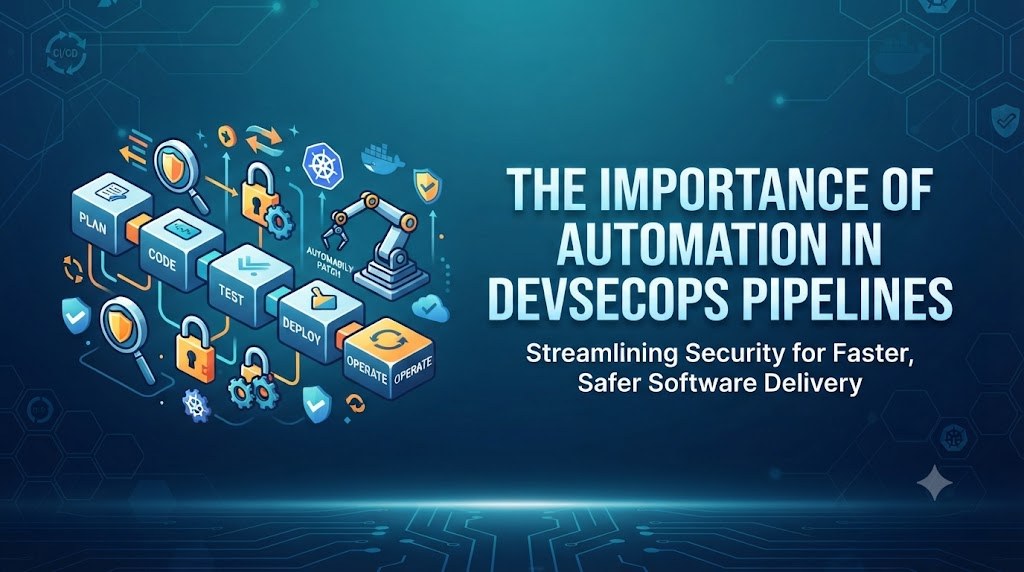
To achieve true continuous security, organizations embed automated checks directly into their CI/CD pipelines. A typical secure pipeline follows this flow:
$$\text{Code} \rightarrow \text{Build} \rightarrow \text{Test} \rightarrow \text{Security Scan} \rightarrow \text{Package} \rightarrow \text{Deploy} \rightarrow \text{Monitor}$$
Different security controls are applied at each stage:
- Code Commit: Pre-commit hooks and static analysis check for hardcoded secrets and syntax vulnerabilities.
- Build Phase: Software composition analysis checks third-party dependencies for known vulnerabilities.
- Packaging Phase: Container images are scanned for misconfigurations and outdated packages.
- Deployment Phase: Infrastructure-as-Code templates and Kubernetes manifests are evaluated against compliance policies.
- Runtime Phase: Monitoring tools continuously observe application behavior and infrastructure activity.
Automated Code Security Testing
Static Application Security Testing (SAST) tools analyze source code, bytecode, or binary code for security flaws without requiring the application to be running. By automating SAST within the CI/CD pipeline, developers receive immediate feedback on security vulnerabilities—such as SQL injection flaws, cross-site scripting risks, or insecure cryptographic storage—right when they commit code. This early visibility allows developers to fix issues while the code context is still fresh in their minds.
Automated Dependency and Software Composition Analysis
Modern applications rely heavily on open-source libraries and third-party dependencies, which often make up the vast majority of an application’s codebase. Software Composition Analysis (SCA) tools automate the process of inspecting these dependencies against known vulnerability databases (such as CVE databases). When a vulnerable library is detected, the automation pipeline can warn developers, suggest patched versions, or automatically block the build depending on the severity of the flaw.
Automated Container Security
Containerized applications introduce unique security considerations regarding base images, runtime privileges, and package vulnerabilities. Automated container security involves:
- Scanning container images during the build phase for known OS-level vulnerabilities and outdated packages.
- Inspecting Dockerfiles and container configurations for risky settings, such as running containers as the root user.
- Incorporating scanning gates directly into CI/CD workflows so that non-compliant container images cannot be pushed to artifact registries or deployed to production.
Infrastructure as Code Security Automation
Infrastructure as Code (IaC) tools like Terraform allow teams to define cloud environments using code. This infrastructure can also be secured using automation. By integrating IaC security and policy checks into the pipeline, teams can scan infrastructure definitions for misconfigurations—such as overly permissive S3 buckets, open security group ports, or unencrypted storage volumes—before any cloud resources are actually provisioned.
Automated Kubernetes Security
Kubernetes orchestration introduces complex configuration layers that require automated governance. Practical automation opportunities in Kubernetes environments include:
- Kubernetes configuration scanning: Validating deployment manifests for security best practices.
- Image security enforcement: Ensuring clusters only pull images from trusted, scanned registries.
- RBAC auditing: Automatically checking Role-Based Access Control settings to prevent excessive permissions.
- Admission policies: Utilizing admission controllers to block insecure pod configurations at runtime.
- Network policies & Secrets management: Enforcing strict pod-to-pod communication boundaries and secure secret injection.
Automated Secrets Management
Hardcoding credentials, API keys, database passwords, and tokens into source code or pipeline configuration files is a major security risk. Automated secrets management involves:
- Utilizing dedicated secret stores (such as HashiCorp Vault, AWS Secrets Manager, or Azure Key Vault) to inject credentials dynamically at runtime.
- Implementing automated secret-scanning tools in code repositories and CI/CD pipelines to detect accidental credential leaks before code is published.
Automated Security Testing in CI/CD
Beyond static analysis, dynamic testing can also be automated. Dynamic Application Security Testing (DAST) and interactive testing tools can run against test environments to simulate real-world attacks. By automating these tests within the pipeline, security teams do not need to manually inspect every single change, freeing them to focus on complex threat modeling and architectural reviews.
Automated Compliance and Policy Enforcement
Manual compliance audits are time-consuming and prone to human error. Policy-as-code tools (such as Open Policy Agent) allow organizations to codify security requirements and compliance frameworks into automated scripts. These policies evaluate infrastructure configurations, container settings, and deployment manifests automatically, ensuring that organizational and regulatory standards are met consistently across every deployment.
Automated Vulnerability Management
Discovering vulnerabilities is only the first step; managing and remediating them efficiently is critical. Automation assists teams by:
- Discovering vulnerabilities across repositories, hosts, and cloud accounts.
- Prioritizing findings based on exploitability, asset criticality, and context rather than treating every alert with equal urgency.
- Tracking remediation progress and automatically notifying responsible development teams.
- Verifying whether applied fixes successfully resolve the reported issues.
Automation for Cloud Security
Cloud environments change dynamically, making manual security oversight nearly impossible. Cloud security automation covers:
- Continuous monitoring of Identity and Access Management (IAM) configurations.
- Automated auditing of cloud resource configurations against security benchmarks.
- Enforcing guardrails and resource policies across multi-account cloud environments.
- Monitoring network security groups and perimeter access rules in real time.
Automated Security Monitoring and Observability
Security does not stop at deployment. Automated security monitoring collects logs, metrics, traces, and security events from applications and infrastructure. Security Information and Event Management (SIEM) and cloud-native monitoring platforms automatically analyze this telemetry using predefined rules and behavioral baselines to identify suspicious activity, unauthorized access attempts, or anomalous traffic patterns.
Automated Incident Response
When security anomalies or incidents occur, speed is critical. Automation can assist with predefined security responses, such as:
- Enriching security alerts with contextual threat intelligence data.
- Automatically creating incident tickets in tracking systems like Jira or ServiceNow.
- Isolating compromised container instances or blocking malicious IP addresses.
- Notifying on-call security engineers via Slack, PagerDuty, or email.
Note: High-impact remediation actions—such as shutting down critical production databases or revoking core master credentials—should still require explicit human approval and verification to prevent unintended service disruptions.
Benefits of DevSecOps Automation
Implementing robust DevSecOps automation delivers profound operational and security advantages:
| Benefit | Description |
| Faster Security Feedback | Developers learn about security flaws immediately within their workflow. |
| Earlier Vulnerability Detection | Finding bugs during coding and build phases reduces remediation costs. |
| Reduced Manual Effort | Eliminates repetitive manual testing tasks for engineers and security staff. |
| Consistent Security Controls | Applies uniform security policies across all projects and teams. |
| Better Developer Experience | Replaces bureaucratic gatekeeping with automated, transparent guidance. |
| Improved Scalability | Supports growing application portfolios without a linear increase in security staff. |
| Reduced Human Error | Prevents configuration oversights caused by manual checklists. |
| Faster Remediation | Streamlines vulnerability tracking, notification, and fix verification. |
| Better Auditability | Generates reliable automated logs and compliance reports for auditors. |
| Continuous Security Validation | Ensures security posture is verified constantly across the entire lifecycle. |
DevSecOps Automation Tools
Selecting the right toolset is vital for successful automation. Organizations choose tools based on their specific technology stack, workflow requirements, and organizational maturity. Common tool categories include:
- CI/CD Platforms: GitHub Actions, GitLab CI, Jenkins, Tekton.
- SAST Tools: SonarQube, Semgrep, Checkmarx, Fortify.
- DAST Tools: OWASP ZAP, Burp Suite Enterprise, Nuclei.
- Software Composition Analysis: Dependabot, Snyk, Trivy, Mend.
- Container Scanners: Trivy, Grype, Clair, Prisma Cloud.
- Infrastructure-as-Code Security: Checkov, tfsec, KICS, Terrascan.
- Secret-Scanning Tools: GitGuardian, TruffHog, Gitleaks.
- Policy-as-Code Tools: Open Policy Agent (OPA), Kyverno.
- Cloud Security Platforms: AWS Security Hub, Microsoft Defender for Cloud, Wiz.
- SIEM & Monitoring Platforms: Datadog, Splunk, Elastic Security, Prometheus.
How to Build an Automated DevSecOps Pipeline
Building a secure pipeline involves orchestrating tools so that security checks happen seamlessly during code delivery. Below is a practical step-by-step workflow:
- Developer commits code: The developer pushes code changes to a version control repository (e.g., GitHub).
- CI pipeline starts automatically: The version control system triggers the CI/CD server to begin the build process.
- Code quality and security checks run: SAST tools analyze the source code for programming flaws.
- Dependencies are scanned: SCA tools check third-party libraries for known vulnerabilities.
- Application tests execute: Unit tests and integration tests run to verify functional correctness.
- Container image is built: The application is packaged into a lightweight container image.
- Container security scan runs: Vulnerability scanners inspect the container image layers and installed packages.
- Infrastructure configuration is validated: IaC templates are scanned for cloud security misconfigurations.
- Security policies are evaluated: Policy-as-code engines verify that all compliance requirements are satisfied.
- Artifact is stored securely: The validated artifact is pushed to a secure private container registry.
- Application is deployed: The deployment tool rolls out the application to staging or production environments.
- Runtime monitoring begins: Observability and runtime security tools start tracking application behavior.
- Security events generate alerts: Any suspicious activity triggers automated notification and logging.
- Findings are tracked and remediated: Vulnerabilities are logged into ticketing systems for developer review and patching.
How Automation Improves Developer Experience
Historically, security was viewed as an obstacle that slowed down development. Security teams imposed manual reviews and long audit cycles, frustrating developers who needed to ship features quickly.
Automation fundamentally flips this dynamic. Instead of acting as a blocker at the end of a project, automation provides developers with instant, actionable feedback right inside their IDE or pull request comments. When a security issue is caught automatically upon code commit, the developer can fix it immediately while the code is fresh in their mind. This transforms security into an empowering guide rather than a punitive gatekeeper, resulting in a much healthier developer experience.
Automation and the Shift-Left Security Approach
The “shift-left” movement encourages teams to move security testing earlier in the software development lifecycle—moving from post-production review to testing during build, test, and code creation phases.
While shifting left with automation is essential for catching bugs early, mature organizations understand that DevSecOps is a comprehensive discipline. Shift-left must be paired with robust runtime and production security controls. Automation bridges this entire spectrum, validating code before release while continuously monitoring infrastructure and runtime behavior after deployment.
Common Challenges in DevSecOps Automation
While automation brings immense value, implementing it successfully can present several hurdles:
- Tool overload: Adopting too many disconnected security tools creates confusion and fragmented data.
- False positives: High rates of false alarms can overwhelm developers and cause them to ignore security warnings altogether.
- Poorly configured pipelines: Poorly integrated security gates can unnecessarily break builds and frustrate teams.
- Slow security scans: If security scans take hours to run, they defeat the purpose of rapid CI/CD delivery.
- Integration complexity: Connecting security scanners smoothly into existing developer workflows requires careful planning.
- Lack of skills: Teams may struggle to implement advanced security automation without proper training and hands-on experience.
- Alert fatigue: Flooding engineers with hundreds of low-priority alerts leads to critical vulnerabilities being missed.
- Legacy applications: Older monolithic applications may not easily fit into modern automated pipeline workflows.
- Inconsistent policies: Disconnected security rules across different business units create compliance gaps.
- Lack of ownership: Confusion over whether developers, operations, or security teams are responsible for fixing specific automated alerts.
Best Practices for DevSecOps Automation
To overcome these challenges and build a sustainable automation strategy, organizations should follow key industry practices:
- Start with high-value security checks: Begin by automating quick-win checks like secret scanning and basic dependency analysis before moving to complex DAST workflows.
- Integrate security into existing workflows: Meet developers where they work by integrating alerts into Git pull requests and existing communication channels.
- Automate repetitive tasks first: Focus automation efforts on routine checks and manual verification steps.
- Keep policies version-controlled: Treat security policies and pipeline configurations as code, storing them in version control systems.
- Prioritize actionable findings: Tune tools to focus on high-severity, exploitable vulnerabilities rather than noisy, low-impact warnings.
- Reduce false positives: Regularly review and refine scanning rules to filter out irrelevant alerts.
- Establish clear ownership: Define clear responsibilities for who addresses specific categories of security findings.
- Monitor pipeline performance: Track how long security scans take and optimize them to prevent pipeline slowdowns.
- Regularly update security tools and rules: Ensure vulnerability databases and scanner definitions are kept current.
- Keep humans involved in high-risk decisions: Ensure that high-impact actions—such as blocking production deployments or executing destructive remediation—still involve human oversight.
Real-World Example: Automated DevSecOps Pipeline
Consider a fintech startup building a containerized payment processing microservice. The engineering team wants to ensure robust security without compromising their daily release schedule. They implement an automated DevSecOps pipeline using GitHub Actions, SonarQube, Trivy, and Terraform.
When a developer pushes a code update to the repository, the automated pipeline kicks off instantly. First, static analysis scans the source code for insecure coding patterns. Simultaneously, software composition analysis checks all third-party libraries for known CVEs. Once the unit tests pass, the build server packages the application into a Docker container image.
Immediately, a container scanner inspects the image for OS vulnerabilities and misconfigurations. Next, Terraform scripts validate the underlying cloud infrastructure definitions against security compliance policies. Because all checks pass successfully, the artifact is published to the registry and automatically deployed to the staging environment. Throughout this entire workflow, runtime monitoring observes application behavior for anomalies. If a medium-severity dependency vulnerability is discovered later, the automation platform creates a prioritized ticket for the engineering team—ensuring continuous security without slowing down business innovation.
How to Measure DevSecOps Automation Success
To understand the effectiveness of a security automation initiative, organizations track meaningful operational and security metrics:
- Time to detect vulnerabilities: How quickly security flaws are identified after code is written.
- Time to remediate vulnerabilities: The average duration required to fix reported security issues.
- Security findings by severity: Tracking the distribution of high, medium, and low severity alerts over time.
- Percentage of pipelines with automated security checks: Measuring automation coverage across active projects.
- Failed security checks: Monitoring how often code builds are blocked due to security violations.
- False-positive rates: Tracking the accuracy of security scanning tools.
- Mean time to respond (MTTR) to security incidents: Measuring how quickly automated and manual incident response resolves threats.
- Security issues discovered before production: Ensuring that the majority of flaws are caught prior to customer release.
How DevSecOps Training Can Help Professionals Build Automation Skills
Implementing DevSecOps automation requires a blend of development, operations, and security knowledge. Many engineers understand traditional development or operations but need structured guidance to master modern security tooling, pipeline integration, and policy-as-code concepts.
Structured professional training provides hands-on experience, bridging the gap between theoretical security concepts and practical implementation. For professionals looking to develop practical DevSecOps, CI/CD, cloud, automation, and security skills, DevOpsSchool offers comprehensive training programs, expert mentorship, and real-world project experience designed to accelerate careers in modern software engineering.
Future of Automation in DevSecOps
The landscape of DevSecOps automation continues to evolve rapidly. Key emerging trends include:
- Security automation at scale: Managing security governance across massive multi-cloud and hybrid environments.
- Policy as Code mainstream adoption: Expanding automated governance across infrastructure, network, and data layers.
- Cloud-native security automation: Leveraging ephemeral cloud workloads for built-in security validation.
- Kubernetes security automation: Utilizing advanced admission controllers and automated cluster hardening.
- Software supply-chain security: Securing every link in the artifact provenance chain using automated signing and bill-of-materials (SBOM) generation.
- AI-assisted security analysis: Utilizing machine learning models to help prioritize alerts and analyze complex log patterns.
- Automated remediation: Expanding safe, automated fixes for common, low-risk misconfigurations.
- Continuous compliance: Replacing periodic compliance audits with real-time automated verification.
- Security orchestration: Unifying disparate security tools into cohesive, automated response workflows.
Frequently Asked Questions
Why is automation important in DevSecOps?
Automation allows security checks to execute at the speed of modern CI/CD pipelines, ensuring consistent application of security rules without creating release bottlenecks.
What can be automated in DevSecOps?
Nearly every repetitive security task can be automated, including static code analysis, dependency scanning, container vulnerability checks, infrastructure validation, secret detection, and compliance auditing.
How does automation improve DevSecOps security?
It eliminates human error, ensures consistent policy enforcement, provides early detection during development, and enables continuous security monitoring across production environments.
Can DevSecOps be implemented without automation?
While principles like cross-team collaboration can exist without automation, true DevSecOps velocity and scale are impossible to achieve without automating security validation steps.
Which security checks should be automated first?
Organizations typically start with quick-win controls like secret scanning in repositories and software composition analysis for third-party dependencies.
How does automation improve CI/CD security?
It embeds automated testing gates directly into the pipeline, preventing vulnerable code or misconfigured infrastructure from reaching production environments.
What is automated security testing?
It is the use of software tools to automatically execute security scans—such as SAST, DAST, and container scanning—without requiring manual inspection for every change.
How does DevSecOps automation reduce human error?
By replacing manual checklists and human memory with standardized, repeatable software scripts that execute identical security evaluations every time.
What tools are used for DevSecOps automation?
Common tools include CI/CD runners (GitHub Actions, GitLab CI), code scanners (SonarQube, Snyk), container auditors (Trivy), and infrastructure security linters (Checkov).
How can beginners learn DevSecOps automation?
Beginners can follow a structured learning roadmap covering Linux, Git, CI/CD fundamentals, and security tools, complemented by hands-on programs from platforms like DevOpsSchool.
How can DevOpsSchool help with DevSecOps learning?
DevOpsSchool provides practical, industry-aligned training programs that help engineers master real-world DevSecOps workflows, automation tools, and cloud security practices.
Conclusion
Automation is the engine that drives modern DevSecOps. By integrating security checks directly into CI/CD pipelines, container workflows, infrastructure provisioning, and monitoring systems, organizations can catch vulnerabilities early, reduce manual effort, and ensure consistent protection across all deployments. However, successful DevSecOps is never just about installing tools. It combines robust automation with cross-team collaboration, continuous learning, and human expertise to build resilient, secure, and fast-moving software delivery organizations.





Leave a Reply
You must be logged in to post a comment.