A website can load quickly for visitors near its server but feel painfully slow for people in other regions. Large images, videos, scripts, and downloads make this problem worse.
A Content Delivery Network (CDN) helps solve it by delivering content through a distributed network of servers. Instead of sending every request to one origin server, a CDN can serve cached content from a location closer to the visitor.
But CDNs do much more than store copies of website files. Many now include traffic protection, image delivery, video streaming, edge computing, and application performance tools.
The right provider depends on where your audience lives, what you deliver, how much control you need, and how you manage costs. This guide compares 10 established CDN options and explains where each one fits.
What Is a Content Delivery Network?
A Content Delivery Network is a group of connected servers placed across different geographic locations. These servers help deliver website content closer to users.
A CDN usually works between the visitor and the website’s origin server.
For example, imagine a website hosted in India. A visitor from Europe requests an image. Without a CDN, the request may travel to the Indian server.
With a CDN, the image may already exist in a nearby European edge location. The CDN can deliver that cached copy instead of requesting it from the origin again.
This process can help reduce:
- Website loading time
- Network latency
- Origin server workload
- Bandwidth consumption
- Traffic spikes reaching the origin
A CDN does not automatically make every request faster. Dynamic pages, uncached files, and application logic may still need to reach the origin server.
How CDN Technology Works
A typical CDN delivery process has four main stages.
- User request: A visitor opens a website or requests a file.
- Request routing: The CDN directs the request to an appropriate edge location.
- Cache check: The edge server checks whether it has a valid copy of the requested content.
- Content delivery: The CDN serves the cached file or retrieves it from the origin server.
When the CDN retrieves a file from the origin, it may store a copy according to the caching rules. Later requests can use that copy until it expires or gets removed.
This process is called caching.
The origin server remains the original source of the content. The CDN helps distribute that content efficiently.
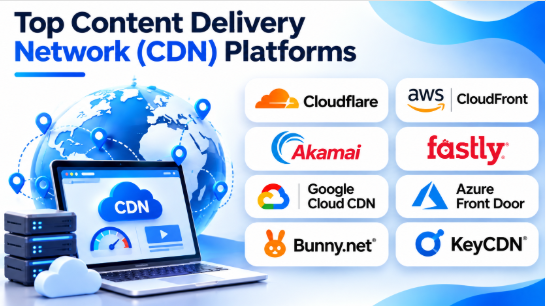
Top 10 Content Delivery Network (CDN) Providers
The following providers serve different needs. Some offer broad security and edge services, while others focus on cloud integration, developer control, or cost-conscious content delivery.
1. Cloudflare
Best for websites needing CDN and security together
Cloudflare combines content delivery with DNS, traffic protection, and application security services. It is a practical option for businesses that want several edge services through one platform.
Its CDN can cache website content across its distributed network. Website owners can configure caching behavior, control content delivery, and use additional edge capabilities.
Cloudflare is also known for making CDN and security features accessible to smaller website owners, not only large enterprises.
Key Features
- Global content delivery network
- DNS services
- Static content caching
- Cache rules and content purging
- DDoS protection
- Web application firewall options
- Image optimization capabilities
- Edge computing through Cloudflare Workers
Pros
- Combines CDN and security services.
- Offers a free entry-level option.
- Provides useful controls for website owners.
- Supports developer-focused edge services.
- Works with many website hosting environments.
Cons
- Advanced configuration can require technical knowledge.
- Some features depend on the selected plan.
- Cache rules need careful setup.
- Complex applications may need additional tuning.
Best Uses: Business websites, blogs, ecommerce stores, SaaS applications, and organizations that want CDN delivery with additional security services.
2. Amazon CloudFront
Best for AWS-based applications
Amazon CloudFront is the CDN service within Amazon Web Services. It delivers websites, files, videos, and application content through AWS edge locations.
Its close connection with Amazon S3, EC2, Elastic Load Balancing, and other AWS services makes it useful for organizations already running workloads on AWS.
Developers can also customize delivery behavior using CloudFront Functions and Lambda@Edge.
Key Features
- Global edge content delivery
- Static and dynamic content acceleration
- Integration with AWS origins
- Cache policies and origin request policies
- Content invalidation
- Signed URLs and signed cookies
- CloudFront Functions
- Lambda@Edge integration
- AWS security service integration
Pros
- Fits naturally into AWS infrastructure.
- Supports different content delivery workloads.
- Offers detailed cache configuration.
- Provides edge customization options.
- Supports secure access to private content.
Cons
- Configuration can be difficult for beginners.
- Costs depend on data transfer, requests, and selected features.
- AWS-specific knowledge helps with administration.
- Incorrect cache policies can expose private content.
Best Uses: AWS-hosted websites, software applications, video delivery, downloadable files, and businesses already using AWS infrastructure.
3. Akamai
Best for large enterprises and high-volume delivery
Akamai is an established content delivery and edge platform provider. It serves organizations that need large-scale content delivery, application performance, and security services.
Its platform supports website delivery, media distribution, caching, and application protection.
Akamai offers detailed cache controls through its delivery management tools. Administrators can define how content is stored, how long it remains available, and when it should be removed.
Its broad service portfolio makes it relevant to organizations with demanding delivery and security requirements.
Key Features
- Global CDN infrastructure
- Website and application acceleration
- Media delivery services
- Cache management
- Content purging
- Application security services
- DDoS protection options
- Traffic and performance monitoring
- Enterprise delivery controls
Pros
- Suitable for large-scale content delivery.
- Offers extensive enterprise capabilities.
- Supports complex caching requirements.
- Combines delivery with security services.
- Useful for media and high-traffic businesses.
Cons
- Enterprise configuration can be complex.
- Pricing and contracts may require direct discussions.
- Smaller businesses may not need its full service range.
- Implementation may require specialist knowledge.
Best Uses: Large enterprises, financial services, media companies, global ecommerce businesses, and organizations with complex delivery requirements.
4. Fastly
Best for developer-controlled edge delivery
Fastly is a CDN and edge cloud platform focused on programmable content delivery.
It gives developers control over caching, request handling, and edge behavior. Its services are useful for businesses that need to change delivery rules quickly or build custom logic close to users.
Fastly also provides content purging and logging capabilities. These features can help engineering teams manage frequently updated websites and applications.
Its developer-oriented approach is a major distinction from simpler CDN services.
Key Features
- Content delivery network
- Programmable caching
- Fast content purging
- Edge computing through Compute
- Origin shielding
- Real-time logging options
- Image optimization services
- Application security capabilities
Pros
- Offers detailed control over delivery behavior.
- Supports programmable edge logic.
- Useful for frequently updated content.
- Provides tools for debugging and monitoring.
- Fits engineering-led organizations.
Cons
- Advanced configuration requires technical skills.
- Developers may need to learn its configuration model.
- Usage and service costs need careful review.
- It may be excessive for simple websites.
Best Uses: Media websites, SaaS platforms, API delivery, ecommerce applications, and engineering teams that need custom edge behavior.
5. Google Cloud CDN
Best for Google Cloud workloads
Google Cloud CDN uses Google’s distributed network to deliver cached content closer to users.
It works with supported Google Cloud load balancing and backend services. Organizations can use it to accelerate websites, applications, and content stored in supported origins.
Its cache modes give administrators control over how responses are stored. Teams can use origin cache headers or configure caching behavior for suitable content.
Google Cloud CDN is particularly relevant to organizations already using Google Cloud infrastructure.
Key Features
- Global edge caching
- Integration with Google Cloud load balancing
- Cache modes and cache policies
- Cache invalidation
- Signed URLs and signed cookies
- Cache key configuration
- Monitoring and cache hit metrics
- Support for external backends
Pros
- Fits into Google Cloud environments.
- Offers detailed caching controls.
- Supports different origin configurations.
- Provides monitoring for cache performance.
- Useful for cloud-hosted applications.
Cons
- Works best within a Google Cloud architecture.
- Configuration requires cloud networking knowledge.
- Cache behavior needs careful planning.
- Costs depend on delivery and related cloud services.
Best Uses: Google Cloud applications, websites backed by cloud storage, APIs, and businesses already operating on Google Cloud.
6. Microsoft Azure Front Door
Best for Microsoft Azure application delivery
Microsoft Azure Front Door combines global application delivery, routing, caching, and security capabilities.
It provides an entry point for web applications running across different origins. Organizations can use it to route traffic, improve content delivery, and apply security policies.
Its caching features can reduce requests reaching origin servers. Teams can configure caching rules for suitable content while keeping private or user-specific responses out of shared caches.
Azure Front Door is more than a basic CDN. It also supports global traffic management and application delivery workflows.
Key Features
- Global application delivery
- Content caching
- URL-based routing
- Origin groups
- Web application firewall options
- TLS termination
- Traffic management
- Rules engine
- Azure service integration
Pros
- Integrates with Azure infrastructure.
- Combines delivery and routing capabilities.
- Supports application security features.
- Useful for multi-origin applications.
- Offers configurable caching rules.
Cons
- Configuration can be complex.
- Advanced features may require higher service tiers.
- Azure knowledge helps with administration.
- Incorrect caching can expose user-specific information.
Best Uses: Azure-hosted applications, enterprise websites, distributed applications, and organizations using Microsoft cloud services.
7. Bunny.net
Best for cost-conscious content delivery
Bunny.net provides CDN and content delivery services for websites, applications, and media files.
It offers a straightforward approach to distributing content through pull zones. A pull zone connects the CDN to an origin server, allowing it to retrieve and cache requested files.
Bunny.net also provides services for storage, image processing, and video delivery. This makes it useful for businesses that want several content delivery services without building a large infrastructure.
Key Features
- Global CDN delivery
- Pull zones
- Cache control
- Cache purging
- Edge rules
- Storage services
- Image optimization
- Video delivery options
Pros
- Offers a simple CDN setup approach.
- Suitable for smaller and growing websites.
- Provides several media delivery services.
- Supports useful caching controls.
- Offers usage-based service options.
Cons
- Advanced enterprise requirements need careful evaluation.
- Costs vary with regions and services.
- Some complex applications need custom configuration.
- Buyers should check regional coverage for their audience.
Best Uses: Blogs, ecommerce websites, small businesses, image-heavy websites, video platforms, and developers seeking straightforward content delivery.
8. Gcore CDN
Best for global delivery and media workloads
Gcore provides content delivery, edge, security, and cloud services.
Its CDN helps businesses distribute website content and digital media across a distributed network. The provider also offers services for video delivery, application protection, and edge computing.
Gcore is worth considering for businesses serving users across multiple regions, especially when media delivery and edge services are important.
Key Features
- Global CDN delivery
- Static and dynamic content acceleration
- Video delivery services
- Cache management
- DDoS protection options
- Web application security services
- Edge computing capabilities
- Traffic analytics
Pros
- Offers delivery and security services.
- Supports media-focused workloads.
- Provides edge computing options.
- Useful for businesses serving multiple regions.
- Offers several services within one platform.
Cons
- Advanced features may require technical setup.
- Regional performance should be tested.
- Service availability can vary by location.
- Pricing depends on selected products and usage.
Best Uses: Media businesses, gaming companies, international websites, streaming platforms, and applications with users across several regions.
9. CDN77
Best for large media and file delivery
CDN77 focuses on content delivery for websites, software downloads, and media-heavy services.
It offers a CDN platform with caching and delivery features. Its services are relevant to organizations that distribute large files or deliver video content to users across different locations.
CDN77 also provides video delivery capabilities for businesses that need to distribute media efficiently.
Key Features
- Global content delivery
- Static content caching
- Cache purging
- Origin protection options
- Video delivery services
- Traffic analytics
- Secure content delivery
- Large-file distribution
Pros
- Suitable for media-heavy websites.
- Supports large content delivery workloads.
- Offers video delivery capabilities.
- Provides CDN management tools.
- Useful for software and file distribution.
Cons
- Buyers should compare regional performance.
- Advanced delivery requirements may need configuration.
- Pricing depends on traffic and service selection.
- It may not be necessary for small websites with limited traffic.
Best Uses: Video platforms, software download services, media publishers, gaming companies, and websites delivering large files.
10. KeyCDN
Best for straightforward CDN delivery
KeyCDN is a content delivery service focused on distributing website assets and other digital content.
It uses zones to connect content sources with its delivery network. Website owners can configure caching, manage delivery settings, and monitor traffic.
Its relatively focused service model makes it worth considering for organizations that need CDN delivery without adopting a large collection of additional cloud services.
Key Features
- Global content delivery
- Pull and push zones
- Cache purging
- Cache control
- HTTP and HTTPS delivery
- Traffic reporting
- Origin configuration
- Secure token options
Pros
- Focuses on core CDN functionality.
- Offers a clear zone-based setup.
- Provides cache management tools.
- Useful for static website assets.
- Can suit smaller technical teams.
Cons
- Offers a narrower service portfolio than large edge platforms.
- Advanced application security may require other products.
- Buyers should check regional delivery needs.
- Complex enterprise workflows may need additional tools.
Best Uses: Blogs, small business websites, developers, static asset delivery, and organizations looking for a focused CDN service.
CDN Provider Comparison Table
| CDN Provider | Main Strength | Best For | Main Consideration |
|---|---|---|---|
| Cloudflare | CDN and security services | Websites and business applications | Plan-dependent features |
| Amazon CloudFront | AWS integration | AWS-hosted applications | Configuration and usage costs |
| Akamai | Enterprise-scale delivery | Large enterprises and media | Implementation complexity |
| Fastly | Programmable edge delivery | Developer-led platforms | Technical expertise |
| Google Cloud CDN | Google Cloud integration | Google Cloud applications | Cloud architecture requirements |
| Azure Front Door | Global routing and delivery | Azure applications | Configuration complexity |
| Bunny.net | Accessible content delivery | Growing websites and media | Regional performance checks |
| Gcore | Delivery and edge services | Media and global applications | Service and regional fit |
| CDN77 | Media and large-file delivery | Video and software distribution | Traffic and service costs |
| KeyCDN | Focused CDN delivery | Smaller websites and developers | Narrower service scope |
Benefits of Using a CDN
1. Faster Website Loading
A CDN can serve cached content from an edge location closer to the visitor.
This can reduce the distance data travels and improve loading times for cacheable content.
2. Reduced Origin Server Load
Without a CDN, repeated requests may reach the origin server.
A CDN can serve cached copies instead. This reduces the number of requests that the origin needs to handle.
3. Better Handling of Traffic Spikes
A popular article, product launch, or promotional campaign can bring sudden traffic.
A CDN can distribute requests across its network and reduce pressure on the origin.
4. Improved Global Content Delivery
A business may have visitors in different countries.
A CDN can help deliver content consistently across regions without requiring the business to operate its own servers everywhere.
5. Additional Security Options
Many CDN providers offer DDoS protection, web application firewall features, bot controls, and secure traffic delivery.
These services can add protection before requests reach the origin server.
6. More Efficient Media Delivery
Images, videos, downloads, and other large files can consume significant bandwidth.
A CDN can cache and distribute supported media content closer to users.
7. Lower Infrastructure Pressure
By serving cacheable content from edge locations, a CDN can reduce origin bandwidth and infrastructure demand.
The actual savings depend on cache hit rate, traffic volume, provider pricing, and content behavior.
Common CDN Use Cases
| Industry | How a CDN Helps |
|---|---|
| Ecommerce | Delivers product images, scripts, and website assets |
| Media | Distributes articles, images, and video content |
| Gaming | Delivers game files, updates, and downloadable assets |
| Education | Distributes learning materials and recorded lessons |
| Banking | Accelerates suitable public content and application assets |
| Healthcare | Delivers public information and approved digital resources |
| SaaS | Accelerates application assets and selected API responses |
| Software companies | Distributes installers, updates, and documentation |
| Entertainment | Supports media and streaming delivery |
| Travel | Delivers images, website content, and booking application assets |
How to Choose the Right CDN Provider
Choosing a CDN requires more than comparing network size or advertised speed. The best option depends on your audience, content, infrastructure, and operating requirements.
1. Understand Your Audience Locations
First, identify where most visitors live.
A CDN that performs well in one region may not deliver the same results in another.
For example, an Indian ecommerce website should test performance from major Indian cities. A global media company should also test important international markets.
Do not choose a provider based only on a worldwide network map.
2. Identify the Content You Deliver
Different content types need different delivery rules.
Consider whether your website mainly serves:
- Images and CSS files
- JavaScript and fonts
- HTML pages
- APIs
- Software downloads
- Large media files
- Live or on-demand video
Static files are usually easier to cache. Personalized pages and authenticated API responses need more careful handling.
3. Check Cache Control
Cache behavior directly affects CDN performance.
Review these settings:
- Time to live (TTL)
- Cache keys
- Query string handling
- Cache-control headers
- Cache invalidation
- Stale content handling
- Origin shielding
A high cache hit rate can reduce origin requests. But caching private or outdated information can create serious problems.
4. Review Security Features
A CDN may become the first network layer that handles visitor traffic.
Check whether the provider offers the security controls your application needs.
Important features may include:
- DDoS protection
- Web application firewall
- Bot management
- TLS support
- Rate limiting
- Secure content access
- Origin protection
Do not assume that every feature is included in every plan.
5. Compare Origin Compatibility
Your origin server may run on a cloud platform, shared hosting, a dedicated server, or an object storage service.
Check whether the CDN supports your origin type and required protocols.
Also review how it handles origin authentication, custom headers, failover, and connection errors.
6. Understand Pricing
CDN pricing can depend on several factors.
Common cost drivers include:
- Data transferred
- Number of requests
- Geographic delivery region
- Cache storage
- Image processing
- Video delivery
- Security features
- Edge computing
- Additional logging
A provider with low bandwidth rates may still cost more if requests, storage, or extra services are expensive.
Estimate costs using your actual traffic pattern.
7. Evaluate Monitoring and Support
A CDN needs regular monitoring.
Check whether the provider offers:
- Traffic reports
- Cache hit metrics
- Error reports
- Request logs
- Performance monitoring
- Purge status
- Technical support
Useful monitoring makes it easier to identify origin problems, cache misses, and delivery errors.
8. Test Before Full Migration
Do not move all production traffic immediately.
Start with a limited test or selected content paths.
Compare loading times, cache behavior, error rates, and origin traffic before expanding the deployment.
Common CDN Configuration Mistakes
Caching Private User Content
A shared cache can accidentally deliver one user’s information to another user if the cache key and access rules are incorrect.
Never apply broad caching rules to authenticated or personalized content without careful testing.
Setting the Wrong Cache Duration
A very short TTL can reduce cache benefits. A very long TTL can keep outdated content available.
Choose cache durations based on how frequently the content changes.
Ignoring Cache Invalidation
When a website publishes updated files, old copies may remain in the CDN cache.
Plan how to purge or version updated content.
Choosing a CDN Only by Price
Low delivery costs do not guarantee good performance in your target regions.
Test actual user locations and compare the total cost of delivery.
Ignoring Origin Protection
A CDN does not automatically prevent every request from reaching the origin.
Configure origin access controls where supported. Otherwise, attackers or misconfigured clients may bypass the CDN and reach the origin directly.
Forgetting Dynamic Content
Not every request can be cached.
Personalized pages, account information, and sensitive API responses often need to reach the application directly.
Separate static and dynamic routes where appropriate.
Frequently Asked Questions
What is the main purpose of a CDN?
A CDN delivers website and application content through distributed servers. It helps reduce latency, improve content delivery, and lower the workload on origin servers.
Is a CDN necessary for every website?
No. A small website with mostly local visitors and limited traffic may not need an advanced CDN. It becomes more useful when visitors are geographically distributed or the website delivers large amounts of content.
Does a CDN improve website SEO?
A CDN can help improve loading performance for cacheable content. Better performance can support a positive user experience, but a CDN alone does not guarantee higher search rankings.
What is the difference between a CDN and web hosting?
Web hosting stores and runs a website’s main application and content. A CDN distributes cached copies of suitable content through edge servers closer to visitors.
They work together rather than replacing each other.
Can a CDN protect a website from DDoS attacks?
Many CDN providers offer DDoS protection services. The level of protection depends on the provider, plan, configuration, and type of attack.
A CDN should be part of a broader security strategy.
What is a CDN cache hit?
A cache hit happens when the requested content is already available in the CDN cache and can be served without fetching it from the origin.
A cache miss happens when the CDN needs to retrieve the content from the origin or another configured source.
What is origin shielding?
Origin shielding adds another caching layer between edge servers and the origin. It can reduce repeated requests to the origin when multiple edge locations need the same content.
Can I use a CDN with WordPress?
Yes. Many CDN providers can work with WordPress websites. Setup usually involves connecting the website’s domain, configuring DNS or proxy settings, and reviewing cache behavior.
Some WordPress hosting providers also include CDN services.
Final Thoughts
A Content Delivery Network can improve content delivery, reduce origin server pressure, and help businesses serve visitors across different regions.
Cloudflare is worth considering when CDN delivery and security need to work together. Amazon CloudFront, Google Cloud CDN, and Azure Front Door fit naturally into their respective cloud environments. Akamai suits demanding enterprise delivery, while Fastly offers developers more control over edge behavior.
Bunny.net and KeyCDN are useful options for focused content delivery needs. Gcore and CDN77 are worth evaluating for media-heavy and international workloads.
Before choosing a provider, test it from your actual user locations. Review cache rules, security controls, origin compatibility, and total costs. A CDN delivers the most value when its network and configuration match the content your business serves.









Leave a Reply
You must be logged in to post a comment.