Introduction
In the current landscape of software development, the pressure to release updates rapidly often clashes with the critical need for robust security. Traditional models, where security was treated as a final “gate” before production, are no longer viable. As cyber threats become more sophisticated and cloud-native architectures increase in complexity, organizations are finding that waiting until the end of the development cycle to address security is a recipe for disaster.
This is where the shift toward integrating security into every phase of the software development lifecycle becomes essential. The adoption of DevSecOps is not merely about adding a security tool to a pipeline; it is about cultural change and technical integration. Organizations that recognize the key benefits of adopting DevSecOps practices are better positioned to navigate the modern threat landscape while maintaining high velocity.
Whether you are a developer, a cloud engineer, or an IT leader, understanding how to balance speed with safety is a non-negotiable skill. For those looking to master these methodologies, resources such as DevOpsSchool provide structured pathways to understanding secure software delivery in real-world environments. In this article, we will explore the foundational aspects and the significant advantages that come with embedding security into the heart of your development culture.
What Is DevSecOps?
At its core, DevSecOps stands for Development, Security, and Operations. It is an organizational mindset that prioritizes security as a shared responsibility rather than a siloed function managed only by the security team.
In a traditional model, security is often viewed as a “blocker” that occurs right before deployment. DevSecOps dismantles this wall. It integrates security controls into the CI/CD (Continuous Integration/Continuous Deployment) pipeline, ensuring that code is scanned, tested, and validated for vulnerabilities from the very first commit.
Think of it as moving from being the “police” who stop traffic at the end of the road to being the “engineers” who build safety features—like seatbelts and airbags—directly into the car’s design. This ensures that security is baked into the software, not bolted on.
Why Organizations Are Adopting DevSecOps
The shift toward DevSecOps is driven by four primary pressures:
- Faster Release Cycles: Business requirements dictate that code must be deployed daily or even hourly. Traditional manual security reviews cannot keep pace with this speed.
- Complex Attack Surfaces: Modern applications use microservices, APIs, and cloud infrastructure, all of which introduce new vulnerabilities that traditional perimeter security cannot monitor.
- Compliance and Regulatory Requirements: Frameworks such as GDPR, HIPAA, and PCI-DSS require continuous monitoring and strict data protection, which are difficult to manage manually.
- The Cost of Breaches: A security incident discovered in production is exponentially more expensive to fix than one caught during the development phase.
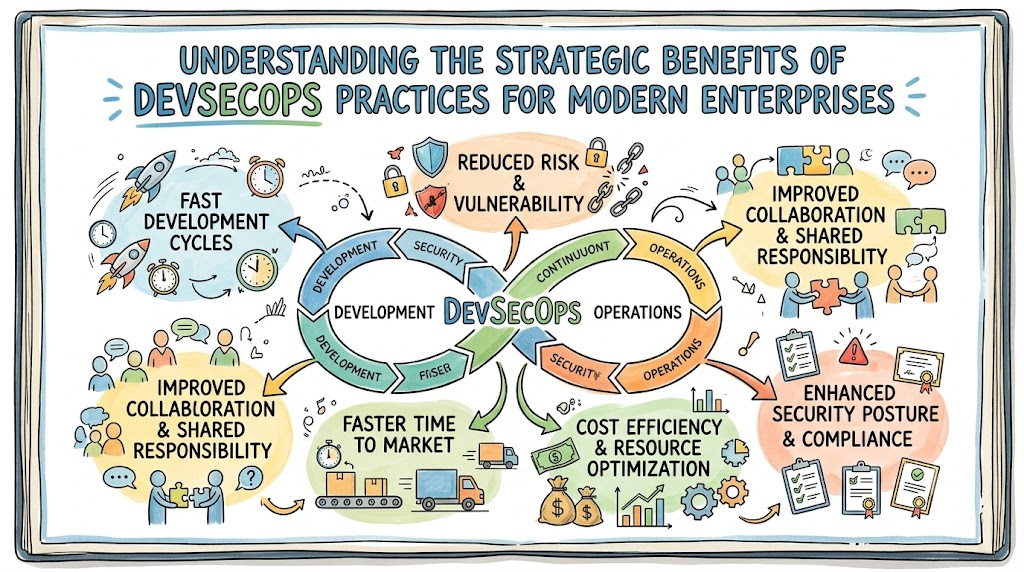
Key Benefits of Adopting DevSecOps Practices
Adopting these practices provides a clear roadmap for balancing agility with risk mitigation. Below is an overview of how this transition impacts an organization.
| DevSecOps Benefit | Business Impact |
| Early Vulnerability Detection | Reduces cost and time to remediate security flaws. |
| Faster Secure Deployments | Enables rapid delivery without compromising safety. |
| Improved Compliance | Automates audit trails and regulatory enforcement. |
| Better Collaboration | Breaks down silos between dev, sec, and ops teams. |
| Reduced Security Risk | Lowers the probability of production-level breaches. |
| Improved Software Quality | Increases trust and reliability for end-users. |
Benefit #1: Shift-Left Security
Shift-left security is the practice of moving security testing to the earliest stages of the development lifecycle. Instead of waiting for a finished application to be scanned by the security team, developers receive feedback on their code while they are still writing it.
Workplace Example: A developer writes a function that uses an insecure library. In a shift-left environment, their IDE or the local pre-commit hook immediately alerts them to the vulnerability. They fix the issue in minutes before the code is even pushed to the repository. This prevents the “vulnerability debt” from accumulating.
Benefit #2: Faster and More Secure Software Delivery
DevSecOps automates security checks within the CI/CD pipeline. When a developer pushes code, the pipeline automatically triggers static application security testing (SAST), dynamic application security testing (DAST), and container scanning.
Workflow Example: Using tools like Jenkins or GitHub Actions, a pipeline is configured to fail the build if high-severity vulnerabilities are found. Because the feedback loop is automated and instantaneous, the team can deliver code faster because they are not waiting for manual approval cycles.
Benefit #3: Early Vulnerability Detection
By scanning for vulnerabilities continuously, organizations catch bugs that would otherwise go unnoticed. This includes dependency scanning, where the system checks if the libraries used in the project have known Common Vulnerabilities and Exposures (CVEs).
Scenario: An application uses an outdated third-party package. A dependency scanner identifies this during the build process, preventing the deployment of vulnerable code. This protects the organization from supply-chain attacks.
Benefit #4: Better Compliance and Governance
Compliance is often viewed as a headache involving spreadsheets and manual audits. DevSecOps uses “Policy-as-Code,” where compliance requirements are codified into the pipeline.
Enterprise Example: An organization needs to ensure all cloud storage buckets are encrypted. Instead of having an auditor check this manually every month, they implement an automated policy that detects and alerts on any unencrypted bucket creation in real-time. This ensures constant audit readiness.
Benefit #5: Improved Collaboration Between Teams
Security teams are often seen as outsiders. DevSecOps encourages shared ownership. When developers understand basic security principles and security teams understand the deployment pipeline, communication barriers fall.
Scenario: A security engineer sits in on a sprint planning meeting to advise on the architecture of a new feature. By being involved early, the security engineer helps design a secure solution rather than rejecting a finished product later.
Benefit #6: Reduced Security Incidents
Proactive monitoring and automated patching reduce the attack surface. By treating infrastructure as code, teams can rapidly replace compromised instances rather than attempting to “clean” them, leading to a more resilient environment.
Benefit #7: Better Cloud Security
Cloud-native workloads often suffer from misconfigurations. DevSecOps practices enforce security at the infrastructure layer (Infrastructure-as-Code). By scanning Terraform or Kubernetes manifests for misconfigurations before deployment, the team prevents production incidents caused by open ports or exposed secrets.
Role of Automation in DevSecOps
Automation is the engine of DevSecOps. It removes human error and ensures consistency. Key areas of automation include:
- Security Scanning: Automated tools scan code for secrets (passwords/API keys) before they reach the repository.
- Policy Enforcement: Automated gates that prevent deployment if security standards are not met.
- Continuous Monitoring: Tools that watch production environments for anomalous behavior and alert the team immediately.
Without automation, the sheer volume of code changes in modern development would make manual security checks impossible.
Real-World Example: Traditional Security Workflow
In a traditional setup, the workflow looks like this:
- Development: Developers write code for weeks.
- Hand-off: Code is pushed to testing.
- Security Review: A security team performs a manual penetration test (weeks later).
- Feedback: They find critical vulnerabilities.
- Rework: Developers must stop current work to fix old bugs.
The Problem: This creates a bottleneck, delays releases, and increases the likelihood that developers will take shortcuts to meet deadlines.
Real-World Example: DevSecOps Workflow
In a DevSecOps environment, the workflow looks like this:
- Commit: Developer pushes code.
- Automated Pipeline: The CI/CD system runs linting, unit tests, and security scans.
- Immediate Feedback: If a vulnerability exists, the build fails, and the developer gets an alert instantly.
- Deployment: Only validated, secure code proceeds to production.
The Result: Developers learn as they code, security debt is minimized, and the deployment is predictable and secure.
Common Challenges in DevSecOps Adoption
Adoption is rarely a straight line. Organizations often face:
- Cultural Resistance: Moving from a “gatekeeper” mindset to a “collaborative” mindset is difficult.
- Skill Gaps: Developers may not have deep security expertise, and security teams may lack automation skills.
- Tool Complexity: Managing dozens of security tools can be overwhelming.
Solutions: Start small. Automate one test at a time. Invest in training, and foster a culture where security is viewed as a feature of the software, not an obstacle to delivery.
Common Beginner Misunderstandings
- “DevSecOps slows down development”: Actually, it accelerates it by catching errors early, which prevents the “stop-the-world” rework required when bugs are found in production.
- “Security teams own all security”: Security is a shared responsibility. Security teams provide the tools and guardrails; developers are responsible for the code they write.
- “Automation solves everything”: Automation is a tool, not a strategy. You still need human oversight for architecture and threat modeling.
- “DevSecOps replaces DevOps”: DevSecOps is an evolution of DevOps, extending its principles to include security.
Best Practices for Successful DevSecOps Adoption
- Start Small: Pick one application and implement one automated security scan in the pipeline.
- Shift Left: Move security testing to the IDE and the pre-commit phase.
- Educate Developers: Security awareness training is vital.
- Continuous Monitoring: Don’t stop at deployment. Monitor production for new threats.
- Standardize Infrastructure: Use Infrastructure-as-Code to ensure consistency and prevent configuration drift.
Role of DevOpsSchool in Learning DevSecOps
Gaining proficiency in DevSecOps requires more than just reading; it requires hands-on practice with the tools and architectures that define modern software delivery. DevOpsSchool offers structured programs designed to help professionals navigate this landscape.
By focusing on practical lab environments, real-world security scenarios, and the integration of CI/CD security automation, learners can move beyond theoretical knowledge. Understanding how to manage cloud-native security and implement effective scanning practices is crucial, and utilizing resources like DevOpsSchool allows engineers to build the specific skill sets needed to manage secure software delivery effectively.
Career Importance of DevSecOps Skills
The demand for professionals who understand DevSecOps is skyrocketing. Roles such as DevSecOps Engineer, Cloud Security Engineer, and SRE are among the most sought-after positions in the tech industry.
Skills in Demand:
- CI/CD Pipeline Security
- Cloud Infrastructure Security
- Monitoring and Logging
- Scripting and Automation
- Threat Modeling
Companies are looking for engineers who can bridge the gap between development and security, making these skills highly valuable for career growth.
Industries Benefiting from DevSecOps
- Banking & Finance: Requires strict compliance and high-security standards for transactional data.
- Healthcare: Mandates protection of sensitive patient information (e.g., HIPAA).
- SaaS Platforms: Constant updates mean they need automated security to maintain velocity.
- E-Commerce: Protects customer data and payment information against rapid-fire threats.
- Telecom: Secures complex, distributed network infrastructures.
Future of DevSecOps
The future of DevSecOps lies in AI-assisted security. We are moving toward systems that can not only detect vulnerabilities but also suggest or even implement the fixes automatically. Policy-as-Code will become more sophisticated, and cloud-native security will integrate even more tightly with development workflows. The goal remains the same: a frictionless path from code to customer, with security woven into every step.
FAQs
- What are the primary benefits of DevSecOps practices?It reduces costs, improves security posture, ensures compliance, and accelerates software delivery by integrating security into the development pipeline.
- Why is DevSecOps important for modern software?It prevents the costly and risky practice of “bolting on” security at the end of development, making software inherently more secure.
- What is shift-left security?It is the practice of performing security tests as early as possible in the development process.
- Does DevSecOps slow down development?No. While it might seem like more work initially, it prevents the time-consuming rework required to fix security bugs late in the cycle.
- Can beginners learn DevSecOps?Yes, provided they have a foundational understanding of development, operations, and basic security concepts.
- Why automate security?Automation ensures that security checks are consistent, repeatable, and capable of keeping up with high-speed deployment cycles.
- What tools are commonly used in DevSecOps?Common tools include SAST/DAST scanners, container security tools, secret management platforms, and CI/CD orchestration tools like Jenkins or GitHub Actions.
- Is DevSecOps replacing DevOps?No, it is a natural progression of DevOps that incorporates security into the existing framework.
- How does DevSecOps help with compliance?It provides automated audit trails and continuous policy enforcement, making compliance “always-on” rather than a point-in-time check.
- What is the biggest challenge in adopting DevSecOps?Changing the culture of the organization is usually more challenging than implementing the technology.
- Do I need to be a security expert to start?No, but you must be willing to learn and collaborate with security teams.
- Is DevSecOps only for cloud environments?While it excels in the cloud, its principles of automation and early security testing apply to any software development environment.
- How do I measure DevSecOps success?Success is measured by metrics like mean time to remediate vulnerabilities, frequency of deployments, and reduction in production incidents.
- What is the role of the security team in DevSecOps?They shift from being “gatekeepers” to “enablers” who provide the tools, guidelines, and expertise for developers to build secure code.
- Can DevSecOps work with legacy applications?Yes, though it is more challenging. It requires wrapping legacy systems in modern security layers and gradually modernizing components.
Final Thoughts
Adopting DevSecOps is a journey, not a destination. The goal is to build a culture where security is a fundamental aspect of engineering excellence. By shifting security to the left, automating critical checks, and fostering collaboration, organizations can deliver high-quality, secure software at speed.
Security should be continuous, automated, and ingrained in the day-to-day workflow. For those starting their path in this domain, the key is to prioritize small, manageable improvements that demonstrate value. DevSecOps is not just about the technology stack; it is about building a safer, more reliable future for software delivery.







Leave a Reply
You must be logged in to post a comment.