Introduction
In modern software engineering, the speed of delivery is often prioritized over the depth of security. However, treating security as an afterthought or a final gatekeeper before production creates massive bottlenecks and leaves systems vulnerable to sophisticated cyber threats. Traditional security approaches, which often rely on manual audits performed only once the code is written, are insufficient for the pace of cloud-native development.
This is where the DevSecOps lifecycle becomes critical. By integrating security into every phase of the software development lifecycle—from the initial planning stages to post-deployment monitoring—teams can identify and mitigate vulnerabilities earlier and more efficiently. Integrating security is not just about tools; it is about building a culture where developers, operations staff, and security professionals share ownership of secure software delivery.
For those looking to transition into this field or enhance their current engineering practices, resources at DevOpsSchool provide structured pathways to master these integrations. Understanding the DevSecOps lifecycle is the primary step in transforming how you approach security, shifting it from a siloed department to a continuous, automated engineering discipline.
What Is the DevSecOps Lifecycle?
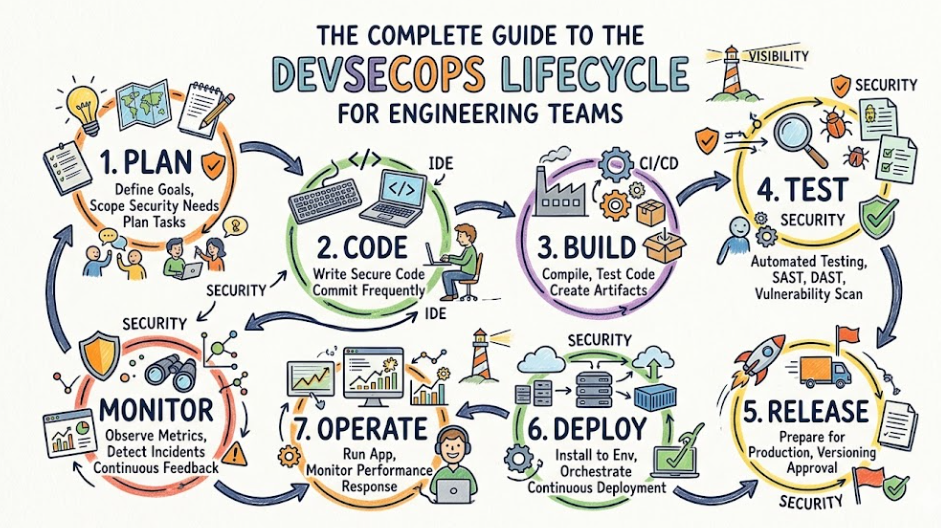
The DevSecOps lifecycle is a framework that incorporates security practices and automation into every phase of the DevOps workflow. Unlike traditional models where security was a separate silo, DevSecOps ensures that security validation, threat modeling, and vulnerability management are baked into the pipeline.
At its core, this approach relies on shift-left security—the practice of testing and verifying code for security flaws as early as possible in the development process. When developers, operations engineers, and security teams collaborate from day one, they reduce the cost of fixing vulnerabilities, minimize technical debt, and ensure the final software product is resilient by design.
Why the DevSecOps Lifecycle Matters
Modern organizations face relentless security risks. Relying on perimeter security is no longer adequate when applications are composed of microservices, third-party libraries, and ephemeral cloud infrastructure.
- Faster Vulnerability Detection: By scanning code and configurations during development, teams catch flaws before they reach production.
- Reduced Security Risks: Automated checks prevent common vulnerabilities like SQL injection or hardcoded secrets from reaching the build phase.
- Compliance Readiness: Continuous monitoring and automated policy enforcement ensure that code remains compliant with industry standards like PCI-DSS or HIPAA throughout its lifecycle.
- Collaborative Culture: DevSecOps removes the friction between development speed and security requirements, aligning teams toward a unified goal of secure shipping.
Evolution from DevOps to DevSecOps
Historically, security was the final gate in the software development lifecycle (SDLC). A development team would build an application, hand it over to operations, and then security teams would conduct a penetration test right before release. If a vulnerability was found, the code had to be sent back, causing significant delays and friction.
The rise of cloud-native technologies, such as containers and orchestration platforms like Kubernetes, required a shift. The velocity of these environments made manual security gates impossible to maintain. Organizations began shifting security left, moving it earlier into the cycle. This evolution transformed security from a manual, intermittent activity into a continuous, automated process that runs alongside every commit.
Overview of the DevSecOps Lifecycle Stages
The following table summarizes the stages of the DevSecOps lifecycle and the primary security focus at each step.
| Stage | Purpose | Security Focus | Common Tools |
| Planning | Requirements & Design | Threat Modeling | Jira, Confluence |
| Development | Writing Code | Secure Coding, Secrets | Git, GitHub |
| Build | Compile & Package | Dependency Security | Maven, npm |
| Integration | Merging Code | SAST, Secret Scanning | Jenkins, SonarQube |
| Testing | Validation | DAST, API Scanning | OWASP ZAP, Nessus |
| Release | Approval | Signing, Compliance | Nexus, Artifactory |
| Deployment | Infrastructure | IaC Security, Policy | Docker, Kubernetes |
| Operations | Management | Runtime Security | Cloud Native Tools |
| Monitoring | Analysis | SIEM, Log Analysis | Prometheus, Splunk |
| Feedback | Improvement | Incident Review | Post-mortems |
Stage 1: Secure Planning
Before a single line of code is written, security must be part of the design. This stage involves defining the security requirements for the features being built.
- Threat Modeling: Teams identify potential attack vectors early.
- Compliance: Mapping features against regulatory requirements.
- Security Policies: Establishing what “secure” looks like for this specific project.
Tools like Jira or Confluence are used to document these requirements, while frameworks like OWASP Threat Dragon help visualize the attack surface.
Stage 2: Secure Development
During development, the focus is on enabling developers to write secure code without slowing down their workflow.
- Secure Coding Practices: Developers follow guidelines to avoid common vulnerabilities (e.g., OWASP Top 10).
- Code Reviews: Peer reviews focusing on security logic, not just functionality.
- Secret Management: Ensuring API keys and credentials never enter the version control system.
Using Git platforms like GitHub or GitLab, teams can implement pre-commit hooks that prevent code with potential security flaws from being committed to the repository.
Stage 3: Secure Build Process
When code is built, dependencies are introduced. The build process must be secured to ensure the software package is not tampered with.
- Dependency Scanning: Checking open-source libraries for known vulnerabilities (CVEs).
- Artifact Validation: Ensuring that the binaries being produced are authentic.
- Secure Package Management: Using private, secured repositories for all third-party dependencies.
Tools like Maven or Gradle are used here, integrated with vulnerability scanners that halt the build if a critical vulnerability is detected in a library.
Stage 4: Continuous Integration Security
The CI pipeline is the heart of the DevSecOps lifecycle. As code is integrated, automation should run the first round of security verification.
- Static Application Security Testing (SAST): Analyzing the source code for patterns that indicate vulnerabilities.
- Secret Scanning: Detecting any accidentally committed passwords or tokens.
- Code Quality Validation: Ensuring the code meets security and stability standards.
Tools like SonarQube, Jenkins, or GitHub Actions automate these tests, providing immediate feedback to the developer.
Stage 5: Security Testing
Once the application is built and integrated, it needs to be tested in a functional state.
- Dynamic Application Security Testing (DAST): Testing the running application to find vulnerabilities like cross-site scripting (XSS).
- API Security Testing: Ensuring that endpoints are not exposed to unauthorized access.
- Vulnerability Scanning: Using tools to probe the application from the outside, mimicking an attacker’s approach.
Tools like OWASP ZAP, Burp Suite, or Nessus are industry standards for these types of assessments.
Stage 6: Secure Release Management
Before the release, the artifact needs to be “signed” and verified to prove it came from the trusted build pipeline.
- Artifact Signing: Cryptographically signing images to ensure integrity.
- Compliance Validation: Final checks to ensure all required security approvals are met.
- Version Control: Ensuring that only authorized versions are tagged for production.
Tools like Nexus or Artifactory manage the secure distribution of these artifacts.
Stage 7: Secure Deployment
Deploying to production is a high-risk activity. The infrastructure itself must be secured.
- Secure Kubernetes Deployments: Using namespaces, RBAC (Role-Based Access Control), and network policies.
- Container Scanning: Ensuring that the container image itself is free of OS-level vulnerabilities.
- Policy Enforcement: Using admission controllers to ensure only compliant configurations are deployed.
Tools like Docker, Kubernetes, Helm, and Argo CD are essential for maintaining a secure deployment state.
Stage 8: Secure Operations
Once deployed, the application enters the operations phase. The focus shifts to maintaining the security posture of the live environment.
- Infrastructure Security: Hardening cloud instances and network configurations.
- Patch Management: Quickly deploying security updates to the environment.
- Runtime Protection: Ensuring the application remains secure during execution.
Stage 9: Security Monitoring and Threat Detection
Security is continuous. Monitoring systems must be in place to detect anomalies that might indicate a breach.
- Continuous Monitoring: Keeping an eye on logs and performance metrics.
- SIEM Integration: Aggregating security data for analysis.
- Threat Detection: Alerting on suspicious behavior in real-time.
Tools like Prometheus, Grafana, ELK Stack, and Splunk provide the visibility required to respond to incidents effectively.
Stage 10: Continuous Feedback and Improvement
The final stage is the loop back to planning. Security data from production must inform future development.
- Security Incident Reviews: Analyzing what happened during an incident and why.
- Lessons Learned: Updating threat models and security policies based on real-world data.
- Process Optimization: Tweaking the CI/CD pipeline to better catch similar issues next time.
Shift-Left Security in the DevSecOps Lifecycle
Shift-left security is the practice of moving security tasks to earlier phases in the SDLC. By testing during the development phase, you avoid the high costs and timeline delays associated with fixing bugs at the end. It empowers developers to take ownership of security, turning them into the first line of defense. This requires tooling that integrates directly into IDEs and command-line interfaces.
Infrastructure as Code (IaC) Security
Modern infrastructure is defined in code. If the code defining the infrastructure (e.g., Terraform scripts) is insecure, the entire environment is vulnerable.
- Misconfiguration Detection: Scanning IaC templates for open ports, insecure permissions, or unencrypted storage.
- Compliance Validation: Ensuring infrastructure matches regulatory requirements before provisioning.
Tools like Terraform, Checkov, and Terrascan are critical for automating these checks.
Containers and Kubernetes Security
Containers have revolutionized deployment, but they have also introduced a new attack surface. Secure container management includes:
- Container Image Scanning: Checking images for vulnerable libraries before they run.
- Kubernetes RBAC: Strictly controlling who can access the cluster and what they can do.
- Pod Security: Using security contexts to limit privileges for container processes.
CI/CD Security in the DevSecOps Lifecycle
To understand the difference, consider the table below.
| Feature | Traditional CI/CD | Secure DevSecOps Pipeline |
| Security Timing | Added at the end (Gate) | Integrated throughout (Process) |
| Vulnerability Scanning | Periodic/Manual | Automated per commit |
| Compliance Checks | Manual Audits | Automated Policy as Code |
| Secrets Management | Hardcoded or Env Vars | Managed via Vault/Secret tools |
| Monitoring | Reactive | Proactive/Real-time |
Real-World DevSecOps Lifecycle Workflow Example
- Development: A developer writes code. Before committing, a pre-commit hook runs a local secret scanner.
- Commit: Code is pushed to Git.
- CI Pipeline: The pipeline triggers a SAST scan to check for logic flaws.
- Build: Dependencies are pulled, and a Software Composition Analysis (SCA) tool checks for known vulnerabilities in those dependencies.
- Artifact: A Docker image is created and scanned for vulnerabilities.
- Deploy: The image is deployed to Kubernetes with pre-approved policies.
- Monitor: Runtime security tools monitor the container for unauthorized access.
- Feedback: Logs are fed into a SIEM, and if an anomaly occurs, the team is alerted to remediate.
Benefits of the DevSecOps Lifecycle
- Faster Vulnerability Detection: Issues are found while code is still fresh.
- Better Compliance: Security controls are automated and auditable.
- Reduced Cyber Risks: A hardened pipeline is harder to exploit.
- Improved Collaboration: Security becomes a shared responsibility rather than a blocker.
- Faster Deployments: Automation removes the “waiting for security sign-off” bottleneck.
Common Challenges in DevSecOps Adoption
- Tool Complexity: Managing a massive stack of security tools is difficult.
- Developer Resistance: Security tools that generate too many false positives will be ignored.
- Security Skill Gaps: Teams often lack the expertise to write secure IaC or manage container security.
- Legacy Systems: Older applications are difficult to integrate into modern automated pipelines.
Best Practices for Implementing the DevSecOps Lifecycle
- Automate Everything: If it isn’t automated, it won’t be consistent.
- Prioritize False Positives: Tune tools to ensure developers trust the feedback.
- Start Small: Pick one application to pilot the DevSecOps lifecycle before rolling it out across the enterprise.
- Train Teams: Invest in security training for developers and platform engineers.
- Audit Regularly: Use automated compliance tools to ensure the environment hasn’t drifted.
Popular Tools Used Across the DevSecOps Lifecycle
| Tool | Lifecycle Stage | Purpose | Difficulty Level |
| Jira | Planning | Tracking requirements | Low |
| SonarQube | CI | SAST & Code Quality | Medium |
| Snyk | Build/CI | Dependency Scanning | Low |
| OWASP ZAP | Testing | DAST | Medium |
| Terraform | IaC | Cloud Provisioning | High |
| Prometheus | Monitoring | Metrics & Alerting | Medium |
Industries Benefiting from DevSecOps
- Banking & Finance: Requires strict compliance and fraud detection.
- Healthcare: Protection of patient data is paramount and heavily regulated.
- E-Commerce: Customer trust depends on secure transactions.
- SaaS Platforms: Rapid updates require automated security to stay competitive.
- Telecom: Managing massive infrastructure requires robust security automation.
Career Opportunities Related to DevSecOps
The demand for professionals who understand the intersection of security and development is skyrocketing.
- DevSecOps Engineer: Bridges the gap between development and security.
- Cloud Security Engineer: Focuses on securing cloud infrastructure and services.
- Security Analyst: Monitors and responds to threats.
- Platform Security Engineer: Hardens the internal developer platforms.
Certifications & Learning Paths
Hands-on experience is the most valuable asset.
| Certification | Best For | Skill Level | Focus Area |
| CKS | Kubernetes Security | Expert | K8s Hardening |
| CompTIA Security+ | General Security | Beginner | Fundamentals |
| AWS Security | Cloud Security | Intermediate | Cloud-Native |
The learning ecosystem at DevOpsSchool is an excellent place to start building these practical skills.
Common Beginner Mistakes
- Treating security as a plugin: You cannot just add a scanner and call it DevSecOps. It requires process change.
- Ignoring developers: If you force security tools on them without training, they will find ways to bypass them.
- Weak cloud security: Using default configurations in cloud providers is a primary source of breaches.
- Focusing on tools over process: Tools are only as good as the processes that guide them.
- Skipping fundamentals: Trying to secure Kubernetes without understanding networking or Linux basics is a recipe for failure.
Future of the DevSecOps Lifecycle
The future lies in AI-powered threat detection, where machine learning models predict vulnerabilities before they are even written. We are also seeing a major shift toward Policy as Code, where security rules are treated like application code and version-controlled. Zero-trust architectures will become the standard, assuming that no device or user is inherently safe, regardless of their location on the network.
FAQs
1. What is the DevSecOps lifecycle?
It is the integration of security practices and automation into every stage of the software development lifecycle, from initial planning to production monitoring.
2. Why is DevSecOps important?
It allows teams to identify vulnerabilities earlier, reduces the cost of remediation, and ensures security keeps pace with rapid software delivery.
3. What is shift-left security?
It is the practice of performing security testing and validation as early as possible in the development process, rather than waiting until the end.
4. Is Kubernetes security important?
Yes, because Kubernetes controls the orchestration of containers. A misconfigured cluster can expose the entire application to the internet.
5. What tools are used in DevSecOps?
Tools range from static analysis (SAST) like SonarQube to infrastructure scanning tools like Checkov and runtime monitors like Prometheus.
6. What is SAST and DAST?
SAST (Static Application Security Testing) analyzes code for flaws without running it. DAST (Dynamic Application Security Testing) tests the application while it is running.
7. Is DevSecOps a good career path?
Yes. As businesses migrate to the cloud and face increasing cyber threats, demand for skilled DevSecOps professionals continues to outpace supply.
8. How is DevSecOps different from DevOps?
DevOps focuses on speed and collaboration between development and operations. DevSecOps adds security as a first-class citizen in that collaboration.
9. Can I implement DevSecOps in a legacy environment?
Yes, though it requires a phased approach, starting with automated scans on existing code and gradually moving toward modern infrastructure practices.
10. What is the most critical stage in the DevSecOps lifecycle?
All stages are critical, but planning and development are where you get the most leverage to prevent vulnerabilities from occurring in the first place.
11. How does IaC security work?
IaC security tools scan configuration files (like Terraform or CloudFormation) to identify security misconfigurations before the infrastructure is deployed.
12. Do I need to be a security expert to learn DevSecOps?
No, but you need a fundamental understanding of how applications are built, deployed, and how basic security principles apply to those processes.
13. What is the biggest hurdle in adopting DevSecOps?
Cultural resistance. Getting teams to value security as much as they value feature delivery is often harder than choosing the right tools.
14. How often should security scans run?
Ideally, security scans should run on every commit or at least daily, ensuring that new vulnerabilities are detected immediately.
15. What is the role of automation in DevSecOps?
Automation removes human error, ensures consistent application of security policies, and allows security checks to happen at the speed of modern development.
Final Thoughts
The DevSecOps lifecycle is not a checklist of tools to buy or a standard to follow; it is a philosophy of engineering. From my experience in the field, the most successful implementations don’t come from organizations with the most expensive tools, but from those that successfully foster a culture of shared responsibility.
Security must be an enabler, not a gatekeeper. By understanding the lifecycle phases and integrating automation where it makes the most sense, you can build systems that are not only fast but inherently secure. Start by understanding the fundamentals, master the CI/CD pipeline, and gradually expand your expertise into cloud-native security. There is no shortcut to building a secure environment, but a methodical approach using the DevSecOps lifecycle will set you on the right path.




Leave a Reply
You must be logged in to post a comment.