Businesses send files to customers, suppliers, banks, and business partners every day. These files may contain payroll records, invoices, customer details, or private business data.
A simple file transfer method may not offer enough control. Teams need to protect files, manage user access, track delivery, and handle failed transfers.
Managed File Transfer (MFT) tools help businesses manage these tasks from one place. They support secure file exchange, transfer automation, activity tracking, and partner connections.
Some tools focus on enterprise file movement. Others help with cloud storage, business integration, or open-source file transfer. This guide compares ten MFT tools and explains their features, benefits, limits, and best uses.
What Are Secure File Transfer (MFT) Tools?
Managed File Transfer tools help businesses send, receive, store, and manage files securely. They bring file transfer tasks under one central system.
These tools often support secure transfer methods such as SFTP, FTPS, HTTPS, and AS2. They can also automate file movement between servers, cloud platforms, and business applications.
MFT tools offer more control than a basic FTP server. They can help teams manage user permissions, schedule transfers, record activity, and track errors.
For example, a company may receive order files from many suppliers. An MFT tool can check each file, move it to the right system, and record the transfer result.
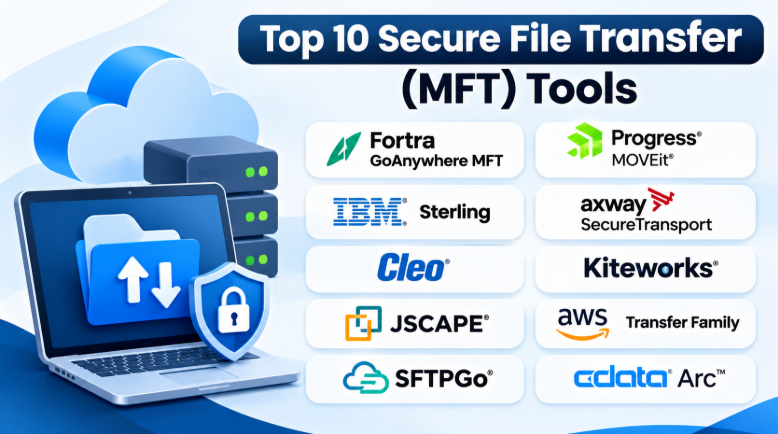
Top 10 Secure File Transfer (MFT) Tools
The following tools serve different business needs. Some focus on automation and enterprise control. Others support partner integration, cloud storage, or flexible file transfer.
1. Fortra GoAnywhere MFT
Fortra GoAnywhere MFT helps businesses manage file transfers through one central platform. It supports file movement between employees, business partners, servers, and cloud services.
The platform offers a visual workflow designer. Teams can build tasks, schedule transfers, and respond to file events. This can reduce the need for separate scripts and manual work.
GoAnywhere supports protocols such as SFTP, FTPS, SCP, HTTPS, and AS2. It also offers encryption, access controls, activity logs, and integration options. Fortra’s GoAnywhere+1
Key Features
- Supports several secure file transfer protocols.
- Automates scheduled and event-based workflows.
- Provides a visual workflow designer.
- Supports file encryption and access controls.
- Tracks file transfer activity through logs.
- Connects with cloud storage and business systems.
Pros
- Brings many transfer tasks into one platform.
- Helps reduce manual file handling.
- Supports different business and technical environments.
- Offers useful workflow automation.
Cons
- Advanced workflows may need technical planning.
- Large deployments can require careful setup.
- Licensing and modules may affect the total cost.
Best Uses
GoAnywhere is useful for businesses that manage many file transfers. It suits teams that want automation, central control, and detailed transfer records.
2. Progress MOVEit
Progress MOVEit helps organizations exchange sensitive files with employees, customers, and business partners. It provides tools for secure file transfer, access management, and activity tracking.
MOVEit Transfer manages file exchange. MOVEit Automation helps teams build and run repeatable transfer workflows.
The platform supports controlled file sharing and automated file movement. It also provides audit records that help teams review transfer activity.
Key Features
- Supports secure file transfer and sharing.
- Provides workflow automation through MOVEit Automation.
- Offers access controls and user management.
- Records file transfer activity.
- Supports APIs and business integrations.
- Helps teams manage external file exchange.
Pros
- Combines secure file exchange with automation options.
- Helps track important transfer activities.
- Supports business and system-based workflows.
- Can serve organizations with sensitive data needs.
Cons
- Some advanced needs may require separate components.
- Setup can take time in complex environments.
- Buyers should review the available modules carefully.
Best Uses
MOVEit is suitable for organizations that exchange sensitive files with outside partners. It can also help teams that need clear transfer records and repeatable workflows.
3. IBM Sterling Secure File Transfer
IBM Sterling Secure File Transfer supports large and complex file exchange environments. It serves organizations that move data between business systems, trading partners, and enterprise applications.
IBM Sterling includes several products for different transfer needs. Sterling File Gateway helps manage partner file exchanges. Connect:Direct supports reliable system-to-system transfers. Other components help with monitoring and secure network access.
This product family suits organizations with complex transfer networks. It can support large business processes that depend on reliable file movement.
Key Features
- Supports enterprise file transfer workflows.
- Offers partner exchange through Sterling File Gateway.
- Provides system-to-system transfer with Connect:Direct.
- Supports centralized monitoring components.
- Helps manage large transfer environments.
- Connects with enterprise applications and systems.
Pros
- Supports complex enterprise workflows.
- Offers different components for different transfer needs.
- Fits organizations with large partner networks.
- Supports demanding system-to-system file movement.
Cons
- The product family can be complex to understand.
- Deployment may need specialist technical skills.
- Licensing and infrastructure need careful planning.
Best Uses
IBM Sterling is useful for large enterprises with complex file transfer needs. It suits industries where many systems and partners exchange important business data.
4. Axway SecureTransport
Axway SecureTransport helps organizations manage file transfers across business systems and external partners. It supports several transfer protocols and provides central control over file exchange.
The platform supports protocols such as SFTP, FTPS, HTTPS, AS2, and other transfer methods. It also offers APIs for connecting file transfers with business applications.
SecureTransport provides monitoring, alerts, reporting, and transfer management features. These tools help IT teams track file movement across different environments.
Key Features
- Supports multiple file transfer protocols.
- Provides centralized transfer management.
- Offers APIs for system connections.
- Supports partner file exchange.
- Provides monitoring and reporting features.
- Helps manage complex transfer environments.
Pros
- Supports different business and technical environments.
- Helps centralize partner file exchange.
- Offers useful monitoring and reporting.
- Supports integration with business systems.
Cons
- Large deployments may need careful planning.
- Administration can require technical knowledge.
- Buyers should review migration needs before deployment.
Best Uses
Axway SecureTransport is suitable for large organizations with many business partners. It can help teams manage file transfers across complex systems.
5. Cleo Integration Cloud
Cleo Integration Cloud combines managed file transfer with business-to-business integration. It helps companies connect suppliers, customers, and business applications.
The platform supports EDI, APIs, file transfer, and application integration. EDI means Electronic Data Interchange. It lets businesses exchange structured documents such as orders and invoices.
Cleo can connect file exchange with business workflows. This makes it useful for companies that need more than basic file movement.
Key Features
- Combines MFT and B2B integration.
- Supports EDI document exchange.
- Connects business applications through integrations.
- Supports secure partner file transfer.
- Helps automate data movement.
- Provides tools for partner management.
Pros
- Combines file transfer and business integration.
- Useful for supplier and customer connections.
- Supports structured business document exchange.
- Helps connect file workflows with applications.
Cons
- May offer more features than basic transfer teams need.
- EDI workflows can require technical planning.
- Integration setup depends on business systems.
Best Uses
Cleo is useful for supply-chain companies and businesses that exchange EDI documents. It suits teams that need file transfer and application integration together.
6. Kiteworks Managed File Transfer
Kiteworks focuses on secure content exchange and data governance. Its platform helps organizations control how sensitive files move between people and systems.
Kiteworks supports secure file transfer and controlled sharing. It offers access policies, encryption, audit records, and integration options.
The platform is relevant to organizations that need strong control over sensitive information. It can help security teams manage file exchange across business workflows.
Key Features
- Supports managed file transfer.
- Provides access controls and security policies.
- Offers encryption for file protection.
- Records file activity for audit needs.
- Supports integrations with business systems.
- Helps manage sensitive content exchange.
Pros
- Focuses on secure content exchange.
- Helps centralize access and governance controls.
- Supports audit and monitoring needs.
- Can suit organizations with strict data policies.
Cons
- Advanced governance features may need planning.
- Buyers should check the exact features in each package.
- It may be more than small teams require.
Best Uses
Kiteworks is suitable for organizations that exchange sensitive business files. It can help teams that need central security controls and detailed activity records.
7. JSCAPE Managed File Transfer
JSCAPE MFT Server helps businesses transfer files across different systems and operating environments. It supports several protocols through a central transfer platform.
The product family includes MFT Server, MFT Gateway, and MFT Monitor. These components help teams manage transfers, protect network access, and monitor transfer services.
JSCAPE can support on-premises, cloud, and hybrid environments. Its protocol flexibility can help businesses connect systems that use different transfer methods.
Key Features
- Supports multiple file transfer protocols.
- Provides centralized file transfer management.
- Offers gateway options for network protection.
- Includes monitoring capabilities.
- Supports different deployment environments.
- Helps automate file transfer tasks.
Pros
- Supports mixed technical environments.
- Offers several protocol options.
- Provides separate gateway and monitoring components.
- Can fit different deployment needs.
Cons
- Some deployments may need multiple components.
- Setup requires network and security planning.
- Teams should check which features need separate licensing.
Best Uses
JSCAPE is useful for businesses with different operating systems and transfer protocols. It suits IT teams that need flexible file transfer management.
8. AWS Transfer Family
AWS Transfer Family is a managed file transfer service from Amazon Web Services. It helps businesses move files into and out of Amazon S3 and Amazon EFS.
The service supports SFTP, FTPS, FTP, and AS2. It lets organizations use familiar transfer methods while storing files in AWS services.
AWS Transfer Family reduces the need to manage traditional transfer servers. Teams can connect file transfers with other AWS services and build automated workflows.
Key Features
- Supports SFTP, FTPS, FTP, and AS2.
- Connects with Amazon S3 and Amazon EFS.
- Provides managed transfer infrastructure.
- Supports identity and access management options.
- Connects with other AWS services.
- Supports automated file processing workflows.
Pros
- Reduces transfer server maintenance.
- Fits businesses already using AWS.
- Connects file transfer with cloud storage.
- Supports several common transfer protocols.
Cons
- Works best in AWS-based environments.
- Costs can depend on endpoints, storage, and data movement.
- Complex partner workflows may need extra AWS services.
Best Uses
AWS Transfer Family is suitable for companies that store business files in AWS. It can help teams create managed file transfer workflows without running their own transfer servers.
9. SFTPGo
SFTPGo is an open-source file transfer server. It supports secure file access through protocols such as SFTP, SCP, FTP/S, and WebDAV.
The platform can use different storage backends. These include local storage and supported cloud storage services.
SFTPGo also offers user management, virtual folders, APIs, and event-based actions. Its open-source edition gives technical teams more control over hosting and configuration.
Key Features
- Supports SFTP, SCP, FTP/S, and WebDAV.
- Connects with different storage backends.
- Provides user and permission management.
- Offers REST API support.
- Supports event-based actions.
- Provides open-source and commercial editions.
Pros
- Offers an open-source option.
- Supports several transfer protocols.
- Works with different storage systems.
- Gives technical teams control over deployment.
Cons
- Self-hosting needs ongoing maintenance.
- Advanced setup may require technical skills.
- Some features depend on the selected edition.
Best Uses
SFTPGo is useful for developers, IT teams, and businesses that want a flexible transfer server. It can suit organizations that prefer self-managed infrastructure.
10. CData Arc
CData Arc combines file transfer with data integration and EDI workflows. It helps businesses connect trading partners, applications, and data systems.
The platform supports protocols such as SFTP, FTPS, AS2, AS4, and FTP. It also helps teams map and transform business data before sending it to another system.
CData Arc can be useful when file exchange includes data conversion. For example, a business may need to convert a supplier’s EDI document before sending it to an ERP system.
Key Features
- Combines MFT and data integration.
- Supports EDI workflows.
- Offers visual workflow design.
- Supports multiple transfer protocols.
- Provides data mapping and transformation.
- Connects with business applications.
Pros
- Combines file transfer with data processing.
- Helps manage business document workflows.
- Supports partner data exchange.
- Offers visual tools for building workflows.
Cons
- Complex mappings may need specialist knowledge.
- Basic transfer users may not need its wider features.
- Buyers should confirm required connectors and formats.
Best Uses
CData Arc is suitable for businesses that exchange EDI files and structured data. It can help teams connect file transfers with application workflows.
Comparison Table: Top 10 Secure File Transfer (MFT) Tools
The table below highlights the main differences between these tools.
| Software | Best For | Main Strength | Deployment Approach |
|---|---|---|---|
| Fortra GoAnywhere MFT | Automated business file transfers | Visual workflow automation | On-premises, cloud, and hybrid options |
| Progress MOVEit | Secure external file exchange | Transfer management and automation | Self-managed and cloud options |
| IBM Sterling | Large enterprise environments | Enterprise partner and system transfers | Enterprise and hybrid environments |
| Axway SecureTransport | Complex partner networks | Centralized transfer management | Cloud, on-premises, and hybrid options |
| Cleo Integration Cloud | Supply-chain integration | MFT, EDI, and application integration | Cloud and hybrid options |
| Kiteworks MFT | Sensitive content exchange | Governance and access controls | Available deployment options depend on offering |
| JSCAPE MFT | Mixed operating environments | Multi-protocol file transfer | Cloud, on-premises, and hybrid options |
| AWS Transfer Family | AWS file workflows | Managed transfer into AWS storage | AWS cloud service |
| SFTPGo | Self-managed file transfer | Open-source flexibility | Self-hosted and supported cloud storage |
| CData Arc | EDI and data workflows | File transfer and data mapping | Self-managed and cloud options |
Which Secure File Transfer Tool Is Right for You?
The right MFT tool depends on your file transfer needs, business size, and technical setup. A small team may need a simple transfer server. A large company may need automation and partner management.
For Beginners and Small Teams
SFTPGo can be a useful starting point for teams with technical skills. Its open-source option provides flexibility without requiring a large enterprise platform.
AWS Transfer Family may suit small teams that already use AWS. It can reduce the work needed to manage transfer servers.
For Business File Automation
Fortra GoAnywhere MFT and Progress MOVEit offer tools for automated file workflows. They can help teams reduce manual transfers and track important file activity.
For Large Enterprises
IBM Sterling and Axway SecureTransport are worth reviewing for complex transfer networks. They can support organizations with many systems and external partners.
For Supply Chain and EDI Workflows
Cleo Integration Cloud and CData Arc can help businesses exchange structured documents. They also connect file transfers with business applications.
For Sensitive Business Files
Kiteworks can suit organizations that need strong control over sensitive content exchange. Progress MOVEit and GoAnywhere are also worth evaluating for controlled file transfer workflows.
For Mixed Systems and Protocols
JSCAPE can help organizations that work with different operating systems and transfer methods. It offers a central platform for managing multiple protocols.
Important Features to Check Before Choosing MFT Software
A good MFT tool should match your business workflow. Check these features before making a decision.
Secure Transfer Protocols
Check whether the software supports the protocols your partners use. Common options include SFTP, FTPS, HTTPS, and AS2.
Do not assume every tool supports every protocol. Confirm support in the product edition you plan to buy.
File Encryption
Encryption helps protect files during transfer and storage. Check how the platform manages encryption keys and certificates.
Also review whether your business needs file-level encryption. This can protect a file beyond its transfer connection.
User Access Control
Access controls help limit who can upload, download, view, or manage files. Look for user roles and folder-level permissions.
Each partner should receive only the access needed for its work.
Workflow Automation
Automation can move files without manual steps. It can also rename, scan, process, or route files after they arrive.
Check whether the platform supports scheduled and event-based workflows.
Audit Logs and Reports
Audit logs help teams review transfer activity. They can show who accessed a file and whether a transfer succeeded.
Check how long logs remain available. Also confirm whether your security team can export them.
Integration Support
Your MFT tool should work with your existing systems. Check support for cloud storage, databases, ERP platforms, APIs, and identity services.
Backup and Recovery
A failed transfer should not cause data loss. Check how the platform handles interrupted transfers and system recovery.
Also confirm how you can back up configuration, keys, workflows, and transfer records.
Common Mistakes to Avoid When Selecting MFT Software
Choosing MFT software only by its protocol list can lead to problems. Consider these common mistakes before buying.
- Ignoring workflow needs: A transfer tool may not support the processing steps your business needs.
- Overlooking access control: Weak permissions can expose sensitive files.
- Ignoring operating costs: Hosting, storage, support, and maintenance can increase the total cost.
- Skipping partner testing: Each partner may use different protocols and security settings.
- Forgetting recovery plans: Teams need clear steps for failed transfers and system outages.
- Choosing too many features: A complex platform can add cost and work when a simple tool is enough.
Frequently Asked Questions About Secure File Transfer Tools
What is Managed File Transfer software?
Managed File Transfer software helps businesses send and receive files securely. It also provides automation, access controls, monitoring, and transfer records.
How is MFT different from SFTP?
SFTP is a secure file transfer protocol. MFT is a platform that manages file transfers, users, workflows, and activity records. An MFT platform may use SFTP as one of its transfer methods.
Are MFT tools suitable for small businesses?
Yes. Small businesses can use MFT tools when they exchange sensitive files or need automated transfers. The right choice depends on cost, technical skills, and workflow needs.
What is the difference between FTP, FTPS, and SFTP?
FTP is a basic file transfer protocol. FTPS adds TLS security to FTP. SFTP transfers files over SSH. These protocols use different connection and security methods.
Can MFT tools automate file transfers?
Yes. Many MFT tools support scheduled and event-based transfers. Some can also scan, rename, transform, and route files.
Are open-source MFT tools available?
Yes. SFTPGo offers an open-source file transfer server. Open-source software still needs proper setup, monitoring, updates, and security management.
What should businesses check before buying MFT software?
Businesses should review protocol support, encryption, user permissions, automation, audit logs, integrations, deployment, and total operating cost. A pilot can help confirm that the tool works with real business workflows.
Final Thoughts
Secure File Transfer tools help businesses protect and manage important file exchanges. They also reduce manual work and improve visibility across transfer processes.
Fortra GoAnywhere MFT and Progress MOVEit offer strong options for managed transfer workflows. IBM Sterling and Axway SecureTransport suit complex enterprise environments. Cleo and CData Arc focus on business integration, while SFTPGo offers an open-source approach.
AWS Transfer Family can suit cloud-based file workflows. Kiteworks focuses on sensitive content governance, and JSCAPE supports varied transfer environments.
Before choosing a platform, list your file sources, destinations, partners, and security needs. Test a complete transfer from start to finish. The best tool is the one that fits your real workflow and that your team can manage with confidence.


Leave a Reply
You must be logged in to post a comment.