Introduction
In the current landscape of software delivery, speed is often prioritized above all else. Engineers are expected to deploy features daily, sometimes hourly. However, this velocity often leaves traditional security practices behind. In the past, security was a final checkpoint—a hurdle at the end of the development cycle that slowed everything down. Today, that approach is no longer viable.
Modern software development requires a shift in mindset. We cannot treat security as a distinct phase that happens after coding is complete. Instead, security must be woven into the fabric of the software development lifecycle. This is where Security Automation in DevOps becomes critical. Without automation, security testing becomes a manual bottleneck, prone to human error and incapable of keeping pace with the rapid release cycles of modern cloud-native applications.
If you are just starting your journey or looking to refine your existing processes, exploring resources can be immensely helpful. For those seeking structured, hands-on learning, DevSecOpsSchool offers specialized training designed to bridge the gap between theory and real-world application.
Integrating automated security controls allows teams to catch vulnerabilities early, reduce manual intervention, and foster a culture of shared responsibility. This guide will walk you through the essential concepts, workflows, and tools required to build a resilient, automated security posture.
What Is Security Automation in DevOps?
At its core, Security Automation in DevOps is the integration of security tools, processes, and policies directly into the CI/CD (Continuous Integration/Continuous Deployment) pipeline. It involves using software to perform security checks, testing, and compliance monitoring automatically whenever code is committed or infrastructure is changed.
A Beginner-Friendly Explanation
Imagine a factory assembly line. In the traditional security model, an inspector stands at the very end of the line, checking every single product for defects before it ships. If they find a flaw, the entire batch goes back to the beginning, causing massive delays.
In a DevOps-driven security model, sensors and automated scanners are installed at every station along the assembly line. If a defect is detected during the molding phase, the alarm sounds immediately. The worker at that specific station fixes the issue before it ever moves to the painting or packaging phase. This is “shifting left.”
Security automation effectively moves security checks from the end of the cycle to the earliest stages of development. It replaces manual, tedious tasks—like scanning code or checking server configurations—with automated scripts and tools that run consistently, every single time code is touched.
Why Security Automation Matters in DevOps
The reliance on manual security assessments is a primary driver of friction in software organizations. Automation solves this by addressing several critical pain points.
Faster Release Cycles
Automation eliminates the waiting period associated with manual security sign-offs. When security testing is automated, developers get feedback in minutes rather than days. This allows them to iterate quickly without compromising the safety of the application.
Reduced Vulnerabilities
Manual testing is inconsistent. Humans forget, get tired, or overlook complex code patterns. Automated tools, however, are tireless. They scan the entire codebase against thousands of known vulnerability patterns consistently, ensuring that low-hanging fruit and common exploits are caught long before deployment.
Early Threat Detection
The cost of fixing a security flaw increases exponentially the later it is found. By automating testing in the development environment, teams identify issues while the code is still fresh in the developer’s mind. This prevents vulnerabilities from ever reaching production.
Better Compliance and Auditability
Compliance requirements, such as SOC2, HIPAA, or PCI-DSS, often require rigorous, documented testing. Automation provides a continuous, timestamped log of all security tests, making audit preparation a matter of running a report rather than scrambling to manually gather evidence.
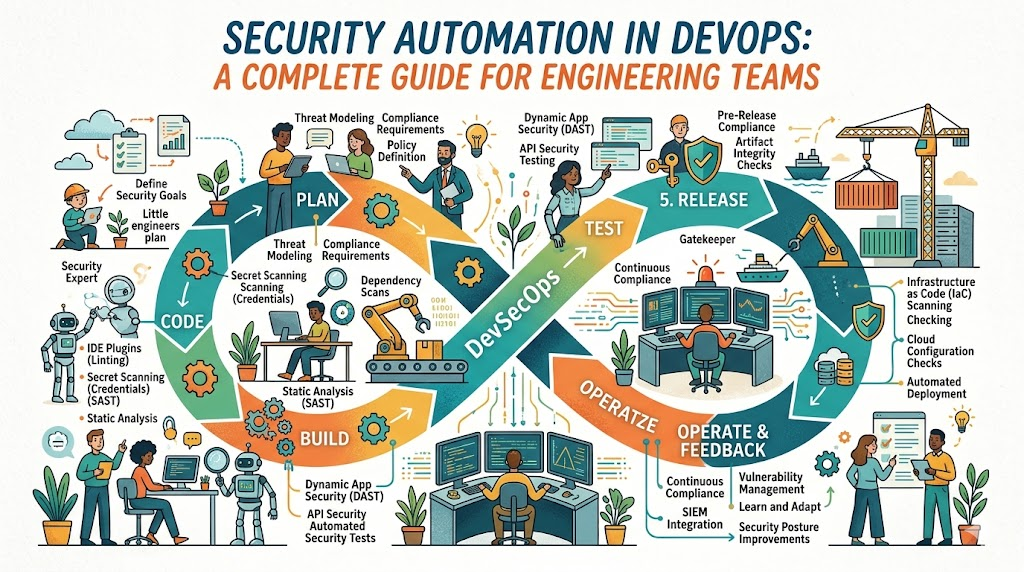
How Security Fits into the DevOps Lifecycle
Security automation is not just about one tool; it is a philosophy that spans the entire application lifecycle.
- Planning: Security requirements are defined here. Automated policy-as-code ensures that architecture decisions comply with security standards before a single line of code is written.
- Development: Developers receive immediate feedback through IDE plugins that highlight insecure code patterns as they type.
- Build: Every time code is pushed, the build process triggers automated SAST (Static Application Security Testing) and SCA (Software Composition Analysis) scans.
- Testing: DAST (Dynamic Application Security Testing) runs against the deployed staging environment to find runtime vulnerabilities.
- Deployment: Infrastructure-as-Code (IaC) scanners check cloud configurations for misconfigurations before resources are provisioned.
- Monitoring: Continuous runtime security tools monitor the production environment for anomalies, providing real-time alerts.
Security Automation Workflow in CI/CD
To understand how this looks in practice, consider the following streamlined workflow. This sequence happens transparently to the developer, providing security without requiring them to become security experts.
- Developer Commits Code: The workflow triggers automatically.
- Code Security Scan: SAST tools analyze the source code for logic flaws.
- Dependency Check: SCA tools scan third-party libraries for known vulnerabilities (CVEs).
- Container Scan: If the app is containerized, image scanning checks for vulnerabilities in the OS layer.
- Build Approval: If scans pass, the pipeline proceeds; if critical flaws exist, the build breaks, and the developer is notified.
- Deployment: Secure code is deployed to the staging environment.
- Runtime Monitoring: Once live, intrusion detection systems monitor the application for attacks.
Types of Security Automation in DevOps
The following table summarizes the primary categories of security automation.
| Security Type | Purpose | Typical Example |
| SAST | Analyzes source code for vulnerabilities | SonarQube |
| DAST | Tests running application for exploitable flaws | OWASP ZAP |
| SCA | Detects vulnerabilities in open-source dependencies | Snyk |
| Container Security | Scans container images for vulnerabilities | Trivy |
| Infrastructure | Scans IaC templates for misconfigurations | Checkov |
| Secrets Management | Detects hardcoded passwords or keys | Gitleaks |
| Compliance | Automates policy enforcement | Open Policy Agent |
| Runtime | Monitors production for attacks | Falco |
Static Application Security Testing (SAST)
SAST tools act like a spell-checker for security. They examine the source code, bytecode, or binaries without executing the program. By scanning the codebase during the development phase, SAST identifies potential vulnerabilities such as SQL injection, cross-site scripting (XSS), and weak cryptography early in the SDLC.
Why it matters: It prevents insecure coding patterns from entering the repository.
Dynamic Application Security Testing (DAST)
DAST operates from the outside in. It interacts with a running application, simulating a malicious user’s behavior. DAST does not have access to the source code; instead, it probes the application’s APIs and interfaces to identify runtime flaws like broken authentication or insecure server configurations.
Why it matters: It catches vulnerabilities that only appear when the application is actually running and interacting with other services.
Software Composition Analysis (SCA)
Modern applications are often 80% third-party libraries and 20% custom code. SCA tools create a Software Bill of Materials (SBOM) and check it against databases of known vulnerabilities.
Why it matters: It protects the software supply chain. If a library you use is compromised, SCA notifies you immediately, allowing you to patch or update your dependencies before attackers exploit them.
Container Security Automation
As organizations move to microservices, containers become the standard deployment unit. Container security automation involves scanning images for vulnerabilities in the OS packages, libraries, and binaries included in the container.
Example: Scanning a Dockerfile or an image in a container registry before allowing it to be deployed to a Kubernetes cluster.
Infrastructure Security Automation
Infrastructure-as-Code (IaC) tools like Terraform and CloudFormation allow us to manage cloud environments with code. However, misconfigured IaC can expose cloud environments to the internet. Security automation here involves scanning IaC templates for common mistakes, such as open S3 buckets or overly permissive security groups.
Secrets Management Automation
Hardcoding secrets (API keys, database passwords, SSL certificates) in code is a primary cause of breaches. Secrets management automation tools detect these secrets before they are committed to version control and replace them with references to secure, centralized vaults.
Tools: HashiCorp Vault is the industry standard for dynamic secret injection, ensuring that even if a developer account is compromised, the actual production credentials remain secure.
Runtime Security Monitoring
Production environments are dynamic. Runtime security tools provide visibility into what is happening inside your containers or on your servers. They look for anomalous behavior, such as a process suddenly trying to open an unexpected network connection or modifying a sensitive system file.
Popular Security Automation Tools in DevOps
| Tool | Best For | Complexity | Enterprise Usage |
| SonarQube | SAST / Code Quality | Moderate | High |
| Snyk | SCA / Developer Experience | Low | High |
| Trivy | Container Scanning | Low | High |
| OWASP ZAP | DAST / Penetration Testing | Moderate | Moderate |
| HashiCorp Vault | Secrets Management | High | High |
| Aqua Security | Cloud Native Protection | High | High |
| Prisma Cloud | Full-Stack Security | High | High |
Real-World DevSecOps Workflow Example
Let us walk through a realistic, secure deployment workflow for a web application.
- Code Commit: A developer writes code for a new feature and commits it to a feature branch in Git.
- Pipeline Trigger: The CI/CD tool (e.g., Jenkins, GitLab CI) triggers the pipeline.
- SAST Scan: SonarQube runs a static analysis. It flags a potential XSS vulnerability. The build fails, and the developer receives an alert in their IDE.
- Fix: The developer fixes the XSS issue, commits the code again, and pushes it.
- SCA Scan: Snyk checks the updated dependencies. It detects that an outdated library has a critical security patch available. The developer updates the library.
- Container Build & Scan: The Docker image is built. Trivy scans the image and finds no high-severity vulnerabilities.
- Deployment: The image is pushed to the container registry and deployed to the staging environment.
- DAST Scan: OWASP ZAP runs automated web application scans against the staging environment. It reports success.
- Runtime Monitoring: Once deployed, Falco runs in the Kubernetes cluster, monitoring for unauthorized container activity.
Benefits of Security Automation in DevOps
- Faster Security Testing: Automated tools complete in minutes what would take manual testers weeks.
- Reduced Manual Effort: Security teams are freed from repetitive, low-value tasks and can focus on architectural security.
- Better Compliance: Automated reports provide an audit-ready trail for compliance officers.
- Improved Release Confidence: Developers can push code with the certainty that automated guardrails have checked for security flaws.
- Scalable Practices: As the organization grows from ten developers to hundreds, security automation scales linearly with the infrastructure.
Common Challenges in Security Automation
- False Positives: Automated tools can sometimes flag code that is safe as vulnerable. This leads to “alert fatigue.” Solution: Tune tools over time and prioritize critical vulnerabilities.
- Slow Pipelines: Scanning large codebases can add significant time to CI/CD builds. Solution: Run incremental scans on code changes rather than full-system scans on every commit.
- Tool Overload: Using too many disjointed tools creates management nightmares. Solution: Integrate tools into a unified security dashboard.
- Security Skill Gaps: Developers may not understand how to remediate the vulnerabilities tools find. Solution: Invest in developer training and create a culture of continuous learning.
- Resistance to Change: Teams used to traditional models may view security tools as blockers. Solution: Position security as an enabler, not a gatekeeper.
Security Automation vs Traditional Security Testing
| Traditional Security | Security Automation in DevOps |
| Performed at end of lifecycle | Performed continuously |
| Manual and sporadic | Automated and consistent |
| Slow feedback loop (weeks/months) | Instant feedback (minutes) |
| High friction for developers | Seamless integration |
| Static, point-in-time checks | Dynamic, ongoing monitoring |
Security Automation for Cloud-Native Applications
Cloud-native applications, built on microservices and orchestrated by Kubernetes, require a different security approach. Traditional perimeter defenses are insufficient.
- Container Security: Since containers are immutable and short-lived, you must bake security into the image before deployment.
- Orchestration Security: Kubernetes clusters must be hardened, with role-based access control (RBAC) and network policies restricting traffic between services.
- Infrastructure-as-Code: Since infrastructure changes constantly, you must treat infrastructure security with the same rigor as application code.
Common Beginner Mistakes
- Ignoring Shift-Left: Trying to add security at the end of the pipeline rather than the beginning.
- Skipping Dependency Scanning: Assuming third-party libraries are inherently safe.
- Hardcoding Secrets: Storing credentials in plaintext within source code or configuration files.
- Weak Monitoring: Focusing only on code security while neglecting runtime threat detection.
- Treating Security as a “One-Off”: Expecting that one scan makes the application secure forever.
Best Practices for Security Automation
- Shift Security Left: Start testing early in the development phase.
- Automate Everything: If a security task is manual and repetitive, script it.
- Secure Dependencies: Always update dependencies and use SCA tools to monitor for new vulnerabilities.
- Monitor Continuously: Security does not stop at deployment; keep monitoring your running systems.
- Practice Least Privilege: Limit access rights for users and services to the absolute minimum necessary.
- Integrate Compliance: Automate policy-as-code to ensure cloud resources meet regulatory standards automatically.
Role of DevSecOpsSchool in Learning Security Automation
Transitioning to an automated security model requires not just tools, but the right knowledge. Developing expertise in DevSecOps involves understanding how these tools interact, how to manage false positives, and how to build a pipeline that is both secure and developer-friendly. DevSecOpsSchool provides a structured pathway for professionals to master these competencies. Their curriculum focuses on hands-on experience, ensuring that students do not just memorize concepts but learn to implement security automation in real-world, cloud-native scenarios.
Industries Benefiting from Security Automation
- Banking & Finance: Handles sensitive financial data; requires extreme compliance and auditability.
- Healthcare: Must adhere to strict privacy regulations (HIPAA); automation ensures continuous compliance.
- E-Commerce: Frequent releases require fast, automated security to prevent data breaches during high-traffic events.
- SaaS Platforms: Managing customer data at scale requires automated, continuous security monitoring.
- Telecom: Managing complex, distributed networks requires automated infrastructure security and rapid incident response.
- Enterprise IT: Large organizations use automation to manage security policies across hundreds of applications simultaneously.
Career Opportunities in Security Automation
The demand for professionals who understand both DevOps and Security is at an all-time high. Organizations are struggling to find talent that can “bridge the gap.”
- DevSecOps Engineer: Focuses on integrating security tools into CI/CD.
- Cloud Security Engineer: Specializes in securing cloud platforms and IaC.
- Application Security Engineer: Focuses on the security of the application code itself.
- Security Automation Engineer: Builds custom scripts and integrations to automate security processes.
- Kubernetes Security Engineer: Focuses on hardening container orchestration platforms.
- Security Consultant: Advises organizations on their DevSecOps strategy and architecture.
Certifications & Learning Paths
Building a career in this field involves a blend of cloud certifications, security credentials, and practical, project-based learning.
| Certification | Best For | Skill Level | Focus Area |
| AWS/Azure/GCP Security | Cloud Engineers | Intermediate | Cloud Infrastructure |
| Certified Kubernetes Security Specialist (CKS) | K8s Specialists | Advanced | Container Security |
| DevSecOps Certification | DevSecOps Engineers | Intermediate | CI/CD Security |
| OSCP | Security Pentesters | Advanced | Offensive Security |
Future of Security Automation in DevOps
The future of security automation is moving toward “autonomous” security.
- AI-Powered Threat Detection: Tools will move beyond pattern matching to behavioral analysis, identifying threats that have never been seen before.
- Autonomous Security Testing: Systems will not just report vulnerabilities but will automatically generate and apply patches for code flaws.
- Policy-as-Code: Security policies will be managed with the same version control systems as application code, making them testable and reproducible.
- Zero Trust Integration: Security automation will focus on verifying every request within the network, moving away from the assumption that the internal network is safe.
- DevSecOps Maturity Growth: Organizations will move from manual security to fully automated, “self-healing” pipelines.
FAQs
- What is Security Automation in DevOps?It is the practice of integrating security tools and checks directly into the CI/CD pipeline to automatically scan code and infrastructure.
- Why is security automation important?It allows for faster development cycles, catches vulnerabilities early, and reduces manual, error-prone testing.
- What is the difference between DevOps and DevSecOps?DevOps focuses on speed and collaboration between development and operations. DevSecOps adds security as a core requirement, ensuring it is integrated throughout the lifecycle.
- What tools are used in security automation?Common tools include SonarQube, Snyk, Trivy, OWASP ZAP, and HashiCorp Vault.
- Is Kubernetes security important?Yes, as containers are the standard unit of deployment, securing the orchestration layer (Kubernetes) is critical.
- What is shift-left security?It refers to moving security testing earlier in the development lifecycle, ideally to the coding phase.
- Can beginners learn DevSecOps?Yes, provided they have a strong foundation in either development or operations and a willingness to learn the other side.
- Is DevSecOps a good career?It is currently one of the most in-demand and well-compensated roles in technology.
- How does SAST differ from DAST?SAST scans source code without running it, while DAST tests the application while it is running.
- Do I need to be a coding expert?You do not need to be a developer, but you must be able to read code and understand how security impacts software logic.
- How do I start with Security Automation?Start by integrating a simple SCA tool into your CI/CD pipeline to check for dependency vulnerabilities.
- Is security automation expensive?While some enterprise tools are costly, many open-source alternatives are powerful and widely used.
- What is Infrastructure-as-Code (IaC) security?It is the practice of scanning infrastructure configuration templates for security misconfigurations.
- How do I reduce false positives?By tuning your scanning tools, configuring them specifically for your environment, and setting appropriate severity thresholds.
- Does automation replace security teams?No, it empowers them by removing the drudgery, allowing them to focus on complex, high-impact security challenges.
Final Thoughts
Implementing security automation in DevOps is not a one-time project; it is a journey. It requires a fundamental shift in how your team perceives security—moving from being a “check-box” exercise to an essential part of the development workflow. Do not attempt to automate everything overnight. Start small, focus on the biggest risks first, and iterate.
Proactive security is the hallmark of professional engineering. In a world where software systems are increasingly complex, the ability to release code safely and rapidly is a significant competitive advantage. As you build your secure CI/CD pipelines, remember that the goal is not to stop development, but to make development safer and more reliable.





Leave a Reply
You must be logged in to post a comment.